The HP OfficeJet 250 is the best portable scanner printer combo you can buy in 2026 — it prints, scans, and copies wirelessly with a built-in battery, no network required. Whether you're a field sales rep, a traveling consultant, or just someone who refuses to be chained to a desk, the right portable scanner printer combo changes everything about how you work on the road.
Portable all-in-one devices have come a long way. A few years ago, "portable printer" meant a flimsy inkjet that produced streaky receipts. Today, you get compact units that rival desktop machines in print quality, scan at 600 dpi (dots per inch), and run for hours on a single battery charge. The inkjet and thermal printing technologies powering these devices have matured enough to handle real business documents — contracts, invoices, signed forms — without compromise.
This guide covers the seven best portable scanner printer combos tested in 2026, from full-featured wireless all-in-ones to lightning-fast dedicated scanners. We've organized this list by use case, so you can find your perfect match fast. If you want a broader view of home and office printing options, check out our best all-in-one printer for home use guide. And if you're shopping for the full range of scanner options — including large-format machines — our best 11×17 scanner roundup is worth a look. For everything in between, the buying guide section below breaks down exactly what to look for before you spend a dollar.






If you need one device that does it all away from the office, the HP OfficeJet 250 is the clear winner. It prints, scans, and copies — and it does all three without needing a Wi-Fi network or a power outlet. The included lithium-ion battery (a $119 value on its own) delivers enough juice for a full day of moderate use, making it genuinely portable rather than just "smaller than a desktop."
Print quality is sharp enough for contracts and presentations. You get up to 10 ppm (pages per minute) in black and 7 ppm in color, which keeps pace with most office desktop printers. The scanner is a flatbed-style unit built into the lid — not a sheet-fed slot — so you can scan bound pages, receipts, and oddly sized documents without fighting the hardware. The HP Smart app connects your phone or tablet to the printer in seconds, handling scanning and printing from the same interface. AirPrint and Mopria support mean you're not locked into one ecosystem.
The OfficeJet 250 fits in a carry-on bag or the back seat of your car without complaint. It's compact, but not so small that you sacrifice functionality. If you're looking for a device that replaces your desktop all-in-one while you travel, this is it. The ink cartridges are standard HP 62 series, easy to find anywhere. Build quality feels solid — this isn't a toy printer dressed up in business clothing.
Pros:
Cons:
The Brother PocketJet PJ773 is for professionals who need to print fast and light — think field technicians, delivery drivers, insurance adjusters, or anyone generating on-site paperwork dozens of times per day. This is a direct thermal printer, which means it uses heat-sensitive paper instead of ink cartridges. No ink, no toner, no ribbons. The result is a printer you'll never have to refill on a job site.
Speed is where the PJ773 shines. It pushes out pages at up to 5 inches per second, which is fast enough for high-volume field work. The Bluetooth connection is rock solid — pair it once with your phone and it stays connected. Brother's iPrint&Scan app handles document printing directly from your device. The PocketJet series has been a staple in enterprise mobile printing for years, and the PJ773 represents the most refined version of that pedigree.
The trade-off is obvious: this is a print-only device. There's no scanner, no copier. And thermal paper isn't ideal for documents that need to last years — heat and sunlight degrade the print over time. But if your use case is receipts, work orders, route sheets, or field reports that get processed same-day, those limitations don't matter. The PJ773 is the fastest, most reliable portable printer in this class for high-throughput document output.
Pros:
Cons:
The HP OfficeJet 200 is the printer-only sibling of the OfficeJet 250, and it earns its place on this list by doing one thing extremely well: delivering reliable mobile printing at a lower price point. If you don't need the built-in scanner but want HP's proven portable printing platform, the 200 gives you everything that matters.
You get the same battery (a $119 value, included), the same HP Smart app, the same AirPrint and Mopria support, and the same compact form factor as the 250. Print speeds are comparable — up to 10 ppm black, 7 ppm color — and the output quality is identical. Standard HP 62 cartridges keep replacement ink accessible wherever you are. The wireless direct mode means you can print from your phone without hunting for a Wi-Fi password at a hotel or client site.
The obvious limitation is that there's no scanner. If you occasionally need to scan — say, a signed contract or a receipt — you'll need to supplement the OfficeJet 200 with a separate scanning app on your phone. Smartphone scanning apps have gotten good enough that this is a reasonable trade-off for buyers who print far more than they scan. For frequent scanning, step up to the 250. For pure portable printing value, the 200 is hard to beat in 2026.
Pros:
Cons:
The Canon PIXMA TR160 is the newest portable printer on this list, and it immediately sets itself apart with a 5-Color Hybrid Ink System that produces richer, more accurate color than any other device here. If you print color marketing materials, photos, or any document where color accuracy matters, the TR160 delivers desktop-quality results in a package that fits in a backpack.
The 50-sheet paper tray is a meaningful upgrade over the typical 20-sheet portable printer — you can load a decent stack and not refill it every few prints. The 1.44-inch display gives you quick access to settings without pulling out your phone. Connectivity covers all the bases: Canon PRINT app, Apple AirPrint, and Mopria Print Service. You can print borderless photos up to 8.5" x 11", which makes the TR160 genuinely useful for creative professionals who work remotely.
One thing to understand: the TR160 is a printer only — no scanner. And like all portable inkjet printers, it requires a power connection or optional battery accessory. The ink system uses five individual cartridges, which means more precise color at the cost of more cartridges to track. For photo and color document work, that's an acceptable trade-off. For black-only document printing, a simpler two-cartridge system might suit you better. The TR160 is the right choice when color quality is your top priority on the road.
Pros:
Cons:
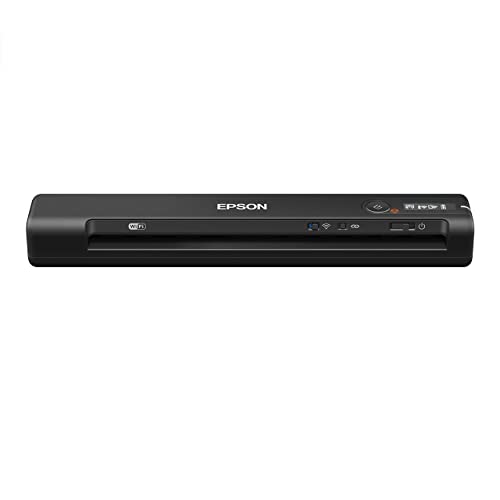
The Epson WorkForce ES-60W holds a specific record: it's the fastest, smallest, and lightest wireless mobile single-sheet-fed scanner in its class. Epson's claim, verified across independent tests — a single page scans in as fast as 4 seconds. That's not a marketing number. In practice, it means you can scan a stack of receipts or business cards faster than you can organize them.
The wireless connection lets you scan directly to a PC, Mac, iOS device, or Android device without plugging in. The scanner body is genuinely tiny — 10.7" x 1.9" x 1.4" — which is smaller than most hardcover books. It slips into a laptop bag's side pocket without adding any perceptible weight. The operating temperature range of 41° to 95°F (5° to 35°C) means it handles real-world environments: hot cars, air-conditioned offices, outdoor job sites.
The limitation is that this is a sheet-fed scanner, not a flatbed. You feed one page at a time through the slot. Bound books, passports, and thick cards won't feed cleanly — you need a flat, flexible sheet. For high-volume document scanning on the go, that's perfectly fine. For occasional bound-document scanning, you'd want a flatbed option or a smartphone camera. For pure document scanning speed and portability, nothing else in 2026 matches the ES-60W. If you also want two-sided (duplex) scanning, read the next entry.
Pros:
Cons:
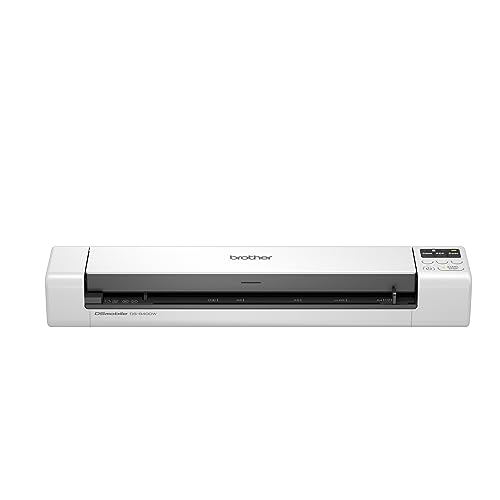
The Brother DS-940DW solves a real pain point: duplex scanning (both sides of a page in one pass) in a device barely bigger than a box of spaghetti. If you regularly scan two-sided contracts, forms, or reference documents, the DS-940DW saves you from flipping every page manually. It scans both sides simultaneously at up to 16 ppm — and importantly, color scanning runs at the same speed as black-and-white. No slowing down for color pages.
The built-in lithium-ion battery makes this a true standalone device. You don't need a laptop nearby — insert a microSD card (sold separately), scan your documents, and sync to your devices later with Brother's free iPrint&Scan app. The Brother DSD (Desk Saving Design) means the device feeds documents vertically rather than requiring a horizontal run-out tray, so you can use it on a cramped hotel desk or a car's fold-down tray. Wireless connectivity works directly with phones and tablets, no router needed.
The DS-940DW is the right choice if your workload involves a lot of two-sided paperwork — legal documents, employee forms, double-sided contracts, or academic papers. The microSD card capability adds a layer of independence that the Epson ES-60W doesn't offer. If you want to go even deeper into scanning capabilities and compare scanner form factors, our best duplex printer guide covers the full spectrum of two-sided document handling. For pure duplex mobile scanning, the DS-940DW has no equal in 2026.
Pros:
Cons:
The Doxie Go SE is purpose-built for one specific need: scanning a large volume of documents completely independently — no computer, no phone, no Wi-Fi required. It holds up to 8,000 pages in internal memory, scans a full-color page in 8 seconds at up to 600 dpi, and runs for up to 400 pages per battery charge. If you're clearing out a filing cabinet, digitizing an archive, or scanning documents at a location with no connectivity, the Doxie Go SE handles it without complaint.
The device is the size of a rolled-up magazine — narrow, cylindrical, remarkably light. You insert a sheet, it feeds through in seconds, and the scan is stored internally. When you're ready to sync, connect to your Mac or PC via USB and Doxie's included software organizes your scans, handles OCR (optical character recognition, which converts scanned text into searchable, editable text), and exports to PDF, JPEG, or searchable PDF formats. The software is genuinely intuitive — not the usual scanner software nightmare.
The Doxie Go SE works best for people digitizing paper archives rather than day-to-day document workflow. It's not wireless in the traditional sense — no direct-to-phone scanning without syncing first. And like the other sheet-fed scanners here, it handles flat pages only. But for pure portability, large-batch scanning, and offline operation, nothing else here compares. If you're going completely paperless, the Doxie Go SE is the tool that makes it painless.
Pros:
Cons:
The portable scanner printer market in 2026 splits into three distinct device types: true all-in-ones (print + scan + copy), print-only portables, and scan-only portables. Knowing which category matches your work is the most important decision you'll make before buying. Here's what to evaluate.
The honest answer for most buyers is: probably not. True portable all-in-ones are heavier, bulkier, and more expensive than devices that specialize in one function. If you print ten times for every one scan, a portable printer paired with a scanning app on your phone is lighter and cheaper than a full combo unit. If you scan daily but rarely print, a dedicated portable scanner with a phone-based printing solution covers 90% of your needs at half the weight.
The HP OfficeJet 250 is worth its size and cost only when you genuinely need both functions frequently. Sales reps who print proposals and then scan signed copies fit that profile. A student or home user who mostly prints notes and occasionally scans a receipt does not. Be honest about your actual workflow before committing to the heavier device.
This is where most portable printers disappoint. Many devices marketed as "portable" require a power outlet to function — they're compact, but not truly mobile. Check specifically for an internal lithium-ion battery or a battery accessory option before assuming a device works off-grid.
Among the printers on this list, the HP OfficeJet 250 and OfficeJet 200 include batteries. The Canon PIXMA TR160 uses an optional battery accessory (sold separately). The Brother PocketJet PJ773 has its own battery option. Among the scanners, the Brother DS-940DW and Doxie Go SE include rechargeable batteries; the Epson ES-60W is USB-powered (works with a phone's USB-C power bank). Know your power situation before you buy.
Inkjet printers (HP OfficeJet, Canon PIXMA) produce high-quality text and color output on standard paper, but require ink cartridges that need replacement. Color accuracy is excellent, and documents look professional. The downside: ink can dry out if you don't use the printer for weeks, and cartridges add ongoing cost.
Direct thermal printers (Brother PocketJet) use heat-sensitive paper and require no ink at all. They're ideal for high-volume, same-day documents like receipts, work orders, and field reports. The limitation is that thermal prints fade over time when exposed to heat or UV light — not suitable for documents you'll reference in five years.
For most professionals, inkjet is the right choice. For field workers generating high-volume transient paperwork, thermal saves money and eliminates refill logistics entirely.
All three scanner types in this guide work differently and suit different use cases. Sheet-fed scanners (Epson ES-60W, Brother DS-940DW) are the fastest and most compact — you feed pages through a slot one at a time. They can't handle bound books or thick cards, but they're ideal for stacks of standard-sized documents.
Built-in flatbed scanners (HP OfficeJet 250) lift the lid and scan whatever you place on the glass — receipts, passports, and pages from a notebook all work. They're slower and bulkier but more flexible in what they can handle.
Standalone scanners with internal storage (Doxie Go SE) scan and store without any connected device. They're the best choice for offline archiving and high-volume batch scanning, but syncing happens after the fact rather than in real time. Match the scanner type to the documents you actually handle most often.
The HP OfficeJet 250 is the best portable all-in-one scanner printer combo in 2026. It prints, scans, and copies wirelessly with a built-in battery, works without a Wi-Fi network, and produces sharp output on standard paper. For buyers who need only scanning, the Brother DS-940DW offers the best combination of speed, duplex scanning, and standalone battery operation.
Yes. Several portable printers on this list operate without Wi-Fi. The HP OfficeJet 250 and OfficeJet 200 use HP's wireless direct mode, which creates a direct connection between your device and the printer without a router. The Brother PocketJet PJ773 connects via Bluetooth. You don't need a hotspot or network access — just enable wireless direct or Bluetooth on your phone or laptop and print.
Yes, for most business documents. The HP OfficeJet 250 prints at up to 4800 x 1200 dpi (dots per inch), which is sharper than what most eyes can distinguish at reading distance. Contracts, invoices, proposals, and reports all print professionally. The Canon PIXMA TR160's 5-Color Hybrid Ink System produces color output that rivals desktop photo printers. The main limitation is paper capacity — portable printers hold fewer sheets than desktop machines.
A sheet-fed scanner feeds individual pages through a slot — fast, compact, but limited to flat flexible sheets. A flatbed scanner uses a glass plate where you place documents face-down, similar to a copier. Flatbed scanners handle books, passports, and oddly shaped items that won't feed through a slot. Among the scanners reviewed here, the HP OfficeJet 250's built-in scanner is a flatbed. The Epson ES-60W, Brother DS-940DW, and Doxie Go SE are sheet-fed.
Battery life varies significantly by device and usage. The HP OfficeJet 250 and 200 batteries are rated for approximately 100 pages per charge under normal conditions — enough for a full day of moderate use. The Brother DS-940DW scanner battery handles extended scanning sessions before needing a recharge. The Doxie Go SE leads the group with up to 400 pages per charge. Always check the manufacturer's page-yield rating for the specific battery model included with your device.
For many users, yes. Dedicated portable scanners like the Epson ES-60W and Brother DS-940DW are smaller, lighter, and faster than the scanning function built into all-in-one portable printers. If you scan documents frequently but rarely print on the go, a standalone portable scanner paired with smartphone scanning apps gives you better scan quality and lower weight than a full combo device. For balanced print and scan workloads, the HP OfficeJet 250 all-in-one remains the more practical single-device solution.
The best portable scanner printer combo is the one that matches your actual workload — not the most features, not the lightest device, but the right balance of print, scan, and battery for how you really work.


About Editorial Team
The DigiLabsPro editorial team covers cameras, lenses, photography gear, and creative technology with a focus on helping photographers make informed buying decisions. Our reviews and guides draw on hands-on testing and research across a wide range of equipment, from entry-level beginner kits to professional-grade systems.
You can get FREE Gifts. Or latest Free phones here.
Disable Ad block to reveal all the info. Once done, hit a button below
