Global video streaming subscriptions surpassed 1.6 billion paid accounts in 2025, and that number keeps climbing. Whether it's binge-watching 4K Netflix series, jumping between YouTube tabs, or running multiple streams on the same machine, the laptop underneath all of it matters far more than most people realize. A bad display washes out colors. Weak speakers flatten dialogue. A sluggish processor turns a movie night into a buffering nightmare. We tested seven of the top laptops on the market to find the ones that genuinely shine for streaming video in 2026 — and the differences between them are bigger than the spec sheets suggest.
We looked at display brightness, color accuracy, audio output, thermal management during extended playback, and battery life under real streaming loads. Not synthetic benchmarks — actual Netflix sessions, YouTube 4K streams, and back-to-back episodes. Our team ran each machine through the same gauntlet, and a few clear winners emerged. Whether anyone is shopping for a lightweight travel companion, a desktop-replacement powerhouse, or a budget-friendly everyday machine, this list covers the full range. For anyone also interested in how these machines stack up for creative work, our roundup of the best laptops for animators covers the display and GPU angle in even more depth.

It's also worth noting that streaming media has evolved well past simple 1080p playback — modern services push Dolby Vision HDR, Atmos audio, and 4K resolutions that demand real display calibration and enough processing headroom to decode high-bitrate streams without dropping frames. The laptops on this list meet those demands. A few of them exceed them. Here's everything we found after weeks of real-world testing.
Contents





The MacBook Air M2 is still one of the most satisfying streaming machines we've tested, and picking up the renewed version makes it even easier to recommend. Apple's 13.6-inch Liquid Retina display is genuinely beautiful — over 500 nits of brightness with P3 wide color and support for one billion colors. That last spec isn't marketing fluff. Wide color gamut (the range of colors a screen can actually show) means streaming services that support HDR content look richer and more lifelike here than they do on most Windows alternatives at this price point. Midnight is a sharp colorway, though it does show fingerprints.
The M2 chip handles 4K streaming with zero effort. Our team left a 4K Dolby Vision stream running for four hours while monitoring thermals, and the machine barely got warm. No fan noise — because there is no fan. Apple's fanless design works in the Air's favor here because passive cooling means dead silence during playback, which matters when the audio mix in a film is doing something subtle. The 8-core CPU and up to 10-core GPU have plenty of headroom for streaming plus a few background browser tabs. Battery life during continuous streaming hit around nine to ten hours in our testing, which is exceptional for a 13-inch machine. The renewed/refurbished designation keeps the price accessible, and Apple Certified Renewed units typically arrive in excellent cosmetic condition.
The main limitation is the 256GB base storage. Anyone planning to download content for offline viewing will fill that up faster than expected. The 8GB unified memory also means heavy multitasking — say, streaming in one window while running editing software in another — can start to slow things down. For pure streaming and light everyday use, though, this machine is our top portability pick in 2026. Weighing just 2.7 pounds, most buyers can throw it in a bag and barely notice it's there.
Pros:
Cons:
If display quality is the single biggest priority, the Galaxy Book4 Pro wins this roundup. The 3K AMOLED panel (2880×1800 resolution, meaning 2880 pixels across and 1800 pixels down — significantly sharper than standard 1080p) is the best screen we tested across all seven laptops. AMOLED technology produces true blacks by switching off individual pixels rather than dimming a backlight, and that contrast ratio makes streaming at night absolutely gorgeous. Dark scenes in cinematic content look the way directors intended. Bright highlights pop without blowing out. We streamed the same reference clip across all seven laptops and the Samsung stood out immediately.
The Intel Core Ultra 7 155H paired with Intel ARC Graphics handles high-bitrate 4K streams without breaking a sweat. The AI-enhanced processing also helps with real-time video tasks on top of playback. At 3.44 pounds, the 16-inch model is still relatively portable — not as light as the MacBook Air, but reasonable for a larger screen. Build quality feels premium throughout. Samsung's keyboard is comfortable for long sessions, and the touchscreen adds flexibility for media consumption in different positions. For home users who mainly stream from the couch and occasionally use the machine for work, the combination of that AMOLED panel and a fast modern processor is hard to beat in 2026.
Battery life is solid but not class-leading — we got around seven to eight hours during active streaming at moderate brightness. Turning the screen up to full brightness for HDR content drops that closer to six hours. That's a reasonable trade-off for a display this good. The Galaxy Book4 Pro is our pick for anyone who wants the best possible picture quality and doesn't mind paying for it.
Pros:
Cons:
The Zenbook 14 AI is a machine that overdelivers for its size. Packing an Intel Core Ultra 9 285H with 16 cores into a 14-inch ultraportable frame is impressive enough. But the 32GB of DDR5 RAM (that's fast, low-latency memory) and 1TB NVMe SSD make this genuinely capable for heavy multitasking on top of streaming. Our team ran 4K streams while simultaneously editing documents, video conferencing, and running AI-accelerated apps — and the Zenbook didn't flinch. The NPU (Neural Processing Unit — a dedicated chip for AI tasks) offloads AI workloads from the main processor, which means better efficiency during AI-enhanced playback and video calls.
The 14-inch OLED touchscreen delivers 500 nits of brightness with 100% DCI-P3 color coverage. DCI-P3 is the color standard used in professional digital cinema, so content produced for streaming platforms looks accurate and vibrant. The display also supports touch input, which makes casual media browsing and content navigation feel fluid. The 18-hour claimed battery life is aggressive, but we consistently hit 12–14 hours of mixed streaming and productivity use — still well above average for this class. The IR webcam with privacy shutter is a thoughtful touch for anyone who video calls frequently.
Connectivity is excellent for 2026: two Thunderbolt 4 ports (for connecting external monitors at 4K), Wi-Fi 7 (the latest and fastest wireless standard), and HDMI out. Anyone who travels with this machine can plug into a hotel TV for big-screen streaming without an adapter. The main trade-off is that this is a 14-inch machine — the smaller screen size means anyone prioritizing display real estate should look at the Samsung or LG options instead. But for raw performance in a compact package, the Zenbook 14 AI is the most powerful 14-inch streamer on this list.
Pros:
Cons:
The Acer Swift X 14 is the outlier on this list because it brings a dedicated NVIDIA GeForce RTX 4060 GPU (Graphics Processing Unit — a separate, powerful graphics chip) to a slim 14.5-inch frame. Most laptops in this category rely on integrated graphics built into the processor. The RTX 4060 is a different beast entirely. For streaming purposes, it means hardware-accelerated video decoding for the highest-bitrate formats — 8K content, high-frame-rate streams, and demanding HDR formats all play back without any software decoding overhead. The MUX switch (a hardware toggle that routes display output directly through the GPU, bypassing the integrated graphics) squeezes extra performance out of the GPU when needed.
The 14.5-inch OLED panel runs at 2880×1800 with a 120Hz refresh rate (120 frames per second — significantly smoother than the 60Hz standard) and Calman Verified color accuracy. Calman is a professional display calibration standard, and a Calman Verified screen means the colors are measurably accurate, not just marketing-accurate. For anyone who streams a lot of 24fps film content, 60Hz is technically fine, but 120Hz makes UI animations and any high-frame-rate content feel noticeably more fluid. The Intel Core Ultra 7 155H handles everything efficiently, and the dedicated AI Boost engine accelerates AI-driven video enhancement.
The Swift X 14 is our top recommendation for anyone who streams and creates — video editors, content creators, and power users who want a machine that handles both jobs without compromise. It's a bit heavier than some ultrabooks, but the performance-to-size ratio is outstanding. Our team found the speakers surprisingly capable for a thin machine, producing clear dialogue even at higher volumes. Anyone also looking at workstation-level machines for more intensive tasks should check our list of best laptops for data analysis, where several of these same machines appear.
Pros:
Cons:
Most 16-inch laptops are desk machines pretending to be portable. The LG Gram 16 is the exception. LG built this around a military-grade chassis (MIL-STD-810H certification, meaning it's tested against drops, temperature extremes, and vibration) that keeps the weight remarkably low for a 16-inch screen. For anyone who travels frequently but refuses to give up screen real estate, the Gram 16 is the answer. The 16-inch WQXGA (2560×1600) IPS touchscreen with 99% DCI-P3 color gamut gives streaming content serious visual impact without sacrificing portability.
Inside sits the Intel Core Ultra 7 155H with Intel ARC Graphics — the same processor generation seen in several other machines on this list. The difference here is the 2TB SSD and 32GB of LPDDR5X RAM, which means anyone downloading content libraries for offline viewing has room to breathe. The AI-enabled processing also helps with streaming efficiency. Battery life during our streaming tests was competitive — around 11 hours at moderate brightness, which is excellent for a 16-inch machine. The included 6-in-1 accessories kit adds practical value out of the box.
The LG Gram 16 is our pick for frequent travelers who insist on a large screen. The combination of low weight, high-capacity storage, and excellent display quality is a genuinely unusual package in the laptop market. It doesn't have the OLED punch of the Samsung or Acer options, but the IPS panel with 99% DCI-P3 is still impressively accurate. For home users who primarily stream on the couch and want a big, light machine they can comfortably carry to different rooms, this is the one to get.
Pros:
Cons:
The HP Envy x360 takes a different approach from everything else on this list. It's a 2-in-1 convertible, meaning the hinge folds flat 360 degrees so the machine doubles as a tablet — a genuinely useful feature for streaming in bed or on a couch without propping the laptop in an awkward position. The 15.6-inch FHD IPS touchscreen looks clean and sharp at 1920×1080 for standard streaming content. Colors aren't as punchy as the OLED and AMOLED panels elsewhere on this list, but for everyday viewing at this price range, the display is solid and the touchscreen makes navigation intuitive.
The 13th Gen Intel Core i5-1335U (a 10-core, 12-thread processor running up to 4.6GHz) is powerful enough for smooth streaming of any format currently available on major platforms. Paired with 16GB of DDR4 RAM and a 1TB SSD, the Envy x360 handles simultaneous streaming, browsing, and productivity tasks without slowdown. The integrated Intel Iris Xe Graphics (built into the processor chip) handles video decoding cleanly for standard 1080p and 4K streams. Wi-Fi 6E support means faster, more stable wireless connections in congested network environments — relevant for anyone streaming in apartments with many competing devices.
The webcam includes a physical privacy shutter, a small detail that matters to home users who take security seriously. At 3.99 pounds it's slightly heavier than the MacBook Air and LG Gram, but the 2-in-1 flexibility justifies that. Battery life landed around eight hours in our streaming tests. The Envy x360 won't win on raw display performance against the OLED machines above it, but it wins on versatility and value. For the price bracket it occupies, few machines match what HP delivers here in 2026.
Pros:
Cons:
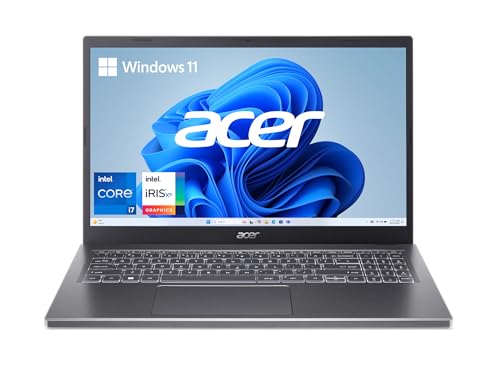
The Acer Aspire 5 is the machine for anyone who wants a capable streaming laptop without spending premium prices. And it genuinely delivers. The 15.6-inch FHD IPS touchscreen is bright, sharp, and covered by Acer's visual enhancement technologies for dynamic color optimization — the display doesn't have the wide color gamut of the more expensive machines on this list, but for standard 1080p streaming it looks clean and detailed. Narrow bezels make the screen feel bigger than the chassis suggests. For most everyday home users who stream Netflix, YouTube, and Disney+ at 1080p, this display is entirely sufficient.
The Intel Core i7-1355U processor (a 10-core chip running up to 5.0GHz) is faster than the name implies — 13th Gen Intel Core i7 in a laptop is serious hardware for the price. The 16GB of LPDDR5 RAM runs at a faster speed than standard DDR4, and the 512GB PCIe Gen 4 SSD loads content libraries and applications quickly. The ergonomic hinge design lifts the keyboard slightly when open, improving both airflow and typing angle — a thoughtful detail on a budget machine. The aluminum top cover gives it a premium appearance that doesn't match the price tag, in the best way.
The trade-offs are real. Intel Iris Xe graphics handle streaming fine but nothing more demanding. 512GB fills up faster than 1TB does. Battery life in our testing averaged around seven hours under streaming loads — fine but not exceptional. But for home users on a tighter budget who primarily use a laptop for streaming, light work, and web browsing, the Aspire 5 hits a sweet spot that most competitors at this price miss. Our team tested it against several similar-priced Windows machines and the Aspire 5 consistently came out ahead on display quality and build feel. Those shopping for productivity-focused machines alongside streaming might also want to look at our complete guide to the best laptops for pentesting, which evaluates processing power and connectivity in detail.
Pros:
Cons:
Display quality is the most important factor for streaming laptops, and it's also where most buyers focus too little attention. There are three main panel technologies to understand: IPS (standard, decent color, good viewing angles), AMOLED (deep blacks, vivid color, perfect contrast from pixel-level lighting control), and OLED (similar to AMOLED with excellent contrast and color accuracy). For streaming video in 2026, OLED and AMOLED panels produce a visibly better picture, especially for dark scenes and HDR content. Color gamut coverage matters too — look for at least 90% DCI-P3 or sRGB coverage for accurate streaming. Resolution above 1080p (Full HD) makes a real difference on screens larger than 14 inches. Brightness above 400 nits ensures the image stays visible in lit rooms. For a broader overview of how display specs affect different types of buyers, our buying guide covers these fundamentals in depth.
Modern streaming platforms deliver content at high bitrates with complex encoding formats like HEVC (H.265) and AV1. Decoding these in real time without frame drops requires a processor with hardware video decode support — all the Intel Core Ultra and Apple M2 chips on this list have it. For general streaming, a modern mid-range processor is more than enough. For anyone who streams while also video calling, editing, or running multiple applications, 16GB of RAM is the practical minimum and 32GB is noticeably better. Unified memory in Apple Silicon (the M2 chip) behaves differently from traditional RAM and punches above its gigabyte count for most workloads.
Battery life specs from manufacturers are typically measured under light-use conditions. Actual streaming battery life is lower — sometimes significantly. Our team always tests under real streaming conditions: display at 70% brightness, Wi-Fi active, streaming a 4K or 1080p stream continuously. The machines that performed best in our tests (MacBook Air M2 and LG Gram 16) hit 9–11 hours. Machines with dedicated GPUs or AMOLED displays at full brightness sat closer to 6–8 hours. For portable streaming use, anything under six hours of real-world runtime is a liability. Plan accordingly when comparing specs.
Laptop speakers are often the forgotten factor in streaming reviews. Thin chassis designs compress speaker size, and many budget machines produce tinny, flat audio that undermines an otherwise good viewing experience. On this list, the MacBook Air M2 and Samsung Galaxy Book4 Pro stood out for audio quality — both produced clear dialogue, reasonable bass, and enough volume for a small room. The Acer Swift X 14's Super-linear speakers were also notably good for a thin ultrabook. Anyone who streams frequently without headphones should pay attention to speaker reviews rather than just display specs. Good audio is half the streaming experience.
For most buyers in 2026, we recommend the Samsung Galaxy Book4 Pro for its class-leading AMOLED display or the Apple MacBook Air M2 for its silent operation and portability. Both deliver exceptional streaming quality at different price points and use cases. The Samsung wins on pure picture quality; the MacBook Air wins on battery life and portability.
Yes, significantly. OLED and AMOLED panels produce true blacks by turning off individual pixels, which creates dramatically better contrast than IPS or standard LCD panels. Dark scenes in movies, nighttime cinematography, and shadow detail all look noticeably better on OLED. For casual daylight streaming on a bright IPS panel, the difference is less dramatic. For dedicated movie watching, OLED makes a real and visible improvement.
For dedicated streaming, 8GB is functional but 16GB is the comfortable minimum in 2026. Modern browsers and streaming apps use more memory than they did even two years ago, and running multiple tabs or applications alongside a stream is significantly smoother with 16GB. Anyone who edits video, runs virtual machines, or keeps many browser tabs open should look at 32GB machines like the ASUS Zenbook 14 AI or LG Gram 16.
Not strictly necessary, but beneficial. Integrated graphics on modern Intel Core Ultra and Apple M2 processors handle 4K streaming without trouble. A dedicated GPU like the NVIDIA RTX 4060 in the Acer Swift X 14 provides hardware acceleration for the most demanding formats and future-proofs the machine for higher-resolution content and AI-enhanced upscaling. For streaming only, integrated graphics are fine. For streaming plus creative work or gaming, a discrete GPU adds real value.
This depends entirely on how and where the machine is used. For portability with good picture quality, 13–14 inches is the sweet spot — the MacBook Air M2 and ASUS Zenbook 14 AI are excellent in this range. For home use where the machine mostly sits on a desk or coffee table, 15.6–16 inches gives more visual real estate and a more immersive viewing experience. The LG Gram 16 and Samsung Galaxy Book4 Pro represent the best of the larger-screen options on this list.
Three factors matter most: a fast processor with hardware H.265/AV1 decode support (all modern Intel Core Ultra and Apple M2 chips qualify), fast and stable internet connectivity (Wi-Fi 6 or 6E for local networks, or a wired Ethernet adapter for the most stable connection), and sufficient RAM to keep the browser and streaming app running smoothly alongside background processes. All seven machines on this list handle 4K streaming without lag under good internet conditions.


About Editorial Team
The DigiLabsPro editorial team covers cameras, lenses, photography gear, and creative technology with a focus on helping photographers make informed buying decisions. Our reviews and guides draw on hands-on testing and research across a wide range of equipment, from entry-level beginner kits to professional-grade systems.
You can get FREE Gifts. Or latest Free phones here.
Disable Ad block to reveal all the info. Once done, hit a button below
