You just unboxed your Ender 3, ran a test print that looked surprisingly decent, and now you're staring at your nearly empty spool wondering what to buy next. Filament choice matters more than most beginners realize — the wrong brand can mean clogged nozzles, warped corners, and hours of frustrated troubleshooting. The right one just works, print after print.
PLA remains the go-to material for Ender 3 users in 2026, and for good reason. It prints at lower temperatures than ABS, doesn't require a heated enclosure, and is forgiving enough for beginners while still delivering clean results for experienced makers. The challenge isn't finding PLA — it's sorting through the dozens of options and knowing which ones actually perform well on Creality hardware. We've put together this guide to help you do exactly that.
Whether you're printing functional parts, decorative models, or art-quality display pieces, the filaments in this roundup cover the spectrum. We've focused on options that are proven to work with the Ender 3's stock extruder and hotend setup, which means no exotic tuning required. You can also browse our full buying guide section for more help across other product categories. And if you're into 3D printing beyond just PLA, our guide to the best nylon filament is worth a read once you're ready to push your machine harder.

Contents
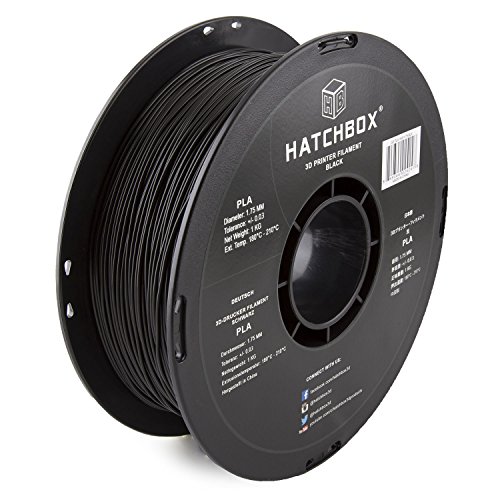




If you've spent any time in 3D printing communities, you already know HATCHBOX. The brand has built its reputation over years of consistent quality, and the black PLA on a 1 kg spool is arguably their most popular offering. It prints at a recommended nozzle temperature of 180°C to 210°C, which gives you room to fine-tune based on your specific Ender 3 setup. The dimensional accuracy sits at +/- 0.03 mm, a tolerance that translates directly to smoother surfaces and more predictable layer adhesion.
What makes this filament stand out for Ender 3 users is how little babysitting it needs. Load it, set your temperatures somewhere in the middle of the recommended range — around 200°C nozzle, 60°C bed — and it tends to print cleanly without constant adjustments. HATCHBOX specifically engineered this formula for improved toughness and fluidity, which means it flows well through the stock Ender 3 bowden setup without the under-extrusion issues that plague cheaper brands. Whether you're printing detailed miniatures at 0.1mm layers or fast structural parts at 0.3mm, this material stays predictable.
The 1 kg spool size is standard and fits the Ender 3's spool holder without any issues. Black PLA is particularly useful for parts where surface finish matters visually but painting isn't planned — the dark color hides layer lines better than lighter colors do. HATCHBOX also vacuum-seals their spools with a desiccant pack, which matters more than people realize. Moisture-absorbed PLA produces bubbling, popping, and stringy prints; getting a properly stored spool from the start saves you a lot of headaches.
Pros:
Cons:
Not every print needs to be functional. If you're making decorative objects, cosplay props, art pieces, or anything where visual impact is the priority, this Stronghero3D dual-colorway spool is worth your attention. The combination of silk green and galaxy blue means your prints come out with a metallic sheen and scattered sparkle effect that standard matte PLA simply cannot achieve. The finished surface genuinely looks like it was painted, even straight off the print bed with no post-processing.
The silk effect comes from the material's formulation rather than any coating, which means it doesn't wear off or chip. Prints have a smooth, almost glossy surface finish that catches light well, making vases, figurines, and display models look significantly more polished than equivalent matte prints. The galaxy blue portion adds glitter-like flecks that create depth and sparkle from certain angles. If you've been printing for a while and want to produce something genuinely eye-catching for a gift or display, this material gives you that without needing painting skills.
Print settings require a bit more attention than a standard matte PLA. Stronghero3D recommends a nozzle temperature of 195–220°C, a bed temperature of 50–60°C, and a print speed of 25–50 mm/s. The lower speed recommendation is real — silk PLAs tend to string more and benefit from slower print speeds. Retraction settings also matter more here; the recommended retraction length is 3–5 mm at 40–50 mm/s. The dimensional accuracy spec is +/- 0.05 mm, which is slightly looser than HATCHBOX, though in practice it rarely causes issues for decorative prints. For tight mechanical fits or functional parts requiring precision, that tolerance difference is worth keeping in mind.
Pros:
Cons:
White PLA serves a specific and important role in any filament collection. It's the canvas color — the one you reach for when you plan to paint, prime, or apply any kind of surface treatment to your finished print. HATCHBOX's white PLA shares the same core formula and dimensional accuracy (+/- 0.03 mm) as their black, so you get the same reliable printing experience. The same nozzle temperature range of 180°C to 210°C applies, and the same improved fluidity and toughness that makes HATCHBOX a go-to for Ender 3 users.
Where white PLA specifically shines is in versatility after printing. Acrylic paint adheres well to PLA, and white gives you a neutral base that lets your colors appear true without the underlying filament hue bleeding through. If you're printing miniatures, models, or decorative pieces that need hand-painting, white is almost always the better starting point over colored filaments. Primer adheres better to white PLA than dark colors, and the overall finishing workflow is simpler. It's also useful for prototyping when you want to photograph or present a model clearly — white shows surface details and geometry under lighting far better than black does.
One thing worth noting about white PLA in general is that it tends to show any print quality issues more visibly than dark colors. Layer lines, stringing artifacts, and under-extrusion gaps are all more apparent on white. That's actually a useful property during calibration — white PLA makes a great diagnostic color for dialing in your Ender 3's settings before moving to other materials. If you're pairing this with a monitoring setup, check out our guide to the best webcam for OctoPrint to keep an eye on your prints remotely. HATCHBOX white consistently gets high marks for color accuracy — it prints as a clean, true white rather than the off-white or ivory shade you see from some cheaper brands.
Pros:
Cons:
Picking a PLA filament isn't complicated, but a few key factors make a real difference in how your prints turn out. The Ender 3 is a capable machine with a straightforward bowden-tube setup, and it responds well to quality filament. Here's what to think about before you add a spool to your cart.
This is the spec you should pay the most attention to. Filament diameter consistency directly affects how evenly your printer extrudes material. The Ender 3's stock extruder and PTFE tube setup is reasonably precise, but it can't compensate for a filament that varies wildly in diameter along the spool. Look for filaments with a tolerance of +/- 0.05 mm or better — the tighter, the more consistent your prints will be. HATCHBOX's +/- 0.03 mm spec is genuinely among the best you'll find at their price point, and it shows in print quality. Budget brands that don't publish their tolerance specs, or list something like +/- 0.1 mm, are worth avoiding if print quality matters to you.
Consistent diameter also matters for bridging and overhangs. When your slicer calculates material flow, it assumes a consistent filament diameter. Significant variations mid-print cause over- and under-extrusion, which shows up as bulging or weak sections in your output. According to Wikipedia's overview of polylactic acid, PLA's properties can vary based on its manufacturing process — which is why brand and production quality matters even within the same material type.
The Ender 3's stock hotend handles temperatures up to around 260°C, which is more than enough for PLA. Most PLA filaments print well in the 190–220°C nozzle range, but exact settings depend on your specific printer, ambient temperature, and print speed. A wider recommended temperature range gives you more room to fine-tune. Filaments like HATCHBOX that specify 180–210°C give you flexibility without the risk of burning the material at higher temperatures.
Bed temperature matters too, though PLA is less demanding than materials like ABS or PETG. Most PLA prints well on a glass or stock Ender 3 bed at 50–65°C. If you're getting poor bed adhesion, bumping the bed temp up slightly and ensuring the bed is level often fixes it without needing specialized adhesives. The Ender 3's heated bed handles this range easily, so standard PLA is never pushing the machine's thermal limits.
Standard matte PLA is the right choice for most prints — functional parts, prototypes, anything where precision matters more than appearance. It's easier to print, more forgiving with settings, and performs consistently across a wide range of models.
Silk and galaxy-effect PLAs like the Stronghero3D option are a different category. They produce stunning visual results but require more attention to settings — slower speeds, adjusted retraction, and sometimes a slightly higher nozzle temp. If you're printing decorative items, display models, or gifts, the extra effort pays off. Keep both types in your supply and choose based on the job rather than defaulting to one or the other.
It's also worth knowing that silk PLAs are generally not suitable as substitutes for engineering filaments. If you eventually need stronger parts, check out options like our guide to the best nylon filament — nylon offers significantly better impact resistance and flexibility for demanding applications, though it requires more tuning and printer preparation than PLA.
PLA is hygroscopic — it absorbs moisture from the air over time. Moisture-laden filament produces prints with bubbling, popping sounds during extrusion, excess stringing, and weakened layer bonding. You might not notice it immediately, but a spool left open in a humid environment for a few weeks will perform noticeably worse than a freshly opened, vacuum-sealed one.
Good practices: reseal spools in zip-lock bags with silica gel desiccant when not in use, or invest in a dry box or food dehydrator to dry out moisture-affected filament before printing. HATCHBOX vacuum-seals their products with desiccant included — that's a meaningful quality-of-life detail. For longer-term storage, an airtight container with fresh desiccant packs extends spool life significantly. You don't need specialized equipment to do this well; a few large zip-lock bags and a bag of silica gel packets is enough for most home users.
Most PLA filaments print well on the Ender 3 at a nozzle temperature between 195°C and 210°C, with a bed temperature of 55–65°C. Start in the middle of the manufacturer's recommended range and adjust by 5°C increments if you notice quality issues. Lower temperatures generally reduce stringing, while slightly higher temperatures improve layer adhesion on fast or complex prints.
Yes, HATCHBOX is widely considered one of the best PLA brands for Ender 3 printers. Its tight dimensional tolerance of +/- 0.03 mm, wide temperature range, and consistent quality across spools make it a reliable choice for both beginners and experienced users. It flows well through the Ender 3's stock bowden tube setup without requiring modifications.
Yes, silk PLA prints on a stock Ender 3 without any hardware upgrades. However, you'll want to reduce your print speed to around 30–40 mm/s and carefully tune retraction settings to minimize stringing, which is more pronounced with silk formulations. A slightly higher nozzle temperature (around 210–220°C) also helps with flow consistency.
Seal opened spools in zip-lock bags with silica gel desiccant packets. Alternatively, use a dedicated dry box or airtight storage containers. If your filament has already absorbed moisture (signs include popping sounds during printing or excessive stringing), you can dry it in a food dehydrator or oven at 40–50°C for 4–6 hours before printing.
Standard PLA has a matte or slightly satin finish and is optimized for dimensional accuracy and ease of printing. Silk PLA contains additives that give finished prints a glossy, metallic sheen and requires slower print speeds and more precise retraction tuning. Silk PLA is not recommended for functional or structural parts — it's best suited for decorative objects where appearance is the priority.
It depends entirely on what you're printing. A small 20g figurine is very different from a 200g structural part. As a general reference, a typical 1 kg spool contains roughly 330–400 meters of 1.75mm filament. For most hobbyist users printing small to medium models a few times per week, a spool lasts anywhere from two weeks to two months. Printing speed and infill percentage significantly affect consumption.


About Editorial Team
The DigiLabsPro editorial team covers cameras, lenses, photography gear, and creative technology with a focus on helping photographers make informed buying decisions. Our reviews and guides draw on hands-on testing and research across a wide range of equipment, from entry-level beginner kits to professional-grade systems.
You can get FREE Gifts. Or latest Free phones here.
Disable Ad block to reveal all the info. Once done, hit a button below
