Which triple monitor stand is actually worth your money in 2026 — and which ones will leave your screens sagging a week after setup? If you're building a serious multi-monitor workstation, the mount you choose matters just as much as the monitors themselves. After digging through specs, customer feedback, and real-world performance data, the VIVO Triple Pneumatic Monitor Mount stands out as the top pick for most users who want premium gas-spring performance without an absurd price tag.
Triple monitor setups have exploded in popularity among traders, video editors, developers, and serious gamers. The right stand eliminates desk clutter, gives you ergonomic control over every screen's angle, and transforms a cramped workspace into a productivity command center. But not all mounts are built the same — there's a real difference between a stand that holds firm for years and one that slowly droops every time you look away.
This guide covers the 10 best triple monitor stands of 2026, from premium pneumatic arms to budget-friendly freestanding options. Whether you're running three 32-inch behemoths or a mixed set of screens in different sizes, you'll find the right fit here. If you're also shopping for the display hardware itself, our roundup of the best laptops for data analysis covers setups that pair perfectly with a triple-monitor workflow.
Contents





VIVO has been a trusted name in monitor mounting hardware for years, and their pneumatic triple arm earns that reputation. The dual pneumatic side arms use gas-spring counterbalancing so you can reposition either side screen with a single finger — no tools, no resistance, no fighting with a locking knob. The center bracket is fixed, which actually works in your favor: it keeps your primary screen rock-steady while you adjust the flanking displays. Together the system accommodates screens from 17 to 32 inches, up to 17.6 lbs each, with VESA 75×75mm or 100×100mm mounting holes.
Build quality is a cut above most of the competition at this price. The steel and aluminum construction feels solid when you handle the arms — there's no flex or play once your monitors are attached. Tension adjustment on the pneumatic springs means you can dial in the resistance for lighter or heavier monitors, so the stand works equally well with a trio of slim 24-inch panels or a set of dense 32-inch gaming monitors. Installation takes about 30 minutes with the included C-clamp and grommet hardware, and the cable management channels keep things tidy.
This is the mount you buy when you want it done right the first time. If you're pairing this with a high-performance machine, check out our guide to the best laptops for animators — those workflows are exactly where a triple setup like this pays off.
Pros:
Cons:

Mount-It! takes the gas-spring triple arm concept and adds something none of the competitors at this tier offer: integrated USB-A and USB-C ports built right into the arm. That's a genuinely useful feature for anyone who charges devices at their desk or plugs in peripherals frequently. The ports are accessible without reaching behind your monitor or bending under your desk — a small quality-of-life upgrade that adds up fast over a workday. Each of the three arms operates independently with a full gas-spring mechanism, so every screen can be set to its own exact ergonomic angle.
Compatibility is broad — 13 to 32 inch screens up to 17.6 lbs per arm, with VESA 75×75mm or 100×100mm support. The mount attaches via either C-clamp or grommet, giving you flexibility with different desk types. The gas springs hold position without sagging or drifting, and independent adjustment on all three arms means you can run a mixed setup (say, one portrait and two landscape screens) without any compromises. The build feels sturdy and the arm movement is smooth rather than jerky.
For traders, home office power users, and anyone who wants true independence on all three screens, this is the one to beat. The USB ports alone push it above comparable mounts in the same price range.
Pros:
Cons:
WALI's clamp-based triple arm is the go-to pick when budget is the priority but you're not willing to sacrifice core functionality. It handles screens up to 27 inches and 22 lbs per arm — solid capacity for most home office or casual gaming setups. The mount plates are detachable and height-adjustable, adapting to both 75×75mm and 100×100mm VESA patterns. Side arms extend and retract, tilt to adjust reading angles, and rotate a full 360° between landscape and portrait — all the adjustment you need for a comfortable daily workflow.
Installation is clamp-only on this model, making it one of the simpler setups in the lineup. The high-grade materials keep the construction stable and the aesthetic clean — this isn't a mount that looks like it belongs in a server room. For a desk where you're running three 24-inch monitors for spreadsheet work, light video editing, or general productivity, the WALI M003S does everything you need without charging for features you don't.
The tradeoff is the 27-inch screen limit, so if you're running larger displays, step up to one of the 32-inch capable mounts on this list. But for standard office screens, this is excellent value.
Pros:
Cons:
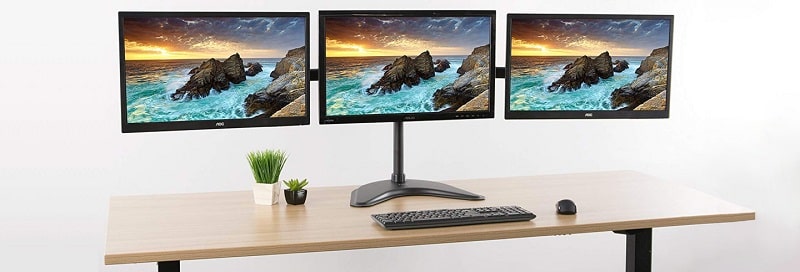
HUANUO's triple mount is a favorite in gaming communities, and it's easy to see why. It supports screens from 17 to 32 inches with a weight range of 4.4 to 17.6 lbs, covering virtually every gaming monitor you'd realistically run in a triple setup. The arm articulation covers every angle a gamer needs — swivel, tilt, and full 360° rotation — and switching between landscape and portrait is straightforward. The space-saving design elevates all three screens off the desk surface, giving you room for a mouse pad, keyboard, and desk accessories without everything feeling cramped.
The design philosophy here is gaming-first: the mount creates an immersive curved arrangement when you angle the side arms inward, which is exactly what you want for triple-screen racing or flight simulation. Mounting hardware includes both clamp and grommet kits, and the VESA compatibility (75×75mm and 100×100mm) covers the vast majority of gaming monitors currently on the market. HUANUO is clear about weight and size requirements — verify your monitor specs before purchasing, since screens outside the 4.4–17.6 lb range won't be properly supported.
This isn't the most premium build in the category, but for the gaming use case, it delivers exactly what you need at a price that won't ruin your peripheral budget.
Pros:
Cons:
Not every desk can take a clamp mount. Thick desktops, glass surfaces, and certain office furniture simply don't accommodate C-clamps or grommets — and that's exactly the problem the WALI MF003 solves. This freestanding model uses a wide V-base that sits on any flat desktop surface, requiring zero modification to your desk. The two-stage locking system gives you both freestanding and 4-inch diameter grommet-base options, so you can switch mounting methods if your desk situation changes. The V-base is stable enough for continuous daily use without shifting or tipping.
The 16-inch height pole with full adjustability gives you precise control over screen position. Center monitor gets ±15° tilt; side monitors get ±90° tilt and swivel plus full 360° rotation. That's more side-arm articulation than several clamp-based competitors in the same price range. Compatibility covers screens up to 27 inches and 22 lbs per arm, with both 75×75mm and 100×100mm VESA support. For users who've been frustrated by desk-clamping limitations, this is the clean, no-compromise solution.
The V-base does occupy some desk footprint, but for what you get — three fully adjustable screens without drilling or clamping — that's an acceptable trade. Renters and home office workers especially appreciate this design.
Pros:
Cons:
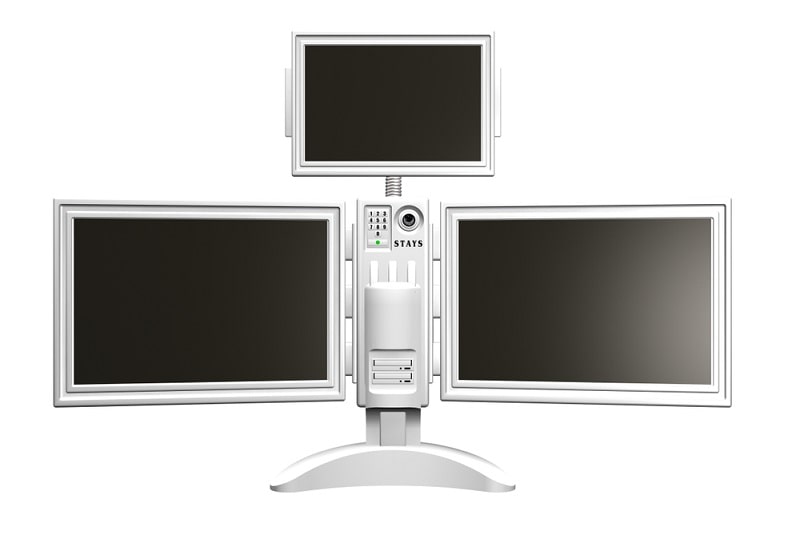
If you're tall, use a standing desk, or just want maximum flexibility in screen height positioning, MOUNT PRO's triple arm is purpose-built for you. The 28-inch pole reaches a maximum height of 36.3 inches — significantly taller than most competitors that max out at 20–24 inches. That extra vertical range isn't just a spec on paper; it's the difference between straining your neck upward or having your screens perfectly at eye level whether you're sitting or standing. Each arm extends up to 18.1 inches, and the mount handles 13–32 inch screens up to 19.8 lbs each.
The full-motion capability covers +90° to -90° tilt, 180° swivel, and 360° rotation. One important note: this is a stacked/vertical configuration triple mount, not a side-by-side layout. If you specifically need three screens arranged horizontally, MOUNT PRO makes a separate side-by-side model. But for users who want a primary screen flanked by screens in a stacked or angled arrangement, this mount's upgraded sturdy base and tall reach make it one of the most ergonomically versatile options on the list. The upgraded base design improves stability over earlier versions, and the 19.8 lb per arm rating handles heavier professional displays comfortably.
Pros:
Cons:
suptek's gas-spring triple mount earns its spot on this list with a 22 lb per arm weight rating — the highest per-arm capacity of any mount reviewed here. If you're running dense professional monitors, color-accurate panels for creative work, or older displays that weigh more than the modern average, this is your mount. Gas springs handle the weight smoothly, and the full-motion articulation (360° rotation, ±80° tilt, ±180° swivel) covers any viewing position you could need.
The standing pole design clears all three screens off the desk surface, and the integrated cable management channels route your cables through the arms to keep your workspace looking clean. The vertical design works especially well for users who want their screens elevated rather than spread out laterally. Compatibility hits the standard sweet spots: 17 to 32 inch screens, VESA 75×75mm and 100×100mm. For a high-capacity gas-spring mount, the price is competitive — you're getting premium weight support without paying a premium price.
If your monitors push the upper end of the weight range for other mounts on this list, stop second-guessing and buy this one. It's built for exactly that scenario.
Pros:
Cons:
Buying a triple monitor stand in 2026 is more nuanced than it looks on the product listing. Here's what actually matters when you're making the decision. You can also browse our full buying guide library for more in-depth hardware comparisons across categories.
This is the first filter — and it eliminates a lot of options fast. Know the exact size and weight of each monitor you plan to mount before you browse.
According to ergonomics research referenced by OSHA's computer workstation guidelines, the top of your screen should be at or slightly below eye level — a key factor when selecting your pole height and arm extension range.
How you adjust your screens day-to-day matters more than the adjustment range itself. Three mechanisms dominate the market:
For anyone who repositions screens frequently — shifting from sitting to standing, switching between tasks — gas spring is worth the premium. For a set-it-once workstation, manual friction mounts are perfectly fine.
Your desk dictates this decision more than your preference does.
Most premium mounts include both clamp and grommet hardware. Freestanding is a specific design choice — don't buy a freestanding mount if you have a standard desk with clamping support, since the V-base occupies desk real estate you'll likely miss.
Standard poles run 15–20 inches. If you use a sit-stand desk or if you're over six feet tall, that won't cut it. Look for a pole height of at least 24–28 inches, and check the arm extension range alongside it — more reach means more flexibility in how you position screens relative to your seated or standing position. For developers and data professionals who spend long sessions at triple setups, this ergonomic range directly impacts fatigue levels. If your workflow resembles what you'd find in our roundup of the best laptops for pentesting — long focused sessions with multiple data streams — ergonomics should be a top-three buying criterion, not an afterthought.
Most triple monitor stands support monitors with standard VESA mounting hole patterns — either 75×75mm or 100×100mm. Check the back of your monitors for these mounting holes before buying. Screen size and weight also matter: most mounts support 13–32 inch screens up to 17–22 lbs per arm. Curved monitors with extreme curvature (1000R) often aren't compatible. Always verify your monitor's specs against the mount's listed compatibility before purchasing.
Installation typically takes 20–45 minutes for most users with basic tools. You'll need to attach VESA plates to the back of each monitor, assemble the pole and arm section, secure the base to your desk via clamp or grommet, then hang each monitor. Most mounts include all required hardware and illustrated instructions. The most time-consuming part is usually routing cables through the arm channels — but the end result is worth it.
Yes, as long as each screen falls within the mount's supported size and weight range. You can absolutely run a 27-inch center screen flanked by two 24-inch side screens on the same mount, provided all three are within the manufacturer's specifications. Mixed setups are common for users who want a larger primary display with smaller secondary screens for reference panels, chat windows, or monitoring dashboards.
C-clamp mounts can leave marks on desk edges over time — using the included rubber padding minimizes this. Grommet mounts require a pre-drilled hole and are more permanent. Freestanding bases sit on the surface and cause no desk modification. For desks you want to protect, either use the rubber padding on clamps or choose a freestanding option. Avoid over-tightening the clamp hardware, as excessive torque is the primary cause of desk surface damage.
Triple monitor mounts hold considerable weight — three 27-inch monitors can total 30–45 lbs combined. Check both the per-arm capacity and your desk's weight rating. Most modern desks handle this easily, but lightweight folding desks or cheap particle-board surfaces may flex under the load of a fully extended triple arm system. Heavy-duty clamp mounts also put lateral stress on the desk edge, so a solid wood or metal desk edge is preferable to thin composite materials.
Gas spring arms use a pressurized chamber to counterbalance your monitor's weight, letting you reposition screens with minimal force and no tools. They hold position precisely without drift. Manual (friction) arms use tightened joints that you adjust by loosening a knob, repositioning, then retightening. Gas spring arms offer a better daily experience if you frequently adjust your screens, while manual arms are more affordable and perfectly adequate for users who set their screens once and rarely move them.


About Editorial Team
The DigiLabsPro editorial team covers cameras, lenses, photography gear, and creative technology with a focus on helping photographers make informed buying decisions. Our reviews and guides draw on hands-on testing and research across a wide range of equipment, from entry-level beginner kits to professional-grade systems.
You can get FREE Gifts. Or latest Free phones here.
Disable Ad block to reveal all the info. Once done, hit a button below
