The single most effective way to improve VHF antenna reception is to reposition your antenna higher and aim it directly toward your local broadcast tower. That one change resolves the majority of weak-signal complaints. For photographers and content creators who rely on reference monitors, broadcast feeds, or simply want reliable over-the-air TV in their workspace, getting VHF right is worth the effort. Browse our photography articles for more setup and tech guides across all skill levels.
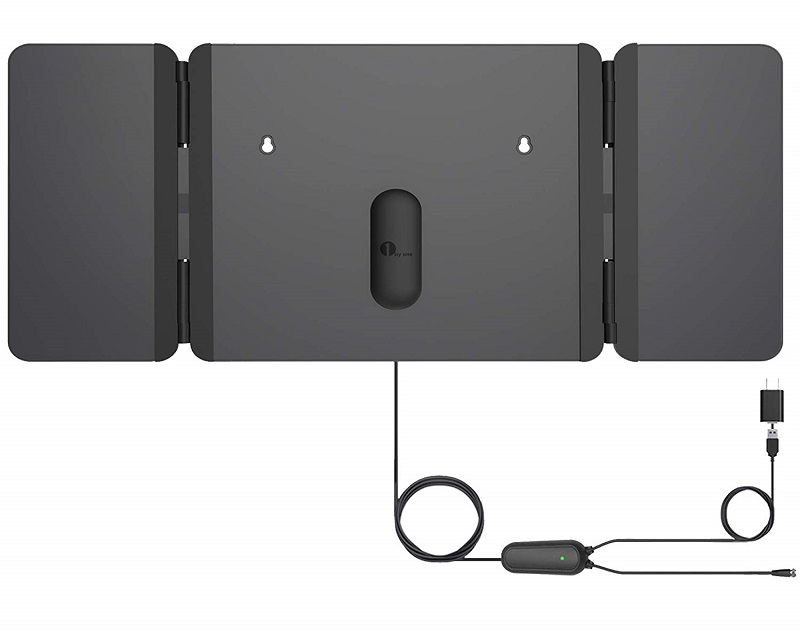
VHF signals occupy the frequency band of 30–300 MHz, covering channels 2 through 13 in the U.S. broadcast spectrum. These longer wavelengths travel impressive distances but are far more sensitive to physical obstructions — walls, trees, metal surfaces, and nearby electronics all degrade the signal. That sensitivity is exactly what separates a stable, crystal-clear picture from a pixelated mess.
This guide covers every practical approach, from zero-cost positioning tricks to hardware upgrades that make a measurable difference. You'll know exactly where to start and when it's worth spending more.
Contents
Not every reception problem needs the same solution. Where you start depends on how bad your signal is right now and how much control you have over your installation space. Beginners should exhaust free options before spending anything. Advanced users dealing with fringe-area signals need a different toolkit entirely.
Start with these zero-cost actions before touching your wallet:
These steps resolve signal issues for the majority of users. Most people assume the hardware is at fault when the real problem is positioning. Don't skip the scan — it's the most overlooked step in antenna troubleshooting.
If basic positioning doesn't solve your problem, move to these upgrades:
Pro tip: A preamplifier mounted directly at the outdoor antenna is always more effective than a booster placed near the TV — amplify the signal before line loss, not after it.
Theory helps, but knowing what works in specific environments is more useful. Here's what real setups look like when you need to improve VHF antenna reception in practice.
Urban environments are the hardest for VHF signals. Buildings block and reflect signals simultaneously, causing multipath interference that degrades picture quality. Your best options:

Suburban and rural setups have more flexibility but often involve greater tower distances. The typical effective approach:
Also consider your overall room setup. If you're wall-mounting or standing a flat-panel TV in your space, our guide on choosing the right flat panel TV stand covers display positioning for both viewing comfort and signal access.
Bad antenna advice spreads quickly online. These myths cost people money and hours of unnecessary troubleshooting. Here's the truth.
Price does not equal performance in antenna hardware. A $15 antenna positioned correctly outperforms a $90 antenna placed badly — every time. The fundamentals of height, direction, and clear line of sight determine signal quality far more than the brand on the box.
This is partially true and mostly false. Indoor antennas struggle in fringe areas beyond 40 miles — that part is accurate. But within 25 miles of a broadcast tower, a well-placed indoor antenna competes directly with many outdoor setups. Your wall construction matters more than the antenna model.
Warning: Low-emissivity (Low-E) window glass contains a thin metallic layer designed to reflect infrared light — but it also blocks RF signals. Placing your antenna against a Low-E window can make reception worse, not better.
Not every viewing scenario demands perfect reception. But in certain use cases, signal quality becomes critical to the experience.
Live sports and breaking news are where VHF signal quality matters most. Streaming introduces latency — anywhere from 10 seconds to several minutes. Over-the-air broadcast is real-time. If you watch live events regularly, a strong VHF signal delivers zero-latency HD that no streaming service can match.
Photographers and content creators often need reliable displays in their workspace. A broadcast feed on a calibrated studio monitor provides a consistent real-world reference signal — useful during monitor calibration sessions or when evaluating color rendering across display types.
Reliable, consistent reception doesn't happen once and stay there. These practices keep your signal strong over months and years.
Your coaxial cable is part of your antenna system. Degraded cable kills signal quality just as effectively as poor placement. Use the right cable for each run length and environment.
| Cable Type | Loss per 100 ft (VHF) | Best Use Case | Approximate Cost |
|---|---|---|---|
| RG-59 | ~4.5 dB | Short indoor runs under 10 ft | $0.10–$0.20/ft |
| RG-6 | ~2.5 dB | Standard indoor and outdoor runs | $0.20–$0.35/ft |
| RG-6 Quad Shield | ~2.0 dB | High-interference environments | $0.30–$0.50/ft |
| RG-11 | ~1.5 dB | Long runs over 100 ft | $0.60–$1.00/ft |
Some of the best ways to improve VHF antenna reception cost absolutely nothing. Others cost under $20. Here's where to focus your attention first.
You don't need to spend heavily to improve VHF antenna reception. The cost of a good result varies widely based on your distance from towers and your installation environment. Here's an honest breakdown of what you'll spend at each level.
For most people within 25 miles of their broadcast towers, a $25–$35 antenna with correct positioning is genuinely all that's required. Pair that with a clean RG-6 cable run and you have a complete, reliable setup.
Pro insight: The single biggest performance jump in any antenna budget is moving from indoors to attic or outdoor mounting — not upgrading from a $30 to a $90 indoor antenna. Spend on elevation before you spend on hardware.
Different VHF channels transmit from different tower locations and at different power levels. Channels 2–6 (low-VHF) are especially difficult to receive indoors because their longer wavelengths require a larger antenna element to capture effectively. Channels 7–13 (high-VHF) are more manageable with standard antennas. If low-VHF channels are the problem, look for antennas specifically rated for VHF low-band reception — not all indoor antennas cover that range.
Yes — in both directions. Heavy rain, dense cloud cover, and atmospheric pressure changes can reduce signal strength temporarily. Conversely, a weather phenomenon called tropospheric ducting can cause VHF signals to travel hundreds of miles further than normal, occasionally pulling in distant stations you'd never normally receive. For day-to-day reliability, outdoor antennas should use weatherproof connectors and sealed coax fittings to prevent moisture from degrading the cable and connectors over time.
Most modern combination antennas cover both VHF (channels 2–13) and UHF (channels 14–36) bands. However, the quality of VHF reception varies significantly between models. Many antennas marketed as "HDTV antennas" are optimized primarily for UHF and handle VHF poorly. If you have local stations on VHF channels, verify the antenna's specifications include a full VHF frequency range — not just high-VHF — before purchasing.
No — and this is a common mistake. An amplifier boosts both signal and noise equally. If your signal is already weak due to poor placement, an amplifier amplifies the interference along with the broadcast. Amplifiers help most when you have a long cable run causing signal loss, or when you're splitting the signal to multiple TVs. They do not compensate for bad positioning or a fundamentally obstructed antenna location.
A quality outdoor directional antenna mounted at rooftop height can reliably receive VHF signals from 60–80 miles under normal atmospheric conditions. In flat terrain with favorable conditions, that range extends further. The limiting factors are transmitter power, terrain obstructions between your location and the tower, and the quality of your coaxial cable run from antenna to TV. For distances beyond 60 miles, a high-gain directional antenna with a rooftop preamplifier is the recommended combination.
Better VHF reception is almost never about buying more — it's about placing what you have correctly, and that answer is always free.


About Editorial Team
The DigiLabsPro editorial team covers cameras, lenses, photography gear, and creative technology with a focus on helping photographers make informed buying decisions. Our reviews and guides draw on hands-on testing and research across a wide range of equipment, from entry-level beginner kits to professional-grade systems.
You can get FREE Gifts. Or latest Free phones here.
Disable Ad block to reveal all the info. Once done, hit a button below
