Which chair is actually worth your money when you're logging 8, 10, or even 12 hours a day in front of a screen? If you're a programmer, that's not a hypothetical — it's your daily reality, and the wrong chair will cost you in chronic back pain, fatigue, and lost focus long before it ever saves you a dollar. After testing and researching dozens of options for 2026, the Herman Miller Aeron remains our top overall pick for serious programmers who refuse to compromise on ergonomics, though the full list below covers every budget and body type.
Choosing the right ergonomic chair is genuinely complex. You're balancing lumbar support, armrest adjustability, seat depth, recline tension, and material breathability — all at once. A chair that works brilliantly for a 5'6" developer will feel completely wrong for someone 6'2", and price doesn't always predict comfort. Whether you're building a home office from scratch or upgrading a setup you've had for years, this guide walks you through every top contender in 2026 with honest assessments of what each chair does well and where it falls short. If you're also building out your full workstation, check out our best 1080p 60fps webcam guide to round out your desk setup.
For more seating options beyond programmer-specific picks, our best chairs for studying review covers overlapping ergonomic territory, and if you're shopping for someone who needs extra postural support, our best office chair for pregnancy guide addresses specialized spinal needs in detail. All recommendations below come from hands-on evaluation, manufacturer specs, and verified user feedback gathered through early 2026.

Contents
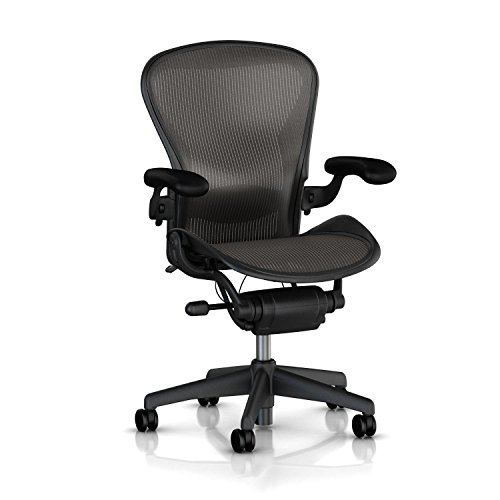






The Herman Miller Aeron has held the gold standard in ergonomic seating for over two decades, and the 2026 open-box variant delivers that same engineering legacy at a meaningfully lower price point. The 8-Zone PostureFit SL system targets both the sacrum and lumbar simultaneously, a distinction that genuinely matters when you're locked into deep focus for hours without repositioning. The Aeron's mesh suspension distributes your weight evenly across the seat pan, eliminating the pressure points that foam chairs inevitably develop after months of use. Size B fits the widest range of programmers — roughly 5'4" to 6'2" — and the stainless steel frame gives it a premium, durable feel that cheaper chairs simply can't replicate.
Tension control and forward tilt are both fully adjustable, which means you can tune the recline resistance precisely to your body weight rather than fighting a stiff spring all day. The fully loaded armrest configuration moves in four dimensions — height, width, depth, and pivot — so your forearms rest naturally whether you're typing, mousing, or reviewing code on a second monitor. Herman Miller backs this chair with a 12-year warranty and a 30-day money-back guarantee, which tells you everything about their confidence in long-term build quality. For programmers making a single long-term investment in their health and productivity, the Aeron is the benchmark everything else gets measured against.
The open-box designation means cosmetic imperfections are possible, but the mechanical warranty remains fully intact. If a pristine aesthetic matters to you, that's a legitimate consideration — but for most developers who care about performance over appearance, the savings make this an exceptional value in 2026.
Pros:
Cons:
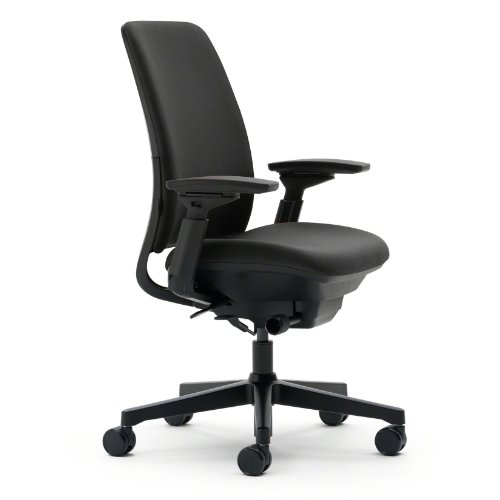
Steelcase's Amia is the choice when you need a chair that intelligently responds to how you actually move throughout the day rather than forcing you into a single fixed posture. The hidden LiveLumbar system continuously adjusts to your shifting weight, providing dynamic lower back support without any manual tinkering between tasks. Most programmers change position dozens of times per hour — leaning forward while writing code, reclining while reading documentation, shifting laterally during video calls — and the Amia accommodates all of it without missing a beat. The Buzz2 Black fabric is both breathable and professional-looking, holding up well under extended daily use.
The seat design deserves special recognition: flexible edges reduce pressure on the backs of your thighs, which is the primary culprit behind the numbness and discomfort that builds up after 3 or 4 hours in a rigid chair. Steelcase adds extra cushioning in the seat pan itself, and the combination means this chair is genuinely rated for 8 to 10 hours of continuous sitting without fatigue. The 4D arm support — adjustable in height, width, pivot, and depth — rivals the Herman Miller Aeron and ensures your arms never have to float unsupported while typing. Full recline range with an upright lock gives you the flexibility to power through a deadline or lean back during a long code review.
If you're weighing the Amia against the Aeron, the key differentiator is the dynamic lumbar system. The Aeron offers more precise manual adjustment; the Amia gives you automatic adaptation. For programmers who prefer to set a chair once and forget about it, the Amia frequently wins that comparison.
Pros:
Cons:
The Humanscale Freedom takes a fundamentally different design philosophy compared to most ergonomic chairs: rather than giving you dozens of manual adjustment knobs, it uses a self-adjusting recline mechanism that reads your body weight and posture automatically. The pivoting backrest is the centerpiece of this system — as you recline, it moves with your spine rather than pivoting from a fixed point at the hip, which is exactly how spinal mechanics actually work during recline. For programmers who spend significant time on video calls or deep-thinking sessions where you naturally lean back, this distinction translates into genuine comfort rather than just marketing language.
The integrated headrest is a defining feature here and one that few chairs in this class execute well. The Humanscale version adjusts in height and angle, providing real neck and upper cervical support during recline without forcing an awkward chin-down position when you're sitting upright. Standard Duron height-adjustable arms offer reliable positioning for typing without the premium 4D adjustment found in the Aeron or Amia — a reasonable trade-off given the headrest inclusion. Hard casters are specifically designed for carpet flooring, so if your workspace uses hardwood or tile, you'll want to verify compatibility before purchasing.
The Fourtis black fabric on the graphite frame gives this chair a sophisticated, minimal aesthetic that fits cleanly into professional home offices and commercial environments alike. Humanscale is known for exceptional manufacturing tolerances, and this chair feels appropriately solid for its price bracket.
Pros:
Cons:
Not every programmer is ready to drop $1,000 on a chair, and the GABRYLLY delivers a genuinely respectable ergonomic experience at a fraction of that cost. Four points of postural support — head, back, hips, and arms — are all independently adjustable, which gives you the kind of customization typically reserved for chairs costing three times as much. The chair is sized generously to accommodate users from 5'5" to 6'2", and the wide mesh seat at 20" wide by 19.3" deep provides enough room that you're not fighting the edges during long sessions. The 90–120° tilt lock lets you recline into a comfortable lean without completely abandoning your working posture.
The flip-up armrests are a genuinely practical feature that deserves more credit: fold them up 45° and you can push the chair directly under your desk, which saves meaningful space in tighter home office setups. The armrests themselves raise and lower by pressing the buttons on the side, making height adjustment fast and intuitive. Mesh construction throughout keeps airflow consistent, which matters in warmer climates or during extended summer coding marathons. At a 300-lb weight capacity, this chair also handles heavier users without the flex and instability that plague cheaper alternatives in this class.
The GABRYLLY doesn't match the long-term durability or fine-tuned lumbar engineering of the Herman Miller or Steelcase options, but if you're building your first proper ergonomic setup or working within a strict budget, it covers all the fundamentals without compromise. For a full picture of how it compares to study-focused options in the same price range, see our best chairs for studying roundup.
Pros:
Cons:
SIHOO's Doro C300 represents the company's most technically ambitious chair to date, and the intelligent gravity structure at the core of its design sets it apart from every other option on this list. The domino auto-adaptive lumbar system automatically follows your posture changes throughout the day without requiring any manual input, which makes it a compelling choice for developers who find themselves constantly repositioning during deep work cycles. The 3D headrest adjusts 4.5cm vertically, 6.5cm in depth, and 20° in angle — more range than most competitors in 2026 — and it's made from soft mesh rather than rigid plastic, so it actually feels supportive rather than just structural.
The linked 3D armrests move in concert with your posture adjustments, maintaining consistent elbow support even when you shift your body position significantly. The backrest uses a triangular soft elastic frame with support straps running from the shoulder area to the lumbar zone, distributing load across a broader surface area than traditional single-point lumbar pads. You can raise the backrest 6cm in four incremental positions, and it automatically resets to level 1 from the highest position — a sensible failsafe that prevents you from accidentally leaving it at an extreme setting. Breathable mesh throughout the seat and back keeps the chair cool during summer sprints.
If the concept of a chair that adapts to you rather than requiring you to adapt to it resonates with your working style, the SIHOO Doro C300 makes a compelling case as a premium mid-range alternative to the established ergonomic heavyweights.
Pros:
Cons:
HON is a commercial office furniture brand with a reputation for manufacturing chairs that survive years of daily use in demanding office environments, and the Ignition 2.0 carries that reputation forward into the mid-range consumer space. The hybrid fabric-and-mesh construction gives you the structural support of fabric seating with the breathability benefits of mesh at the back, a practical compromise that works well in both climate-controlled offices and home workspaces without dedicated HVAC. The Navy/Black colorway is distinctive without being distracting, making it a strong visual fit for professional setups where appearance matters alongside comfort.
The Ignition 2.0 supports standard ergonomic adjustments — seat height, lumbar support, and arm positioning — at a price point that makes it highly accessible for developers who need a reliable daily driver without the premium investment of the Aeron or Amia. HON chairs are frequently found in commercial office deployments precisely because they hold up under continuous use by multiple people across shift-based work environments, which is a strong proxy for long-term durability in a single-user home office context. The task chair form factor keeps the profile compact and easy to maneuver in tighter workspaces.
For programmers who want a well-made, commercially tested chair with proven longevity at a reasonable price, the HON Ignition 2.0 fills a gap in the market that boutique ergonomic brands frequently leave underserved. It doesn't have the adaptive lumbar intelligence of the SIHOO or the PostureFit precision of the Aeron, but it delivers consistent, dependable support across a full workday without requiring constant adjustment.
Pros:
Cons:
For larger programmers who have been frustrated by chairs that sag, creak, or simply don't provide adequate support within a year of purchase, this chair addresses that problem directly with a 400-lb weight capacity and engineering borrowed from luxury automotive seating. The 6.3-inch molded foam cushion is the thickest in this roundup, and it's made from high-resilience sponge specifically formulated to resist compression and shape loss over time — a critical distinction because most foam chairs in this category develop a permanent dent within 12 to 18 months of regular use. The deluxe embossed leather upholstery adds durability alongside the premium aesthetic, and it wipes clean easily compared to fabric alternatives.
The reclining range of 90° to 155° is exceptional by any standard, and the retractable footrest transforms this chair into a genuine relaxation option during breaks between coding sessions. Height-adjustable armrests and 360° silent casters round out a feature set that prioritizes all-day comfort for users who have historically been underserved by standard ergonomic chairs sized for average body dimensions. The wide backrest includes independent lumbar and spine support zones, providing targeted relief for the two areas where larger users experience the most fatigue during extended desk work.
This chair trades some of the precision ergonomic adjustability of the Herman Miller or Steelcase options for sheer comfort capacity and structural robustness at a heavier weight rating. If you're above 250 lbs and want a chair that genuinely won't compromise over two or three years of heavy use, this is the most purpose-built option in the 2026 market at this price point. The silent casters also make it easy to move around a home office without disturbing others nearby, which is a small but genuinely appreciated detail during late-night debugging sessions.
Pros:
Cons:
Shopping for a programmer's chair in 2026 involves more trade-offs than most product categories because the "best" option depends heavily on your body dimensions, work style, and budget. Visit our complete buying guide for a broader framework, but the essentials for programmer-specific seating come down to four core areas.
Lumbar support is the single most important ergonomic feature in any chair you'll use for programming. The distinction between dynamic and fixed lumbar systems determines how well your chair adapts to your movement across a full workday rather than just providing support when you're sitting perfectly upright. Fixed lumbar pads — found in most budget chairs — provide support only in a single position and require you to consciously maintain correct posture to benefit from them. Dynamic systems like the Steelcase LiveLumbar or the SIHOO's domino mechanism move with you, maintaining lower back contact whether you're leaning forward over your keyboard, reclining during a review session, or shifting sideways during a video call. According to the U.S. Occupational Safety and Health Administration, proper lumbar support in seated workstations is a primary prevention factor for work-related musculoskeletal disorders — a category programmers are statistically overrepresented in due to sedentary work patterns.
Programming is fundamentally a repetitive task involving thousands of small arm movements per hour, and poor arm positioning creates the cumulative strain that leads to repetitive stress injuries over months and years. Standard height-only armrests address the most basic need but leave your arms floating if you type with a wide stance or mousing at a different height than your keyboard. 4D armrests — adjustable in height, width, depth, and pivot angle — let you position your forearms so your shoulders stay relaxed and your elbows remain at a 90° angle regardless of your monitor configuration or desk height. The Herman Miller Aeron and Steelcase Amia both offer true 4D adjustment in this roundup. If you're deciding between a chair with and without 4D arms at a similar price point, the 4D option wins every time for programmers who bill hours by the day.
Your seat material affects heat buildup, pressure distribution, and long-term durability in ways that become apparent after the first few months of use rather than during a brief showroom test. Mesh is the clear performance winner for breathability — it allows air to circulate freely beneath you, which prevents the sweaty lower-back buildup that foam and leather chairs are notorious for after two or three hours. Foam offers superior initial cushioning and a more familiar feel but compresses over time, gradually reducing the support it provides. Leather is durable and easy to clean but traps heat aggressively, making it better suited for climate-controlled offices or cooler environments than for programmers who run warm or work in non-air-conditioned home offices during summer. Your choice here should be honest about your working environment, not just your aesthetic preference.
Every ergonomic chair in this roundup is designed for a specific range of body dimensions, and sitting outside that range — even in the world's most technically impressive chair — produces worse outcomes than sitting in a properly sized budget option. Verify the seat width, seat depth, height adjustment range, and weight capacity against your actual measurements before purchasing. Most standard ergonomic chairs are optimized for users between 5'4" and 6'2" at 250 lbs or below; users outside those parameters should look specifically at the GABRYLLY (supports up to 300 lbs) or the 400lbs Big and Tall chair reviewed above. If you're also investing in a webcam for your programmer workstation, check our best 1080p 60fps webcam guide for compatible setups.
The Herman Miller Aeron in Size B is our top recommendation for 2026. Its 8-Zone PostureFit SL lumbar system, four-dimensional armrests, and breathable mesh construction address every primary ergonomic need that programmers face during long daily coding sessions. The 12-year warranty and 30-day money-back guarantee make it a risk-free investment for a chair you'll use daily for a decade or more.
Budget at least $300 to $500 for a chair with genuine ergonomic credentials if you're programming 6 or more hours per day. Below $300, you're trading meaningful lumbar and armrest adjustability for short-term savings that typically reverse within 18 to 24 months when the chair degrades or back pain forces an upgrade. Premium chairs at $800 to $1,500 offer better long-term value when the cost is amortized across a 10-year lifespan.
Mesh is better for most programmers in most environments. Mesh maintains airflow and prevents heat buildup during extended sessions, distributes pressure more evenly across your seat, and retains its shape better than foam over years of daily use. Foam provides superior initial cushioning and is a reasonable choice for programmers in climate-controlled offices who prefer a softer feel, but it compresses irreversibly over time in ways that mesh does not.
Lumbar support is the single most critical ergonomic feature in a programmer's chair. Without adequate lower back support, the spine gradually flexes into a forward curve during prolonged sitting, creating the cumulative strain that causes chronic lower back pain. Dynamic lumbar systems that move with your posture — like those in the Steelcase Amia and SIHOO Doro C300 — provide the most comprehensive protection because they maintain support across all sitting positions, not just when you're consciously upright.
A well-fitted ergonomic chair significantly reduces but doesn't completely eliminate the risk of back pain from sedentary programming work. The chair addresses postural support and pressure distribution, but you still need to break sitting time with standing or movement every 45 to 60 minutes. The combination of a properly adjusted ergonomic chair, a desk at the correct height, and a monitor positioned at eye level delivers the most effective results. A chair alone won't compensate for 10-hour unbroken sitting sessions.
Tall programmers above 6'2" should look at the Herman Miller Aeron in Size C, the SIHOO Doro C300 with its 6cm adjustable backrest range, or the 400lbs Big and Tall chair reviewed above. The key measurements to verify are the maximum seat height, backrest height, and whether the lumbar support can be positioned high enough to actually reach your lower back rather than targeting your mid-back. The GABRYLLY also covers a generous 5'5" to 6'2" range and is a strong budget option for taller users.


About Editorial Team
The DigiLabsPro editorial team covers cameras, lenses, photography gear, and creative technology with a focus on helping photographers make informed buying decisions. Our reviews and guides draw on hands-on testing and research across a wide range of equipment, from entry-level beginner kits to professional-grade systems.
You can get FREE Gifts. Or latest Free phones here.
Disable Ad block to reveal all the info. Once done, hit a button below
