Which commercial printer will actually keep up with your office workload in 2026 — and which ones will leave you frustrated with slow speeds, jammed paper, and ballooning toner costs? That's the question every business owner and office manager wrestles with before pulling the trigger on a major equipment purchase. After testing and researching the top contenders on the market, the Canon Color imageCLASS MF753Cdw II stands out as our top pick for most commercial environments, thanks to its blazing 35 ppm speed, rock-solid wireless reliability, and impressive 3-year warranty.
Commercial printers are a different breed from the inkjet you might use at home. They're built for volume, consistency, and multi-user access across a network. Whether you're running a busy law firm, a marketing agency, or a mid-sized retail operation, the printer you choose affects daily productivity in ways that are easy to underestimate — until the thing breaks down during a deadline crunch. If you're also shopping for personal use, check out our guide to the best all-in-one printer for home use 2026 for lighter-duty options.
We've put together this comprehensive breakdown of the seven best commercial printers available right now. You'll find detailed reviews, a head-to-head comparison, and a buying guide that covers every spec that actually matters. If you care about print quality beyond black-and-white documents, our best color laser printer for photos 2026 guide is worth a look too. For now, let's get into the top picks.
Contents








The Canon Color imageCLASS MF753Cdw II is the printer that earns its spot on every commercial shortlist in 2026. With print speeds of up to 35 ppm in both color and monochrome, it handles busy office output without making your team wait around. The first-print-out time of approximately 7 seconds is legitimately fast — you walk up, hit print, and it's done. That alone separates it from competitors that take 15–20 seconds to warm up from sleep mode.
Setup is refreshingly painless. Canon's wireless connection wizard walks you through the process in a handful of steps, and dual-band Wi-Fi means you won't fight interference from other office devices. The 4-in-1 functionality — print, scan, copy, and fax — covers every workflow a modern office demands. The auto document feeder handles multi-page originals without babysitting, and the duplex printing capability cuts your paper consumption significantly over time. The 3-year limited warranty is the longest in its class and gives you real peace of mind for a commercial investment of this size.
Build quality is solid and unmistakably Canon. The control panel is intuitive, the paper handling is reliable, and color accuracy is consistent across runs. If you need vibrant marketing materials printed in-house or consistently sharp client reports, this machine delivers both without compromise.
Pros:
Cons:
The Brother MFC-L8930CDW is designed for teams that print a lot — and need to do it without constantly buying new toner. Brother completely redesigned this machine from the previous generation, trimming the footprint by 25% while maintaining impressive output quality. At 33 ppm for both color and monochrome printing, it keeps pace with demanding office environments. The included toner cartridges give you 3,000 pages of black and 1,800 pages of color right out of the box, which is a solid starting point.
Where the MFC-L8930CDW really shines is in its long-term cost efficiency. The optional TN635XXL super high yield cartridges deliver 7,500 pages of black and 6,500 pages of color — that's serious volume that drives your cost-per-page down dramatically. The scanning system is equally impressive, with two-sided scanning at up to 104 ipm and an 80-page auto document feeder that handles large batches. The ability to scan directly to SharePoint, email, or cloud services from the touchscreen makes document management genuinely modern.
The multipurpose tray adds flexibility for envelopes, labels, and custom media without interrupting your standard paper supply. The legal-size glass ensures you can scan large originals accurately. Security features are robust, which matters when multiple users share a networked device.
Pros:
Cons:
If your office handles sensitive data — legal documents, financial records, healthcare information — the HP Color LaserJet Pro M479fdw belongs on your shortlist. HP's Wolf Pro Security platform is built directly into the printer hardware, firmware, and operating system. This isn't a software add-on; security is embedded at every layer of the device's architecture, protecting against malware, unauthorized access, and data breaches that increasingly target networked printers as entry points into corporate systems. According to NIST cybersecurity guidelines, network-connected printers represent a significant vulnerability in many business environments — HP takes this seriously.
Beyond security, this is a capable all-in-one that handles print, scan, copy, and fax with consistent quality. The customizable touchscreen control panel lets you program complex multi-step workflows and trigger them with a single button press. For finance teams or legal departments that run the same document processing steps dozens of times a day, that workflow automation saves real time. Print quality is sharp and consistent, and the wireless setup supports standard 802.11 networking without fuss.
HP backs this printer with a one-year next-business-day onsite warranty — so if something goes wrong, a technician comes to you, not the other way around. That's a meaningful service commitment for a business that can't afford downtime.
Pros:
Cons:
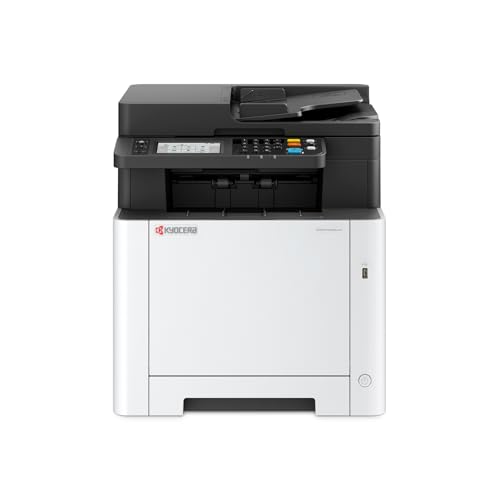
KYOCERA has built a reputation for long-lasting, cost-efficient printing, and the ECOSYS MA2600cwfx continues that tradition in 2026. The standout feature here is true 1200 x 1200 dpi print resolution — not interpolated, not simulated. You get genuinely sharp output whether you're printing text documents or color graphics, and that quality holds up consistently throughout the toner cartridge's life. At 27 ppm, it's not the fastest machine in this roundup, but it's entirely adequate for most small-to-medium office environments.
The 4.3-inch color touchscreen control panel is one of the most intuitive in this class, making it easy for non-technical staff to navigate settings, scan to destinations, and manage print queues without IT involvement. Wi-Fi Direct support means mobile users can print without going through the office network — handy in hybrid work environments where not everyone is on the same subnet.
The 1GB of onboard memory ensures the machine processes complex print jobs and high-resolution graphics without choking. Full copy, scan, print, and fax capabilities round out the package. KYOCERA's ECOSYS line is also known for its long-life drum units, which reduce total cost of ownership compared to brands where drums and toner are replaced together.
Pros:
Cons:
If your office runs primarily on black-and-white documents — contracts, reports, invoices, shipping labels — the Brother MFC-L5915DW is the machine to buy. At 50 ppm, it's the fastest printer in this entire roundup, and that speed matters when you have a team of 20 people sending jobs to one device throughout the day. The included 3,000-page toner cartridge gets you started, and when that runs out, the TN920UXXL ultra high-yield replacement delivers an extraordinary 18,000 pages per cartridge. Your cost-per-page drops dramatically.
Scanning is equally impressive. The 70-page auto document feeder handles single-pass, two-sided scanning at up to 56 ipm — meaning you can digitize a 70-page double-sided document in about two and a half minutes. The legal-size document glass accommodates oversized originals without cropping. Dual-band Wi-Fi ensures stable wireless connectivity even in offices crowded with competing signals, and the network-ready design supports shared access across your team without requiring wired connections at every workstation.
For offices that have already made the calculation that color printing isn't a daily need, this is the smartest investment. You're not paying for color hardware you don't use, and you're getting the fastest throughput available in this price range. If you occasionally need color output, consider pairing this with a dedicated color device for those jobs. For more budget-focused options, our best cheap laser printer 2026 guide has solid entry-level picks.
Pros:
Cons:
The HP LaserJet Enterprise M507dn is built for large organizations where printing is infrastructure, not just a convenience. This isn't a plug-and-play printer for a 5-person startup — it's a device designed to integrate with corporate IT environments, scale across departments, and operate under over 200 embedded security features that actively detect and respond to threats. HP calls it the world's most secure printing, and the spec sheet backs that claim: the device monitors its own firmware integrity, thwarts malware attempts, and self-heals from certain attack types without IT intervention.
HP Web JetAdmin gives IT administrators centralized control over the device alongside every other HP printer on the network. You can push firmware updates, enforce security policies, add printing solutions, and manage corporate printing behavior from a single console. HP JetAdvantage Security Manager extends this with compliance reporting and automated configuration enforcement — useful in regulated industries like finance, healthcare, and government contracting.
The built-in Ethernet (the "dn" designation confirms duplex and network) gives you wired reliability in high-traffic environments. Print quality is consistently sharp for text and line art. For organizations that need a workhorse that integrates deeply with enterprise management tools, this is the right choice. If you also need multifunction capabilities, check our best multifunction printer 2026 guide.
Pros:
Cons:
The Epson WorkForce WF-C5890 takes a different approach from the laser printers in this list. It uses Epson's PrecisionCore inkjet technology to deliver business-class output with a lower upfront cost and exceptional color vibrancy that laser printers often struggle to match on certain media types. If your commercial printing needs include marketing collateral, color-accurate photographs, or documents with photographic elements, inkjet technology gives you a color gamut that most laser machines simply can't replicate.
The WF-C5890 is engineered for low cost-per-page inkjet printing at business volumes, using high-capacity ink cartridges that reduce the frequency of replacements. It handles the full suite of business printing tasks including duplex printing, network connectivity, and multi-page scanning. The machine is compact relative to its output capability and fits comfortably in workgroup environments without dominating the floor space.
Where you'll notice the trade-offs: inkjet is slower than laser for pure throughput, and ink cartridges require more regular attention than toner. Standby mode ink evaporation can also be a factor if the machine sits idle for extended periods. For offices that prioritize color quality on a range of media types over raw speed, the WF-C5890 makes a compelling case. It sits in an interesting middle ground between a laser all-in-one and a dedicated photo printer — check our complete printer buying guide if you're still deciding which category fits your workflow best.
Pros:
Cons:
Print speed is measured in pages per minute (ppm), and it matters more than most buyers initially realize. A 5 ppm difference across a team of 15 people printing 50 pages a day each adds up to significant time lost waiting. For most commercial environments, look for a minimum of 30 ppm for color all-in-ones and 40 ppm for monochrome workhorses.
Equally important is the monthly duty cycle — the maximum number of pages the manufacturer has rated the machine to print per month. A printer rated for 50,000 pages/month will outlast one rated for 20,000 when your team is running it hard. Match the duty cycle to your actual monthly volume, not your light-use estimate.
The purchase price of a commercial printer is only the beginning of what you'll spend. Toner and cartridge costs dominate the long-term budget, often exceeding the printer's purchase price within the first year of heavy use. Before buying, calculate the cost-per-page using the high-yield replacement cartridge specs, not the starter cartridge that ships in the box.
Every commercial printer you consider in 2026 should support both wired Ethernet and wireless 802.11 connectivity. Beyond that, look at how the machine integrates with your existing workflows. Can it scan directly to SharePoint, Google Drive, or your document management system? Does it support mobile printing protocols like AirPrint and Mopria for employees on phones and tablets?
Security matters enormously for networked printers. Devices on your office network can be exploited as entry points by attackers. Look for printers with encrypted hard drives, user authentication requirements for sensitive print jobs, and security platforms like HP Wolf Pro that actively monitor firmware integrity. In regulated industries, your printer's security posture can directly affect compliance.
For most commercial environments, an all-in-one (print, scan, copy, fax) is the right call. The scanner alone justifies the premium over a single-function printer when you factor in document digitization workflows. But if you're buying for an enterprise environment where scanning happens on dedicated document management hardware, a high-speed single-function laser like the HP M507dn can be a smarter, more reliable choice.
Commercial-grade printers are rated for significantly higher monthly print volumes, feature more robust paper handling, include longer warranties, and are designed for multi-user network access. They typically have faster processors, more onboard memory, and higher-capacity toner cartridges than consumer devices. A commercial printer might be rated for 50,000+ pages per month where a consumer printer might be rated for 2,000–5,000 pages.
If more than 20% of your print jobs involve color, a color laser all-in-one is worth the premium. If your office runs almost exclusively on black-and-white documents — contracts, invoices, reports — a monochrome laser like the Brother MFC-L5915DW saves significant money per page and delivers faster throughput. You can always print monochrome jobs on a color laser printer, but you'll pay more per cartridge than with a dedicated mono device.
For standard office documents and text, 600 dpi is entirely sufficient. For marketing materials, detailed graphics, or any output that clients will see and evaluate, 1200 dpi makes a noticeable difference in sharpness and professionalism. The KYOCERA ECOSYS MA2600cwfx offers true 1200 x 1200 dpi at a competitive price point specifically for this reason. Avoid "enhanced" or "interpolated" resolution claims — they don't reflect true optical output quality.
Duplex printing means the printer automatically prints on both sides of a sheet without you manually flipping the paper. For any commercial environment printing more than a few hundred pages per week, automatic duplex printing is essential — it cuts paper consumption in half on two-sided documents and significantly reduces supply costs over time. All seven printers in this guide support automatic duplex printing.
Divide the replacement toner cartridge cost by its rated page yield at 5% coverage (the industry standard measurement). For example, a $120 toner cartridge rated for 6,000 pages costs $0.02 per page. Do this separately for black and color toner, then add them to get your combined color cost-per-page. Don't forget to factor in drum unit replacements if the brand uses separate drum and toner components, as some KYOCERA and Brother models do.
At minimum, your commercial printer should support 802.11ac (Wi-Fi 5) dual-band wireless and wired Ethernet simultaneously. Beyond that, look for Wi-Fi Direct for mobile users, AirPrint for iPhone and iPad users, and Mopria certification for Android devices. Cloud print integration — scan to Google Drive, SharePoint, Dropbox — is increasingly standard and genuinely useful. For secure environments, look for WPA3 support and the ability to disable wireless entirely when wired-only operation is required.
The best commercial printer isn't the fastest or the cheapest — it's the one whose total cost, speed, and security features match exactly what your office actually does every day.


About Editorial Team
The DigiLabsPro editorial team covers cameras, lenses, photography gear, and creative technology with a focus on helping photographers make informed buying decisions. Our reviews and guides draw on hands-on testing and research across a wide range of equipment, from entry-level beginner kits to professional-grade systems.
You can get FREE Gifts. Or latest Free phones here.
Disable Ad block to reveal all the info. Once done, hit a button below
