You're standing in front of your home office desk, staring at a printer that jams every third page, runs out of ink without warning, and costs a fortune every time you replace cartridges. Sound familiar? Finding the best multifunction printer in 2026 means cutting through a crowded market of inkjets, laser printers, and supertank machines — each promising to be the last printer you'll ever need.
A multifunction printer (MFP) does more than just print. It scans, copies, and usually faxes — all from one compact unit. Whether you're running a small business, working from home, or managing a busy household that prints everything from tax documents to school projects, the right MFP saves you time, space, and real money over the long haul. We've tested and researched the top options so you don't have to guess. If you're also shopping for related output devices, check out our Best Cheap Laser Printer 2026 guide for budget-focused picks.
Below, you'll find seven standout multifunction printers covering every use case — from high-volume office workhorses to cost-efficient supertank models. We break down what each one does best, where it falls short, and who it's really built for. For more context on the category, visit our complete buying guide to understand what specs actually matter before you spend a dollar.
Contents









If your office regularly churns out color presentations, brochures, and client-facing documents, the HP OfficeJet Pro 9125e is built for exactly that job. It prints up to 18 pages per minute (ppm) in color and 22 ppm in black — fast enough that you're not standing at the printer waiting while your meeting starts. The print quality on color graphics is crisp and vibrant, making it a legitimate step up from budget inkjets that smear on anything but plain text.
What sets the 9125e apart in 2026 is HP's AI-assisted formatting. When you print a web page or email, the AI strips out ads, navigation bars, and other clutter you never wanted on paper anyway. The result is a clean, properly paginated printout without manual editing. The 250-sheet input tray and auto document feeder (ADF) mean you can load up and walk away — no babysitting each page. Auto two-sided printing is included, which cuts paper use significantly in a busy office. HP's Instant Ink subscription (three months free included) can further reduce per-page costs if you print consistently high volumes.
The printer connects wirelessly, and setup through the HP Smart app is genuinely painless. You can send jobs remotely, check ink levels, and receive alerts before you run dry. The three-month Instant Ink trial is a meaningful perk — it's worth activating even if you decide to cancel later, since you'll pay nothing for ink during that window. If your team prints heavy color workloads daily, this machine earns its place on the desk.
Pros:
Cons:
If ink cartridge costs make you cringe every time you open the printer drawer, the Epson EcoTank ET-4850 solves that problem at the source. Instead of disposable cartridges, this printer uses large refillable ink tanks that ship full right out of the box — enough ink for thousands of pages before you need to buy more. The cost per page drops dramatically compared to traditional inkjet printers, and Epson's replacement ink bottles are cheap, widely available, and easy to pour in without making a mess.
Print quality hits 4800 x 1200 dpi (dots per inch — the measure of how many ink dots fit in one inch of print, which determines sharpness), which means both text and photos come out looking clean and detailed. Speed is moderate at 15.5 ppm black and 8.5 ppm color, which is fine for a home office or small business but may feel slow if you're running a high-volume print environment. The ET-4850 includes a scanner, copier, fax, and ADF, plus Ethernet connectivity for wired network setups — an uncommon bonus at this price point. The Epson Smart Panel app handles mobile printing and scanning smoothly, and Scan to Cloud makes it easy to send scanned documents directly to Google Drive or Dropbox.
The upfront price is higher than a basic inkjet, but you recover that cost in ink savings within a few months if you print regularly. For anyone tired of the cartridge treadmill — buying ink every few weeks, paying $30+ per set — the EcoTank model changes the math completely. Pair this with knowledge of your consumable options by browsing our Best Remanufactured Ink Cartridges 2026 guide if you ever need third-party alternatives for other machines.
Pros:
Cons:
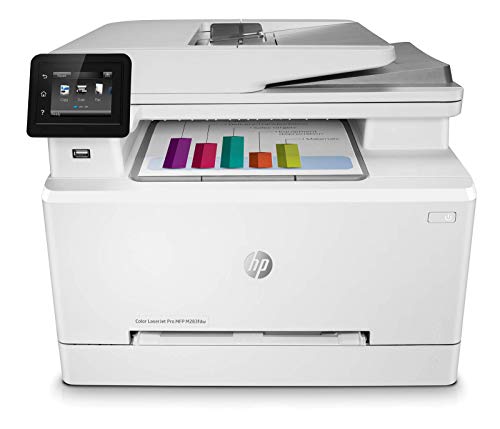
The HP LaserJet Pro M283FDW is a certified renewed unit, which means it's been professionally inspected, repaired to manufacturer specs, and tested before shipping. Buying renewed is one of the smartest moves you can make for a high-quality laser printer — you get flagship-level hardware at a significantly reduced price. Laser printing (which uses heat and toner powder instead of liquid ink) produces sharp, smudge-resistant text and graphics that outlast inkjet prints in humid environments or when stored long-term.
This machine prints up to 22 ppm in both color and black, making it one of the faster options on this list. The 50-page automatic document feeder handles multi-page scan and copy jobs without you standing there flipping sheets. Auto two-sided printing is built in, and the HP Smart app gives you remote control over print jobs, notifications, and scanning from your phone. At 600 x 600 dpi, text documents are razor sharp — though color photo output isn't its primary strength compared to high-DPI inkjets.
The HP Smart app's customizable shortcuts are genuinely useful. You can set up one-tap workflows for frequently used tasks — scan to email, print a specific document template — and save meaningful time over a work week. For a small office that needs reliable, high-speed color printing without the ongoing expense of ink cartridges, a renewed laser MFP like this delivers serious value. Toner cartridges last far longer than ink and cost less per page on average for black-and-white documents.
Pros:
Cons:
Most printers top out at standard 8.5" x 11" letter-size paper. The Epson WorkForce Pro WF-7840 prints up to 13" x 19" — wide enough for architectural diagrams, large-format marketing materials, custom banners, and detailed photography prints. If your work regularly involves oversized output, this machine fills a niche that most office printers simply can't cover. The PrecisionCore Heat-Free print technology generates fast, sharp output while running cooler and more reliably than heat-based alternatives.
DURABrite Ultra ink is Epson's smudge-resistant, quick-dry formula, which matters when you're handling wide-format prints that take longer to process. The 500-sheet paper capacity — double what most competitors carry — means you load paper less often, which is a real quality-of-life improvement during heavy production days. The 50-page ADF handles document scanning and copying efficiently, and built-in Wi-Fi 802.11ac keeps connections fast and stable. A 4.3" color touchscreen makes navigating settings and initiating jobs from the printer itself straightforward, with no computer required.
Epson Connect Solutions extends the machine's usefulness further: Email Print, Remote Print, the Smart Panel app, and iPrint all let you push jobs from anywhere. For creative professionals, small design studios, or businesses that need tabloid-size output without renting time at a print shop, the WF-7840 pays for itself quickly. It's a specialized machine, but if you need what it offers, nothing on this list comes close. You might also find our Best Printer for Screen Printing 2026 guide useful if you're working in apparel or custom merchandise production.
Pros:
Cons:
When speed and reliability matter more than color output, the Brother MFC-L2750DW is hard to beat. At 36 ppm black printing — the fastest on this list — it blazes through stacks of text documents, contracts, reports, and forms without slowing down. Monochrome (black and white only) laser printing is the gold standard for businesses that print high volumes of text, because toner lasts dramatically longer than ink, smudge resistance is excellent, and per-page costs stay low month after month.
Resolution reaches 2400 x 600 dpi, which renders fine text and thin lines with exceptional sharpness. The 250-sheet input tray plus a single-sheet bypass handles a range of media including envelopes, labels, and plain paper — useful when you need to switch paper types quickly without emptying the main tray. A 50-sheet auto document feeder supports automatic duplexing (two-sided) in scan, copy, fax, and print modes, which is a comprehensive feature set that many competitors reserve for higher-priced models. With 256MB of onboard printer memory and 500-page fax memory, the machine handles complex jobs and incoming faxes without bogging down.
The 2.7" TFT color touchscreen is responsive and intuitive — Brother's menu structure is clean and doesn't bury common functions three levels deep. NFC (Near Field Communication — tap-to-print technology) and Ethernet round out the connectivity options alongside standard Wi-Fi. If your office prints primarily text documents at high volume, this machine delivers the speed and durability you need at a price that makes sense. According to Consumer Reports, laser printers consistently outperform inkjets for text-heavy workloads in long-term reliability testing.
Pros:
Cons:
The HP OfficeJet Pro 8125e is the home office version of HP's Pro lineup — a compact, full-featured color inkjet that handles everyday printing without the industrial footprint of higher-end office machines. It prints at 10 ppm in color and 20 ppm in black, which is plenty fast for a remote worker, freelancer, or household that prints regularly but not constantly. The 225-sheet input tray is a practical size for home use without taking up half your desk.
Like its bigger sibling the 9125e, this model includes HP's AI print formatting — the same technology that cleans up cluttered web pages and emails before they hit paper. Auto two-sided printing and an auto document feeder make it a complete package for routine scan, copy, and print workflows. A three-month Instant Ink trial comes included, giving you time to evaluate whether HP's subscription model fits your printing habits before committing. Setup via the HP Smart app takes minutes, and the wireless connection is stable across typical home Wi-Fi networks.
The 8125e hits the sweet spot for home office users who want professional output quality without paying for office-scale capacity. If you're printing business documents, contracts, school reports, or the occasional photo, this machine handles it cleanly. It's not built for high-volume daily printing — a busy 10-person team would outgrow it fast — but for individuals and small households, the balance of features, speed, and size is well-calibrated. If you need a machine optimized specifically for photo output, our Best Photo Printer for Mac 2026 guide covers dedicated photo printers worth considering.
Pros:
Cons:
The Brother MFC-L3720CDW brings color laser performance into a price range that was previously dominated by inkjets. At 19 ppm for both color and black, it's fast enough for a small business or busy home office — and laser printing means your color documents are smudge-resistant, fade-resistant, and durable in a way that inkjet output simply isn't. The print quality is sharp and consistent, making it a strong choice for branded materials, reports, and any color document you want to look professional and last.
Connectivity is genuinely impressive for this price: dual-band wireless (2.4GHz and 5GHz — meaning you can connect to a less congested 5GHz network for faster, more reliable wireless printing), Wi-Fi Direct (print without a router), and USB 2.0. Multiple users can connect and print from different devices seamlessly, which matters in a shared office environment. The 50-sheet auto document feeder and 250-sheet adjustable paper tray cover the basics well, and automatic duplex printing is included for double-sided jobs.
Brother's Refresh Subscription trial (similar to HP's Instant Ink) means toner can be automatically replenished when you're running low, and the machine is Amazon Dash Replenishment Ready — it can reorder supplies on its own when programmed to do so. For a small team that needs reliable color output without the per-page cost penalties of inkjet printing, the MFC-L3720CDW is the pick. Color laser toner cartridges last thousands of pages, which makes the per-page economics excellent over time compared to traditional ink.
Pros:
Cons:
This is the single most important decision you'll make. Inkjet printers use liquid ink sprayed onto paper, which produces excellent photo quality and vibrant color at a lower upfront cost. Laser printers use toner powder fused to paper with heat, which delivers sharper text, faster print speeds, and lower per-page costs for black-and-white documents — but color laser output doesn't match inkjet quality for photos. If you print mostly text documents and want long-term low running costs, go laser. If you print photos, flyers, or color-heavy materials, an inkjet or supertank model is the better call.
Supertank or EcoTank models occupy a useful middle ground: they use inkjet technology but replace disposable cartridges with large refillable tanks. The upfront cost is higher, but you can print thousands of pages before spending another dollar on ink. For home offices and small businesses that print consistently but not at industrial volume, supertank models typically offer the best long-term economics.
Print speed is measured in pages per minute (ppm). For casual home use, 10–15 ppm is perfectly acceptable. For an office where multiple people share a printer, aim for 20 ppm or higher. The monthly duty cycle (the maximum number of pages a printer is rated to handle per month) is equally important — buying a machine rated for 500 pages monthly and pushing it to 2,000 pages will shorten its life dramatically. Match the duty cycle to your actual workload, not just the print speed on the spec sheet.
A printer with a 100-sheet tray means you're reloading paper constantly in a busy environment. Most office-grade MFPs offer 250-sheet or larger trays, and some — like the Epson WF-7840 — pack 500-sheet capacity. If you print on envelopes, labels, cardstock, or wide-format paper, check the supported media types carefully before buying. A single-sheet bypass tray is valuable for quick specialty print jobs without disturbing the main paper load. Auto document feeders (ADF) are essential if you regularly scan or copy multi-page documents — feeding one sheet at a time manually is a serious productivity drain.
Every printer on this list supports Wi-Fi, but the specifics matter. Dual-band Wi-Fi (2.4GHz and 5GHz) provides more flexibility in congested wireless environments. Ethernet is valuable in offices where wired connections are preferred for stability. Wi-Fi Direct lets devices print without going through a router at all — handy for guests or devices that aren't on the main network. Mobile app quality varies significantly between brands — HP Smart, Epson Smart Panel, and Brother's iPrint & Scan are all mature apps, but test them with your own devices before assuming everything works seamlessly. Cloud integration (scan to Google Drive, Dropbox, or email) is increasingly standard and saves meaningful time in digital-first workflows.
The HP OfficeJet Pro 9125e and Brother MFC-L3720CDW are both strong choices for small offices. The 9125e excels at color inkjet printing with fast speeds and AI formatting. The L3720CDW delivers color laser output with lower long-term running costs. Choose based on whether you prioritize color vibrancy (inkjet) or durability and per-page economy (laser).
Yes, for most regular users. A supertank like the Epson EcoTank ET-4850 costs more upfront than a standard inkjet, but the included ink is enough for thousands of pages. If you print even moderately throughout the year, you'll recoup the price difference in ink savings within months — and pay very little for ink going forward. The math strongly favors supertank models for anyone who prints more than occasionally.
Inkjet printers spray liquid ink onto paper and produce excellent color and photo quality. Laser printers use powder toner fused with heat, which gives you sharper text, faster speeds, and lower per-page costs for black-and-white printing. Laser printers are generally more durable for high-volume use. Inkjets are better for color-intensive output and photos. Your choice depends on what you print most often.
It depends on your industry. Most modern businesses have moved away from fax entirely, and if your workflow doesn't require it, you don't need to pay extra for it. However, healthcare, legal, real estate, and government sectors still use fax regularly. All seven printers on this list include fax functionality, so you're covered if you need it — and you simply won't use it if you don't.
For text documents, 600 dpi is more than sufficient — text looks clean and professional at that resolution. For color graphics and marketing materials, 1200 dpi or higher gives noticeably sharper output. For photo printing, you want 2400 dpi or above. If you print mostly documents and occasional graphics, don't overspend chasing maximum DPI — prioritize speed and reliability instead.
For home use, prioritize compact size, ease of setup, and low running costs. A machine like the HP OfficeJet Pro 8125e hits all three — it's compact, sets up quickly through an app, and the Instant Ink trial keeps early costs down. Auto duplex printing saves paper, and a built-in ADF handles multi-page document scanning without manual feeding. You don't need a 500-sheet tray or 36 ppm speed at home — match the machine to your actual printing habits.


About Editorial Team
The DigiLabsPro editorial team covers cameras, lenses, photography gear, and creative technology with a focus on helping photographers make informed buying decisions. Our reviews and guides draw on hands-on testing and research across a wide range of equipment, from entry-level beginner kits to professional-grade systems.
You can get FREE Gifts. Or latest Free phones here.
Disable Ad block to reveal all the info. Once done, hit a button below
