Which pigment ink printer actually delivers the color accuracy, archival longevity, and professional-grade output you need in 2026? That's the question every photographer, designer, and serious home printer is asking right now — and the answer isn't as simple as picking the most expensive model. After testing and researching the top contenders on the market, our top pick is the Epson SureColor P900, a 17-inch powerhouse that strikes the ideal balance between print width, ink precision, and workflow flexibility for most users.
Pigment ink printers have a distinct edge over dye-based systems when it comes to longevity and color fidelity. According to inkjet printing research, pigment-based inks can last upward of 100 years under proper display conditions, while dye inks typically fade within decades. That makes pigment printers the go-to choice for fine art reproduction, professional photography, archival documents, and any project where you need prints that hold up over time. If you're also exploring the best printer for waterslide decals, pigment inks offer excellent adhesion and color stability on specialty media that dye inks often can't match.
This guide covers seven of the best pigment ink printers available in 2026, ranging from budget-friendly all-in-ones to professional wide-format machines. Whether you're printing 4×6 snapshots or 13×19 gallery prints, you'll find a model here that fits your workflow and budget. Check our complete buying guide for a broader look at printer categories, and read on for detailed reviews, a head-to-head comparison, and answers to the questions most buyers are asking.
Contents



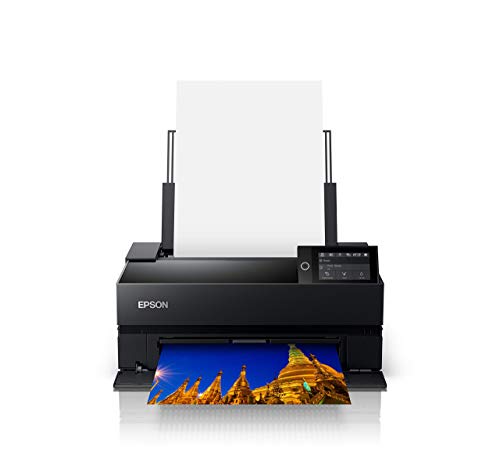

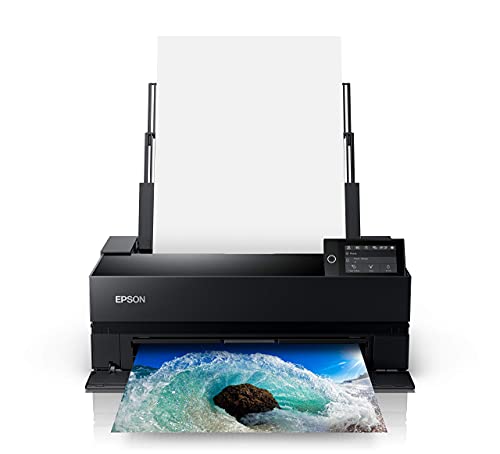


The Epson EcoTank Photo ET-8550 is one of the most compelling value propositions in the pigment ink printer market in 2026. Instead of buying expensive cartridges every few weeks, you fill refillable tanks directly from ink bottles — and the cost per 4×6 photo drops to roughly 4 cents compared to about 40 cents with traditional cartridges. For anyone who prints photos regularly, that difference adds up fast. The six-color Claria ET Premium ink system delivers lab-quality output with vivid color accuracy, and the high-precision printhead punches well above the printer's price point.
Print speed is genuinely impressive for a consumer-grade wide-format machine — a 4×6 photo in as fast as 15 seconds. The ET-8550 handles borderless photos up to 13×19 inches and supports thick specialty media up to 1.3mm, including cardstock and CD/DVDs. Auto 2-sided printing is a welcome addition for anyone printing double-sided documents or brochures. The 4.3-inch color touchscreen makes navigation intuitive, and wireless plus Ethernet connectivity means it fits easily into any home studio or small office setup.
The main trade-off is that the EcoTank system uses dye-based inks in some configurations, but the ET-8550 specifically uses pigment-based inks for its black channel alongside dye-based color inks — making it a hybrid system optimized for photo quality. It's not a pure pigment system like the SureColor P-series, but for most photo enthusiasts, the output quality is more than sufficient. If you're comparing options and also looking for something more budget-friendly, check out our roundup of the best photo printers under $200 for additional context.
Pros:
Cons:
The Epson SureColor P700 is built for photographers and creative professionals who need reliable, consistently excellent output without stepping up to a 17-inch machine. Its defining feature is the UltraChrome PRO10 Ink system with Violet — a 10-color configuration that expands the color gamut significantly beyond standard 8-color setups. The addition of violet ink unlocks richer purples and more accurate blues, which matters enormously when you're printing fine art reproductions or landscape photography with complex color gradients.
One of the P700's most practical upgrades over earlier pro models is the elimination of Photo Black and Matte Black ink switching. Dedicated nozzles for both black ink types mean you can print glossy and matte media back-to-back without waiting for the printer to purge and swap inks. That single change alone saves significant time and ink waste in busy workflows. The new 10-channel MicroPiezo AMC printhead delivers consistent accuracy across long print runs, and print speeds are competitive for a 13-inch professional printer.
The P700 handles roll paper, fine art paper, and rigid media with equal confidence. It's a compact machine relative to its output capabilities, making it a realistic fit for a desk or studio cart. The trade-off is price — you're paying a professional premium over consumer-grade options — but the output quality and ink efficiency justify the investment for anyone printing for clients or exhibitions. This is the machine to choose if 13-inch maximum width covers your needs and you want the best pure image quality at that size.
Pros:
Cons:
Canon's imagePROGRAF PRO-300 brings professional-grade image quality into a surprisingly compact package that fits on most desks. The LUCIA PRO pigment ink system — 10 colors including Chroma Optimizer — produces prints with outstanding tonal gradations, deep shadow detail, and smooth highlight transitions. Fine art photographers consistently rank the PRO-300 as one of the most color-accurate 13-inch printers available, and it's easy to understand why: Canon's ink chemistry has been refined over decades of professional large-format printing.
The PRO-300 includes Canon's Nozzle Recovery System, which automatically detects and compensates for clogged nozzles without requiring manual head cleaning cycles. That's a significant practical advantage — nozzle clogs are the most common frustration with professional inkjet printers, and the automated recovery means fewer failed prints and less wasted ink. The Skew Correction feature automatically straightens slightly misaligned media, which matters when you're loading expensive fine art papers that you can't afford to waste.
The included Professional Print & Layout software is genuinely good — it gives you precise control over color profiles, print sizes, and paper handling, and it works as a standalone application or as a plug-in within Lightroom and Photoshop. Setup is straightforward via wireless, and the 3.0-inch LCD screen provides clear status feedback. The PRO-300 is the natural choice if Canon's color rendering philosophy aligns with your output preferences and you prioritize fine art and gallery-quality prints.
Pros:
Cons:
The Epson SureColor P900 is our top overall pick for 2026, and it earns that position through a combination of print width, ink quality, and workflow intelligence that no other printer at its price point matches. The 17-inch maximum print width opens up panoramic formats and larger fine art reproductions that simply aren't possible on 13-inch machines — and the UltraChrome PRO10 Ink system ensures every one of those larger prints is rendered with stunning accuracy. Like its smaller sibling the P700, the P900 includes Violet ink in its 10-color configuration, extending the printable color gamut into territory most printers can't reach.
The dedicated nozzles for Photo Black and Matte Black — with no switching required — make the P900 an exceptionally efficient machine for photographers who work across both glossy and matte media. You can go from a glossy exhibition print to a matte artist's proof without any delay or ink purging. The MicroPiezo AMC printhead maintains consistency across print runs, which matters enormously when you're matching prints for a series or producing multiples for clients. Print speeds are fast for a professional 17-inch printer, and the rear manual feed accommodates thick fine art papers and rigid substrates.
The P900 ships with Epson's Print Layout software and is compatible with major color management workflows. Wireless, USB, and Ethernet connectivity cover every setup scenario. This is the printer you buy when you're serious about output quality and need the flexibility of 17-inch printing. It's a meaningful step up in capability from the P700, and for most professional photographers and fine art printers, it represents the sweet spot between professional performance and desktop-friendly dimensions.

Pros:
Cons:
The Canon imagePROGRAF PRO-1100 makes a strong argument for being the finest pigment ink printer Canon has ever produced for the desktop professional segment. Its 11-ink LUCIA PRO II system plus Chroma Optimizer is the most sophisticated ink configuration on this list — the additional ink channel enables a broader color gamut, superior gloss uniformity, and dramatically reduced bronzing on glossy media. Bronzing — that unpleasant color shift visible at certain angles on glossy prints — has been a persistent issue in pigment printing for years, and the PRO-1100's Chroma Optimizer directly addresses it by flattening the print surface and expanding the effective color range.
The LUCIA PRO II ink system delivers exceptional color reproduction fidelity, with particularly impressive performance in darker tones and shadow detail. Subtle gradients that reveal banding on lesser printers come out smooth and natural on the PRO-1100. The 17-inch maximum print width matches the Epson P900, and the wireless connectivity works reliably across both Windows and macOS environments. The included Professional Print & Layout software supports plug-in integration with Adobe Lightroom, Adobe Photoshop, and Canon's Digital Photo Professional, giving you a complete professional workflow from capture to print.
The PRO-1100 is the choice for users who are deeply invested in Canon's color rendering philosophy and need the most complete pigment ink system available at the desktop level. The Chroma Optimizer is a genuine differentiator on glossy media — if you print primarily on glossy or luster papers and bronzing has been a frustration with other printers, the PRO-1100 solves that problem definitively. This is also an excellent choice if you're printing creative projects that demand the widest possible color gamut.
Pros:
Cons:
The Epson EcoTank Photo ET-8500 is the white-colored counterpart to the ET-8550, offering the same core supertank printing technology in a slightly different configuration. The six-color Claria ET Premium ink system produces photos with vivid details and accurate color reproduction across a wide range of media, and the refillable tank design eliminates the recurring cost of cartridge replacements. For anyone printing photos regularly at home — birthday prints, event photos, personalized gifts — the long-term savings are substantial compared to traditional ink cartridge printers.
The ET-8500 handles borderless photo printing and supports specialty media including cardstock, envelopes, CDs, and DVDs, making it genuinely versatile beyond standard photo paper. The 4.3-inch color touchscreen is responsive and well-organized, and the combination of Wi-Fi and Wi-Fi Direct means you can print directly from a smartphone without going through a router. Built-in scanning and copying functionality rounds out the feature set, making this a true all-in-one solution for home studios and small creative offices.
The ET-8500 is essentially the same machine as the ET-8550 in terms of output quality — the primary difference is color (white vs. black) and minor configuration details. If you're choosing between the two, pick based on which color fits your workspace. Both deliver excellent value for photo enthusiasts who want to escape the ink cartridge cycle. This is also a strong pick for users who occasionally print on specialty media like decal paper — for more on that niche, see our guide on the best printers for stickers.
Pros:
Cons:
The Epson WorkForce Pro WF-7840 takes a different approach than the other printers on this list — it's engineered for office productivity as much as print quality, and it delivers on both fronts. The PrecisionCore Heat-Free technology is a genuine differentiator: unlike thermal inkjet systems that heat ink to force it through nozzles, Heat-Free technology uses mechanical pressure, which results in less heat stress on the ink and more consistent droplet formation. The DURABrite Ultra ink system dries quickly and produces smudge-resistant output — important in office environments where prints get handled immediately after coming out of the printer.
The WF-7840 handles wide-format prints up to 13×19 inches while also delivering the office automation features that the professional photo printers on this list lack: a 50-page ADF, fax capability, and a 500-sheet paper capacity. That high paper capacity is a significant practical advantage — you're not constantly refilling the paper tray when running large jobs. The built-in wireless (802.11a/b/g/n/ac) supports high-throughput connections, and Epson Connect Solutions including the Smart Panel app and Email Print make remote printing straightforward.
Auto 2-sided printing across the full 13×19-inch format is another capability this machine handles efficiently. For real estate agents, small businesses, designers who produce client-facing materials, and anyone who needs wide-format output alongside full office functionality, the WF-7840 is the most versatile machine on this list. It's also worth noting that the WF-7840 uses pigment-based DURABrite Ultra ink, which gives it better water and fade resistance than many dye-based office inkjets. For more office-focused printer options, see our guide to the best printers for real estate agents.
Pros:
Cons:
The number of ink channels directly determines how wide a color gamut a printer can reproduce. Standard consumer photo printers use 4-color CMYK systems. The professional models on this list use between 6 and 11 colors, with dedicated channels for Photo Black, Matte Black, Light Cyan, Light Magenta, Violet, and Chroma Optimizer depending on the model. More ink channels generally means smoother gradients, more accurate color matching, and better shadow detail — but it also means higher ink replacement costs. If you're printing for personal enjoyment, a 6-color system like the ET-8550 delivers excellent results. If you're printing for clients or galleries, the 10- or 11-color professional systems justify their cost.
Maximum print width is one of the most important specs to nail down before you buy. A 13-inch maximum width covers the most popular fine art and photo paper formats, including 13×19 (Super B), which is large enough for most desktop printing needs. A 17-inch maximum width adds panoramic printing capability and accommodates larger single-image prints without cropping or tiling. Think carefully about the largest print format you realistically need — stepping up to a 17-inch printer adds cost, footprint, and weight. If you're not regularly printing panoramics or prints larger than 13×19, the smaller machines deliver equivalent quality at lower cost.
One of the core advantages of pigment-based inks over dye-based systems is archival longevity. Quality pigment prints on archival fine art paper can last well over 100 years under proper display conditions — a critical consideration for photographers and artists who sell prints. When evaluating a pigment printer, check the manufacturer's rated archival longevity on their reference papers, and verify that the printer supports the media types you plan to use. Specialty media support — fine art cotton rag, baryta paper, backlit film — varies significantly between models. Professional printers like the P900 and PRO-1100 handle the widest range; office-focused models like the WF-7840 are optimized for standard papers and cardstock.
All seven printers on this list support wireless printing, but connectivity goes beyond Wi-Fi. If you're integrating a printer into a professional workflow, Ethernet connectivity ensures stable, high-throughput network printing without the variability of wireless. Software ecosystem matters too — Canon's Professional Print & Layout with Lightroom and Photoshop plug-in support gives you precise color management control directly from your editing software. Epson's Print Layout software offers similar capabilities. For office users, features like the Epson Smart Panel app, remote printing, and 50-page ADF are more relevant than color management plug-ins. Match the printer's software capabilities to the workflow you actually use, not the one you might use someday.
A pigment ink printer uses ink made from solid particles suspended in a liquid carrier. The pigment particles sit on top of the paper surface rather than being absorbed into it, which makes them more resistant to water, UV light, and environmental factors. Dye-based inks dissolve completely into a liquid and are absorbed deeper into the paper, producing vibrant colors but fading more quickly over time. For archival prints, fine art reproductions, and professional photography, pigment ink is the superior choice because of its longevity and stability.
High-quality pigment ink prints on archival media can last 80 to 200 years under proper storage and display conditions — figures backed by accelerated aging tests conducted by manufacturers and independent labs. Dye-based prints typically last 25 to 50 years under similar conditions. The actual lifespan depends heavily on the paper, display environment, UV exposure, and humidity levels. Prints stored in albums or kept away from direct sunlight will always outlast those displayed under fluorescent or natural light without UV protection.
Yes, if you regularly print larger than 13×19 inches or produce panoramic prints. The P900's 17-inch maximum width is the primary differentiator — the ink system and print quality are essentially identical between the two models. If your workflow is entirely within 13-inch formats, the P700 delivers the same output quality at lower cost and in a smaller footprint. The P900 makes sense for photographers who sell large prints, artists producing gallery-size work, or anyone who needs the flexibility of 17-inch media.
Yes, and this is one of the primary reasons photographers and artists prefer pigment printers. Professional models like the Epson P700, P900, Canon PRO-300, and PRO-1100 are specifically designed to handle fine art cotton rag papers, baryta papers, watercolor textures, and canvas rolls. The key is matching the ink system and print profiles to the specific media you're using — always use ICC profiles either provided by the paper manufacturer or generated through profiling hardware for the most accurate color output on specialty stocks.
Pigment inks are more prone to clogging than dye-based inks because the solid particles can settle and dry in the printhead nozzles during periods of inactivity. Most modern professional printers address this with automated maintenance cycles that run periodically even when the printer is idle. If you go weeks or months without printing, run a nozzle check and cleaning cycle before your next print job. The Canon PRO-300's Nozzle Recovery System handles this automatically. For all pigment printers, regular use — even just printing a test page weekly — is the most effective way to prevent clogging.
The Epson EcoTank Photo ET-8550 is the best choice for most home users in 2026. Its refillable ink tank system dramatically reduces the cost per print — around 4 cents per 4×6 photo versus 40 cents with traditional cartridges — making it the most economical option for regular photo printing. It supports wide-format printing up to 13×19 inches, handles specialty media, and includes a scanner and copier for full all-in-one functionality. If you want a step up in pure image quality without the professional price tag, the Canon imagePROGRAF PRO-300 is an excellent alternative for print-only photo output.


About Editorial Team
The DigiLabsPro editorial team covers cameras, lenses, photography gear, and creative technology with a focus on helping photographers make informed buying decisions. Our reviews and guides draw on hands-on testing and research across a wide range of equipment, from entry-level beginner kits to professional-grade systems.
You can get FREE Gifts. Or latest Free phones here.
Disable Ad block to reveal all the info. Once done, hit a button below
