The Epson SureColor P900 is our top pick for printing on watercolor paper in 2026 — its UltraChrome PRO10 pigment inks and dedicated matte black nozzle deliver gallery-quality results on textured art media without smearing or bleeding. If you're a fine art photographer, watercolorist looking to reproduce originals, or a printmaker who demands archival permanence on heavy cotton rag sheets, the right wide-format pigment printer changes everything.

Watercolor paper presents unique challenges that standard inkjet printers simply aren't built for. The thick, textured sheets — often 200 gsm to 640 gsm — jam in consumer feeders. Dye-based inks bead up on the sizing and fade within months. And without a proper matte black channel, shadow detail on uncoated art paper looks washed out. You need a printer specifically designed with a straight-through paper path, pigment-based inks, and dedicated ICC profiling tools to handle this demanding media. That's exactly what the models in this guide deliver.
We evaluated seven printers across three critical dimensions: print quality on textured cotton and alpha-cellulose watercolor sheets, media handling reliability with papers from 200 gsm to 640 gsm, and long-term color permanence. Whether you need a wide-format poster printer for exhibition-size giclée reproductions or a 13-inch model for studio proofing, this guide covers every price point and use case. For a deeper look at how the right display affects your color workflow, see our guide to the best monitors for photo editing under $500.
Contents
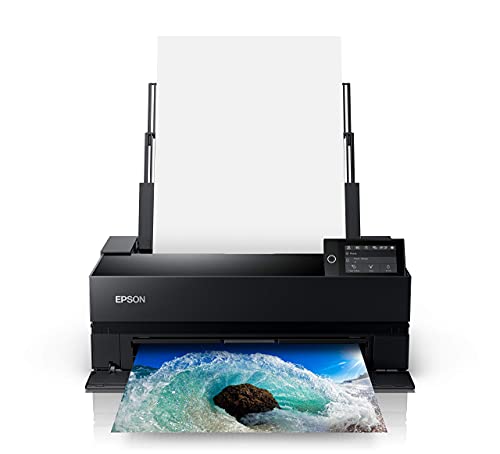


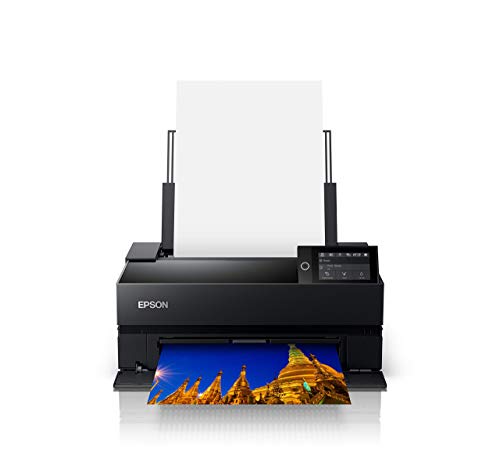


The Epson SureColor P900 stands at the top of this list for good reason. Its all-new UltraChrome PRO10 ink set uses ten pigment-based channels — including a dedicated Violet ink — to produce an exceptionally wide color gamut that translates beautifully onto the muted surface of watercolor paper. Where lesser printers lose saturation on uncoated stocks, the P900 maintains rich, punchy color that holds up under gallery lighting. Reproducing watercolor originals with this printer delivers results that artists and collectors genuinely mistake for hand-painted work.
The standout feature for watercolor paper users is the dedicated matte black nozzle alongside the photo black, meaning you never deal with the wasteful, time-consuming ink switching that plagued earlier Epson models. When you're running a batch of fine art prints on Hahnemühle or Arches watercolor sheets, that seamless transition between glossy and matte workflows saves both ink and patience. The rear straight-through feed path handles sheets up to 1.3 mm thick — that's well beyond the 640 gsm cold-press papers most artists use.
Print speed is surprisingly good for a 17-inch pigment printer. The new 10-channel MicroPiezo AMC printhead lays down ink with outstanding consistency, and borderless prints at 17 × 22 inches are something most competing printers at this price point simply cannot match. The Epson Print Layout software provides advanced ICC profile management, soft proofing, and color management tools that give you total control over how your watercolor reproductions render on specific paper stocks. If you're serious about fine art printing in 2026, this is the machine to beat.
Pros:
Cons:
Think of the SureColor P700 as the P900's equally talented younger sibling crammed into a much smaller package. It runs the exact same UltraChrome PRO10 ink technology with all ten pigment channels, including the Violet ink that extends the gamut into hues that other 13-inch printers simply cannot reproduce. On watercolor paper, the difference is immediately visible — purples stay rich instead of turning muddy, and warm earth tones have a depth that matches what you see on a calibrated monitor.
Just like its bigger brother, the P700 features separate matte and photo black nozzles that eliminate ink switching entirely. This is a bigger deal than it sounds. If you regularly alternate between glossy photo paper and matte watercolor stock, you'll save significant ink and avoid the 5-10 minute delay that older Epson pro printers imposed every time you changed media types. The rear feed handles thick media up to 1.3 mm, which covers virtually all watercolor papers on the market including heavyweight cold-press sheets.
Where the P700 differs from the P900 is maximum print width — you're capped at 13 inches, so the largest borderless output is 13 × 19 inches (Super B). For many studio artists and photographers, that's plenty. If you're producing prints for Etsy sales, gallery proofs, or portfolio work, the 13-inch format covers your needs while taking up roughly half the desk space. The print quality is, for all practical purposes, identical to the P900 at the same output size. You're only giving up the 17-inch option and roll media support.
Pros:
Cons:
Canon's imagePROGRAF PRO-1100 brings an 11-color pigment ink system to the table, and the results on watercolor paper are genuinely stunning. The LUCIA PRO II ink formulation was designed from the ground up for uncoated fine art media, and it shows. Dark areas maintain detail without blocking up, color transitions are smooth even in subtle watercolor washes, and the Chroma Optimizer coat flattens the print surface to reduce bronzing — that annoying metallic sheen that pigment inks sometimes produce on matte papers under certain viewing angles.
What sets the PRO-1100 apart from the Epson models is Canon's Professional Print & Layout software, which offers an exceptionally refined soft-proofing and color management workflow. You can simulate how your print will look on a specific watercolor paper before committing ink to sheet, and the built-in ICC profile integration works seamlessly with Adobe Photoshop and Lightroom. For photographers who need precise color matching between screen and print — especially when reproducing watercolor artwork for sale — this level of software sophistication is hard to overstate.
The 17-inch print width matches the P900, and the paper handling is equally robust for heavy watercolor stocks. Canon's L-type cassette accommodates sheets up to about 400 gsm from the front, while the manual top feed handles even heavier specialty papers. Wireless connectivity is built in, and the overall build quality feels tank-like. It's a serious investment, but if you're pairing this with a dedicated pigment ink setup and calibrated workflow, the PRO-1100 delivers prints that hold their own against professional lab output.
Pros:
Cons:
The imagePROGRAF PRO-300 occupies a sweet spot that makes it arguably the best value in this entire guide. It packs Canon's professional-grade LUCIA PRO ink system into a 13-inch-wide body, giving you the same pigment-based permanence and color accuracy as the PRO-1100 at a substantially lower investment. For watercolor paper users, the 10-color ink system (nine colors plus Chroma Optimizer) produces prints that exhibit exceptional tonal range, smooth gradients, and deep blacks on uncoated stocks — all the hallmarks of a professional fine art printer.
Canon deserves credit for the PRO-300's Nozzle Recovery System and Skew Correction technology. The nozzle recovery feature automatically compensates for clogged nozzles without requiring a manual cleaning cycle, which means fewer wasted sheets of expensive watercolor paper during your print sessions. Skew correction ensures that even slightly misaligned thick sheets feed straight, eliminating the crooked prints that plague cheaper printers when you load heavy, textured stock. These are the kind of practical, day-to-day reliability features that matter more than headline specs once you're actually in the studio working.
The footprint is notably smaller than the PRO-1100, which is a genuine advantage if your studio space is limited. Wireless connectivity works reliably, and the 3-inch LCD screen makes standalone operation straightforward. You get borderless printing up to 13 × 19 inches — the same Super B format as the Epson P700. If you're torn between the Epson and Canon ecosystems at the 13-inch size and your priority is watercolor paper performance, the PRO-300's Chroma Optimizer gives it a slight edge in reducing bronzing on matte surfaces. The P700 counters with its Violet ink channel for extended gamut. Both are excellent. Your existing investment in Canon or Epson ICC profiles might be the tiebreaker.
Pros:
Cons:
Here's where things get interesting. The PIXMA PRO-200S uses an 8-color dye-based ink system rather than pigment inks, and that distinction matters significantly for watercolor paper printing. Dye inks produce more vibrant, saturated colors than pigment inks — the trade-off is reduced longevity and water resistance. On watercolor paper specifically, dye inks absorb deeper into the fibers, which can create a softer, more organic look that actually mimics the appearance of hand-painted watercolors better than pigment prints in some cases.
The speed is impressive. A bordered A3+ print finishes in about 90 seconds, and a bordered 8 × 10 takes just 53 seconds. If you're producing a high volume of prints for craft sales, greeting cards, or decorative reproductions where archival permanence isn't the primary concern, the PRO-200S lets you churn out beautiful prints at a pace that pigment printers cannot match. The 8-color dye system includes specialized photo-optimized inks that deliver smooth gradients and accurate skin tones alongside those vivid watercolor reproductions.
Borderless printing from 3.5 × 3.5 inches up to 13 × 19 inches gives you flexibility across print sizes, and the wireless connectivity with Canon's PRINT app makes casual printing straightforward. The 3-inch color LCD provides a clear interface for standalone operation. Should you choose this over a pigment model? If your prints will be framed behind glass and displayed indoors (which covers most wall art), the longevity difference is less of a concern. If you need prints that resist handling, moisture, and direct sunlight without fading, stick with pigment. Know your use case and choose accordingly.
Pros:
Cons:
The XP-15000 is the entry point for anyone who wants 13 × 19 inch borderless printing on watercolor paper without the professional-tier investment. Epson's 6-color Claria Photo HD ink system adds Red and Gray channels beyond the standard CMYK, and that expanded gamut produces noticeably better results on watercolor paper than a typical four-color consumer printer. The gray ink is particularly valuable for black-and-white watercolor reproductions, adding smooth tonal transitions that eliminate the color casts you'd otherwise fight.
Let's be upfront about what this printer is and isn't. The Claria Photo HD inks are dye-based, not pigment-based, so you're in the same longevity category as the Canon PRO-200S rather than the archival class of the Epson P-series or Canon PRO models. On watercolor paper, the dye inks absorb well into the fiber and produce clean, vibrant color. But these prints won't match the light-fastness ratings of a P700 or P900 output. For personal use, gift prints, or indoor display behind glass, the quality-to-cost ratio is outstanding.
The dual-tray design is a practical advantage that the more expensive printers in this guide don't offer. You can keep plain paper in the front cassette for everyday printing and load watercolor sheets through the rear feed without swapping media constantly. The rear feed handles reasonably thick stock, though you'll want to stay below about 300 gsm for reliable feeding — the heaviest cold-press watercolor papers may not cooperate. At its price point, the XP-15000 is the printer to buy if you're exploring fine art printing and want wide-format capability without a four-figure investment. Browse our buying guide hub for more recommendations across printing categories.
Pros:
Cons:
The Canon PIXMA iP8720 has been on the market for a while, and it continues to sell steadily for one simple reason: it delivers 13 × 19 inch prints at a price that undercuts nearly everything else in this roundup. The 6-color dye ink system includes a dedicated gray cartridge, pushing the maximum resolution to 9600 × 2400 dpi. On watercolor paper, that translates to sharp detail reproduction and clean gradients, particularly in monochrome and sepia-toned prints where the gray channel does its heaviest lifting.
The iP8720 is a no-frills machine. There's no touchscreen, no front paper cassette, and no duplex printing. What you get is reliable wide-format photo printing with wireless connectivity and AirPrint support for direct printing from Apple devices. The rear feed tray handles watercolor papers up to about 300 gsm without issues, though you'll want to feed sheets one at a time rather than stacking them to avoid jams on textured stock. Ink droplet sizes of 1, 2, and 5 picoliters help maintain fine detail even on the rough surface of cold-press paper.
The noise level is notably low at approximately 43.5 dB(A) — quieter than most printers in this class, which matters if you're working in a shared studio or home environment. For artists and hobbyists who want to experiment with printing their watercolor paintings or photographs onto art paper without investing in a professional pigment system, the iP8720 is the most accessible gateway. Just understand that the dye inks won't match pigment systems for archival durability, and the lack of a dedicated matte black ink means shadow density on uncoated papers won't reach the levels of the Epson P-series or Canon PRO models. For casual art printing and personal projects, it punches well above its price.
Pros:
Cons:
This is the single most important decision you'll make. Pigment-based inks (used in the Epson P900, P700, Canon PRO-1100, and PRO-300) sit on top of the paper fibers and resist water, UV light, and handling. They're rated for 100+ years of display life under glass. Dye-based inks (Canon PRO-200S, Epson XP-15000, Canon iP8720) absorb into the paper, producing more vivid color but fading faster — typically rated for 30-50 years behind glass. For watercolor paper specifically, pigment inks also resist smearing if the print accidentally gets damp, which matters for unframed handling. If you're selling prints or exhibiting professionally, pigment inks are non-negotiable. For personal use and indoor display, dye-based printers deliver gorgeous results at a fraction of the cost.
Watercolor paper ranges from lightweight 190 gsm hot-press sheets to heavy 640 gsm cold-press blocks. Not every printer can handle the full range. The Epson P900 and P700 accept media up to 1.3 mm thick through their rear straight-through feed paths — that covers virtually every watercolor paper you'll encounter. The Canon PRO models handle heavy stock through their top manual feed. Consumer printers like the XP-15000 and iP8720 top out around 300 gsm reliably, which covers most hot-press and lighter cold-press papers but struggles with the heavyweight sheets preferred by traditional watercolorists. Before buying, check the maximum media thickness spec against your preferred papers. A 300 gsm limit rules out popular choices like Arches 640 gsm cold-press, and nothing is more frustrating than discovering your expensive paper doesn't fit your expensive printer. The history of watercolor media reveals just how varied these papers can be in weight and texture.
More ink channels generally mean a wider color gamut and smoother gradients. The Epson P900 and P700 lead with 10 colors including Violet — the widest gamut in this roundup. The Canon PRO-1100 follows with 11 colors (plus Chroma Optimizer makes 12 channels total), trading Violet for broader overall coverage and anti-bronzing technology. At the entry level, 6-color systems with Red and Gray (XP-15000, iP8720) still outperform standard 4-color printers significantly. For watercolor reproductions, the gray and light-density color channels matter most — they prevent visible dot patterns in subtle wash areas and smooth the transitions between tones that define watercolor art.
A printer is only as good as the color management workflow driving it. Both Epson and Canon include their own print layout software with ICC profiling tools, but Canon's Professional Print & Layout has an edge in soft-proofing capabilities. Regardless of which printer you choose, you'll want to download paper-specific ICC profiles from your watercolor paper manufacturer (Hahnemühle, Canson, Arches all provide free profiles for popular printers). Without the correct profile, your prints will shift in color and density compared to what you see on screen. If you're pairing a new printer with a display upgrade, a quality laptop for photo editing with a factory-calibrated screen makes the entire color workflow more reliable from capture to print.
Yes, but not all inkjet printers handle it well. You need a printer with a rear feed or straight-through paper path that accepts thick media — typically 300 gsm or higher for quality watercolor stock. The printers in this guide are specifically selected for their ability to handle heavy, textured art papers. Consumer printers with only front-loading cassettes will jam on anything above standard card stock weight.
It depends on your purpose. Pigment inks (Epson P900, P700, Canon PRO-1100, PRO-300) offer archival permanence, water resistance, and superior durability — essential for prints you're selling or exhibiting. Dye inks (Canon PRO-200S, Epson XP-15000, Canon iP8720) produce more vivid colors and absorb into the paper for a softer, more natural watercolor look, but they fade faster and aren't water-resistant. For professional work, choose pigment. For personal and decorative use, dye can actually look more authentic.
Papers in the 240–310 gsm range offer the best balance of thickness and compatibility across all printers. Hot-press (smooth) watercolor paper produces sharper detail and more predictable color, while cold-press (textured) paper creates a more traditional painted look but can reduce fine detail. For printers with a maximum thickness around 300 gsm, stick with hot-press sheets at or below that weight. Professional printers like the P900 and PRO-1100 can handle 640 gsm cold-press without issues.
Three factors cause this: incorrect ICC profiles, uncalibrated monitors, and the inherent optical properties of matte paper. Watercolor paper absorbs more ink and reflects less light than glossy photo paper, so prints naturally appear darker and less saturated. Download the correct ICC profile for your specific paper and printer combination, calibrate your monitor with a hardware colorimeter, and use soft proofing in Photoshop or Lightroom to preview how the print will look before committing ink to paper.
Choose a watercolor paper specifically designed for inkjet printing — brands like Hahnemühle, Canson Infinity, and Moab by Legion Paper apply an inkjet-receptive coating to their art papers. Uncoated traditional watercolor paper will cause bleeding with any ink type. Also, select the correct media type setting in your printer driver (Matte Paper or Fine Art Paper) rather than Plain Paper, which adjusts ink volume and drying time to prevent oversaturation on absorbent surfaces.
For most artists and photographers, 13 inches is sufficient. A 13 × 19 inch print is already a substantial wall piece, and it covers all standard portfolio and Etsy sale sizes. You only need 17-inch capability if you're producing exhibition-size prints (17 × 22 inches), creating large-scale reproductions of watercolor originals, or offering prints to clients who want statement pieces. The price premium for 17-inch models is significant, so don't pay for width you won't use.
Match the ink to the mission — pigment for permanence, dye for vibrancy — and let the paper do the rest.


About James W.
A contributing writer at DigiLabsPro covering photography gear reviews, buying guides, and camera comparisons. Specializes in evaluating cameras, lenses, and accessories for photographers at the intermediate and enthusiast level looking to upgrade their kit.
You can get FREE Gifts. Or latest Free phones here.
Disable Ad block to reveal all the info. Once done, hit a button below
