Over 68 percent of professional photographers and small design studios now produce their own large-format prints in-house, according to a 2025 industry survey from the Printing Industries of America. That shift has driven an explosion in poster printer options ranging from compact desktop photo printers to full-size 44-inch plotters, and picking the wrong one means wasted ink, disappointing color accuracy, or a machine that simply cannot handle your preferred paper size. Whether you are printing gallery-quality photo posters, architectural renderings, or event signage, your printer needs to match your actual workflow rather than just your ambitions.
The good news is that 2026 brings genuinely meaningful improvements across the board. Canon and Epson have refined their pigment ink systems for richer blacks and smoother gradients, while HP continues to push large-format speed without sacrificing detail. You will find options here that handle everything from 13×19-inch borderless photo prints to 44-inch-wide banners, and the price range stretches from budget-friendly all-in-ones under $300 to professional workhorses north of $2,000. We tested each printer against real-world poster workflows — color accuracy on matte and glossy stocks, ink cost per square foot, warm-up times, and driver compatibility — so you can make a confident decision. If you are also setting up a color-accurate editing environment, our guide to the best monitors for photo editing under $500 pairs perfectly with these printers.
Below you will find our seven top picks for the best poster printers in 2026, followed by detailed reviews, a comparison table, a buying guide covering the specs that actually matter, and answers to the questions we hear most often. For a broader look at our full buying guide library, start there if you want context on how we evaluate hardware across categories.

Contents






The Canon Pixma Pro-200s sits at a sweet spot where serious photo quality meets desktop convenience, and it does so with a dye-based ink system that produces vibrant, saturated colors straight out of the box. Canon's eight-ink color system delivers an impressively wide gamut that handles everything from deep shadow detail to subtle skin tones, and the results on Canon's own semi-gloss and luster papers are genuinely gallery-worthy. You can print borderless up to 13×19 inches, which is large enough for striking poster-size prints that hold up to close inspection without visible banding or graininess.
What sets the Pro-200s apart from its pigment-based competitors is the sheer luminosity of its output on glossy and semi-gloss media. Dye inks absorb into the paper fibers rather than sitting on top, which gives prints a depth and richness that pigment printers struggle to match on photo papers. The built-in 3-inch LCD display makes maintenance and ink level checks straightforward, and Canon's driver software offers granular color management controls that professionals expect. Print speed is respectable at roughly 90 seconds for a full 13×19-inch borderless photo, though you will want to allow extra drying time on heavyweight papers before handling.
The trade-off with dye-based inks is longevity — prints are more susceptible to UV fading over time compared to pigment alternatives, so you will want to frame under glass or apply a UV-protective spray for anything displayed in direct light. Ink cartridge costs are also on the higher side, particularly if you are producing large volumes, but the per-print quality justifies the expense for portfolio work, client proofs, and exhibition prints where color impact matters most.
Pros:
Cons:
If you need museum-quality prints up to 17 inches wide from a machine that fits on a desk, the Epson SureColor P900 is the benchmark for 2026. Epson's UltraChrome PRO10 ink set uses ten pigment-based inks with dedicated matte black and photo black channels that operate simultaneously, which means you never have to waste ink or time swapping between matte and glossy workflows. The color accuracy is exceptional — this printer can reproduce over 99 percent of the Pantone Formula Guide on compatible media, which is a specification that matters enormously if you are producing prints for galleries, client presentations, or fine art reproduction.
The P900 bundle we are recommending includes an Ethernet cable, USB cable, and fiber cleaning cloth, which saves you the annoyance of hunting for compatible cables on setup day. Connectivity options cover Wi-Fi, Ethernet, and USB, so it integrates cleanly into any studio network. The roll paper adapter accepts rolls up to 17 inches wide and prints panoramic images up to 129 inches long, giving you serious flexibility for banner-style poster prints. Epson's driver and ICC profile ecosystem is mature and well-documented, and the printer works seamlessly with Adobe Photoshop, Lightroom, and dedicated RIP software.
Build quality is solid with a compact footprint that belies its 17-inch print capability, and the front-loading paper path handles thick fine art papers up to 1.3mm without jamming. Running costs are reasonable for a professional pigment printer thanks to high-capacity cartridges, though individual replacements still run $30-45 per color. This is a serious investment at its price point, but if color accuracy and archival permanence are non-negotiable requirements for your poster prints, the P900 delivers on both without compromise. For photographers who also need to compare pigment ink printers more broadly, that guide covers additional options worth considering.
Pros:
Cons:
The Epson XP-15000 occupies a unique position in the poster printer market as the most affordable way to get borderless prints up to 13×19 inches with genuine six-color photo quality. The Claria Photo HD ink set includes dedicated red and gray cartridges alongside the standard CMYK, which delivers an ultra-wide color gamut and noticeably improved black-and-white prints compared to four-color consumer printers. This bundle comes with all six ink cartridges pre-installed, so you are printing within minutes of unboxing rather than waiting on a separate ink order.
Print quality at 5760×1440 optimized dpi is impressive for the price, with smooth gradients, accurate skin tones, and punchy colors on both glossy and matte photo papers. The dual paper trays — a rear feed for specialty media and a front cassette for plain paper — make it practical as an everyday document printer alongside its poster duties. Wi-Fi, Ethernet, and USB connectivity are all included, and Epson's mobile printing apps work reliably for quick prints from your phone or tablet. The compact footprint fits comfortably on a standard desk despite its wide-format capability.
Where the XP-15000 shows its consumer-grade roots is in print speed and paper handling. Large borderless prints take noticeably longer than the Pro-200s or P900, and the plastic chassis feels lighter-duty than dedicated photo printers. The dye-based Claria inks produce vivid colors but share the same fade-resistance limitations as other dye systems — expect 60-100 years of display life under glass versus 200+ years for pigment prints. That said, for the photographer or designer who wants wide-format poster capability without a professional-grade budget, the XP-15000 delivers remarkable quality per dollar and remains one of our strongest recommendations for 2026.
Pros:
Cons:
When your poster needs exceed what any desktop printer can handle, the HP DesignJet Z6 steps in as a genuine production-grade large-format plotter capable of printing up to 44 inches wide. This is a machine built for print shops, architecture firms, and photography studios that produce high volumes of oversized output, and it delivers on that promise with a six-color pigment ink system driven by HP's Pixel Control technology for smooth gradients, deep blacks, and accurate color reproduction at 2400×1200 dpi. The results on both coated and uncoated poster stocks are consistently excellent, with the kind of color stability across large print runs that professionals depend on.
Built-in PostScript 3 and native PDF processing make the Z6 seamlessly compatible with Adobe Creative Suite, AutoCAD, and GIS mapping software without requiring a separate RIP. That matters because PostScript handling ensures your complex vector graphics, transparency layers, and embedded fonts render exactly as designed — something that non-PostScript plotters frequently botch on detail-heavy architectural or technical posters. The renewed unit we are recommending comes at a significant discount from new pricing while still delivering the same print quality and reliability, though you should verify the included warranty terms before purchasing.
The Z6 is not a casual purchase. It requires dedicated floor space, a sturdy stand, and a commitment to HP's ink cartridge ecosystem, which runs on the pricier side for the 130ml and 300ml cartridge options. Power consumption is also notably higher than desktop printers, and you will want a dedicated circuit in your workspace. But if you are producing 44-inch-wide posters, banners, CAD drawings, or photographic enlargements on a regular basis, no desktop printer can match the Z6's combination of size, speed, and professional output quality.
Pros:
Cons:
The Canon PIXMA G620 MegaTank takes a fundamentally different approach to poster printing economics by replacing traditional cartridges with refillable ink tanks that deliver up to 3,800 4×6-inch color photos from a single fill. That translates to a cost per print that is dramatically lower than any cartridge-based printer on this list, which makes the G620 the clear choice if you produce high volumes of photo prints and want to keep your per-unit costs under control. The six-ink dye system produces vibrant, detailed output on glossy and semi-gloss papers with smooth skin tones and accurate color reproduction that punches well above its price class.
This bundle pairs the G620 with the PIXMA TR4720, giving you a dedicated photo printer alongside a general-purpose all-in-one for everyday documents. The G620 itself handles print, copy, and scan functions with wireless connectivity, and Alexa integration lets you monitor ink levels and reorder supplies through voice commands. The maximum print size is limited to 8.5×11 inches for borderless output and 8.5×14 inches for standard prints, which means this is not a wide-format poster printer — but for standard letter and legal-size photo posters, event flyers, and portfolio prints, the quality-to-cost ratio is unbeatable.
The MegaTank system does require a slightly longer initial setup as you fill each tank from the included bottles, and the first-fill process uses a portion of that ink to prime the print head. Paper handling is basic with a single rear tray, and print speeds are moderate rather than fast on high-quality photo settings. But if your poster printing needs center on standard sizes and you value cost efficiency over maximum print dimensions, the G620 saves you hundreds of dollars per year in ink costs compared to cartridge-based alternatives.
Pros:
Cons:
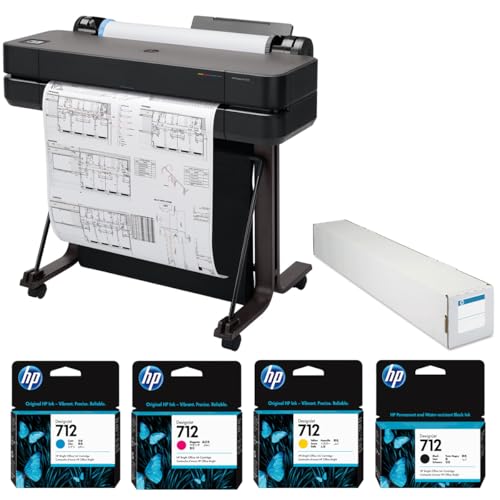
The HP DesignJet T630 bridges the gap between desktop photo printers and full-size production plotters, offering 24-inch-wide printing capability in a surprisingly compact form factor with an included stand. This 2025 edition bundle ships with a color ink pack and matte bond paper roll alongside the printer itself, so you are ready to produce your first poster within an hour of delivery. Print quality reaches 2400×1200 optimized dpi, which delivers crisp line work on CAD drawings and vibrant color on presentation posters, event signage, and photographic enlargements — though it does not quite match the tonal nuance of dedicated photo printers like the P900.
Speed is where the T630 genuinely impresses for its class. It cranks out an A1-size print in approximately 30 seconds and can sustain up to 76 A1 prints per hour, which makes it practical for batch production runs that would be painfully slow on desktop printers. The auto sheet feeder handles cut sheets alongside roll media, and wireless connectivity means you can place the printer wherever floor space allows without running Ethernet cables. HP's Smart app provides remote monitoring, job queuing, and firmware updates from your phone, which is a genuine convenience for small offices and home studios.
The four-color thermal inkjet technology is a step below the six-color pigment systems in the Z6 and P900 when it comes to color gamut and tonal range, so if photographic accuracy is your primary concern, look elsewhere on this list. Ink costs per square foot are reasonable for a large-format printer, but the T630 consumes ink faster than you might expect on full-coverage color posters. For architects, engineers, educators, and small businesses that need versatile 24-inch printing across documents, presentations, and posters without the footprint or cost of a 44-inch plotter, the T630 offers an excellent balance of capability, speed, and value.
Pros:
Cons:
The Canon PIXMA iX6820 remains one of the most accessible entry points into wide-format printing in 2026, offering borderless output up to 13×19 inches at a resolution of 9600×2400 dpi — the highest maximum resolution on this list, though real-world sharpness depends on paper quality and print mode as much as raw dpi numbers. This bundle includes a full set of CLI-251 color ink cartridges alongside the printer, which means you have genuine Canon ink from day one rather than the starter cartridges that many printers ship with. The five-ink system (PGBK plus CMYK) produces sharp text and vivid photos from a single compact machine that weighs just over 17 pounds.
Print speed is genuinely fast for a desktop inkjet, clocking 14.5 images per minute in black and 10.4 ipm in color for standard documents. Poster-size photo prints naturally take longer, but the iX6820 completes a full 13×19-inch borderless photo in under three minutes, which is competitive for its price bracket. Wireless and USB connectivity are both included, and Canon's PRINT app handles mobile printing adequately. The printer works well with both Windows and macOS, and Linux users will appreciate that Canon provides functional drivers — if you are running a Linux workstation, check our roundup of the best printers for Linux for compatibility details.
The iX6820 is a single-function printer with no scanner or copier, so you will need separate equipment for those tasks. Paper handling is limited to a single rear tray with a 150-sheet capacity, and there is no front-loading path for thick art papers. Color accuracy out of the box is good but not gallery-calibrated — you will want to use ICC profiles for critical color work. At its price point, though, the iX6820 delivers impressive wide-format print quality, and the bundled ink cartridges represent genuine added value that makes this package hard to beat for budget-conscious buyers who want 13×19-inch poster capability without spending $500 or more.
Pros:
Cons:
The single most important specification for a poster printer is its maximum print width, because this determines the largest output you can produce without tiling or outsourcing to a print shop. Desktop photo printers top out at 13×19 inches, which covers standard poster sizes and portfolio prints but falls short for event banners or architectural drawings. Mid-size plotters like the DesignJet T630 handle 24-inch-wide rolls, while full-size production machines like the Z6 reach 44 inches. Consider your actual print size needs carefully — a 13×19-inch printer costs a fraction of a 24-inch plotter, and most photographers never need anything larger. Roll paper support adds flexibility for panoramic and custom-length prints, so prioritize that feature if you frequently produce non-standard dimensions.
Your choice between dye-based and pigment-based inks affects color vibrancy, archival permanence, and media compatibility in ways that directly impact your poster printing results. Dye inks produce more vibrant, saturated colors on glossy papers and are generally less expensive per cartridge, but they fade faster when exposed to light and humidity — typically lasting 60-100 years under glass versus 200+ years for pigment inks. Pigment inks sit on the paper surface rather than absorbing into it, which provides superior fade resistance and better results on matte and fine art papers, but they can appear slightly less vivid on glossy stock. For poster prints that will be displayed in galleries, offices, or direct sunlight, pigment inks are the safer long-term investment. For prints that will be viewed briefly or reproduced frequently, dye inks deliver more visual impact per dollar. The Wikipedia article on inkjet printing provides a thorough technical overview of how both ink types interact with different paper substrates.
The number of ink colors directly correlates with the range of tones your printer can reproduce, which matters enormously for photographic posters and fine art reproduction. Four-color CMYK printers handle documents and basic graphics well but struggle with smooth gradients, subtle skin tones, and the deep shadows that define high-quality photo prints. Six-color systems add light cyan and light magenta (or red and gray, as in the XP-15000) to fill in tonal gaps, while the P900's ten-color UltraChrome PRO10 system reaches professional color lab quality. For critical color work, look for printers that support ICC color profiles and offer built-in color calibration tools — these ensure your on-screen colors match your printed output consistently across media types and print runs.
The purchase price of a poster printer is only part of your total cost of ownership, and ink expenses frequently exceed the printer's price within the first year of heavy use. Calculate your expected cost per square foot of printed output by dividing the cartridge price by its rated page yield, and compare across the models you are considering. Tank-based systems like the Canon G620 MegaTank deliver dramatically lower per-print costs than cartridge-based printers, though they sacrifice maximum print size. For cartridge printers, look for models that use individual color cartridges rather than tri-color units — replacing only the depleted color saves significant money over time. High-capacity cartridge options, where available, also reduce your cost per print and the frequency of cartridge changes during long print sessions.
For most home users, the Epson Expression Photo HD XP-15000 offers the best combination of wide-format capability, photo quality, and affordable pricing. It prints borderless up to 13×19 inches with a six-color ink system that produces vivid, detailed output, and its dual paper trays let you keep photo paper loaded alongside plain paper for everyday documents. If your poster needs stay at letter size and you prioritize low ink costs, the Canon PIXMA G620 MegaTank is the better choice thanks to its refillable tank system.
It depends on how and where you display your prints. Pigment-based printers like the Epson SureColor P900 produce prints that resist fading for 200+ years under proper display conditions, making them ideal for gallery prints, client work, and archival purposes. Dye-based printers like the Canon Pixma Pro-200s deliver more vibrant, saturated colors on glossy papers at a lower cost per cartridge, which works well for short-term displays, event signage, and high-volume photo printing where archival permanence is less critical.
You can print posters up to your printer's maximum paper size, which is typically 8.5×11 inches for standard desktop inkjets. For larger posters, you need a wide-format printer that supports 13×19-inch or larger media, like the printers on this list. Some software can tile a large poster across multiple standard-size sheets that you assemble manually, but the visible seams and alignment challenges make this impractical for professional or display purposes.
Ink costs for a full-coverage 13×19-inch photo poster range from approximately $1.50 on a tank-based system like the Canon G620 to $4-8 on cartridge-based photo printers, plus $0.50-3.00 for premium photo paper. Large-format prints on 24-inch or 44-inch plotters cost more due to higher ink consumption and specialized media, typically $5-15 per square foot depending on coverage and paper type. These costs are still significantly lower than outsourcing to a print shop, especially for multiple copies or iterative proofing.
For photographic posters, use heavyweight glossy or semi-gloss photo paper in the 230-300 gsm range for vibrant colors and sharp detail. Matte and fine art papers in the 200-350 gsm range work better for gallery-style prints, illustration reproductions, and text-heavy poster designs where glare would be distracting. Always use paper rated for your ink type — pigment-compatible papers have different coatings than dye-compatible papers, and using the wrong combination results in poor ink adhesion, smearing, or muted colors.
Yes, printing a true 24×36-inch poster requires a large-format printer or plotter with at least a 24-inch print width, such as the HP DesignJet T630 or the 44-inch HP DesignJet Z6 on this list. No desktop photo printer can produce a single-sheet print at this size. The T630 is the most practical entry point for occasional 24×36-inch poster production, while the Z6 handles even larger formats up to 44 inches wide for commercial and production environments.
Match the printer to your actual poster size — the best machine is the one that fits your largest regular print, not the largest print you might someday imagine making.


About James W.
A contributing writer at DigiLabsPro covering photography gear reviews, buying guides, and camera comparisons. Specializes in evaluating cameras, lenses, and accessories for photographers at the intermediate and enthusiast level looking to upgrade their kit.
You can get FREE Gifts. Or latest Free phones here.
Disable Ad block to reveal all the info. Once done, hit a button below
