You've got a stack of orders sitting in your eBay dashboard, a pile of packages on the kitchen table, and you're still printing labels on regular paper and taping them down. Sound familiar? If you're shipping more than a handful of items a week, a dedicated shipping label printer will save you time, money on ink, and a whole lot of frustration.
The 2026 market has more options than ever — wireless, Bluetooth, USB, renewed, budget-friendly, and premium. Narrowing it down without wasting money on the wrong one is exactly what this guide is for. We've reviewed seven of the top thermal label printers (thermal means no ink cartridges, ever) to help you find the right fit for your eBay selling setup.
Whether you ship five orders a week or fifty, there's a printer here that matches your workflow. If you also need help comparing other printing gear, check out our best small printer guide for general office needs. And if you want to browse more categories, visit our full buying guide section. Now, let's get into the picks.
Contents






If you want to cut the cord completely, the Rollo Wireless is the go-to choice in 2026. It connects over Wi-Fi using AirPrint, which means you can print directly from your iPhone, iPad, or Mac without installing drivers. Android, Windows, Chromebook, and Linux users are covered too — just connect to the same Wi-Fi network and you're ready to go. You can also fall back to USB if your network is acting up.
Speed is a real strength here. At 150mm/s — roughly one 4×6 label per second — you won't be waiting around after a big sales day. The 203 DPI (dots per inch) print head produces clean, scannable barcodes that USPS, UPS, and FedEx systems read without issues. The Rollo Ship Manager app is a nice bonus: it connects your eBay store directly, gives you access to discounted shipping rates, and removes the need to pay for a third-party platform like ShipStation.
Build quality is solid and the footprint is compact enough to sit on a shelf without taking over your workspace. One thing to keep in mind: the Rollo ecosystem works best when you stay within it. Some users report occasional Wi-Fi reconnection issues if the router is far away, so placement matters. Overall, this is a premium pick that earns its price through genuine daily convenience.
Pros:
Cons:
The MUNBYN RealWriter 941 is designed for people who want to plug in and start printing without a tech tutorial. MUNBYN claims it takes one minute to set up, and that's not far off — it installs like a standard printer on both Windows and macOS. No proprietary software required; it works directly from your browser or any application you already use to print labels.
One feature that stands out is the Auto Analyze function. The printer detects your label format automatically and adjusts without you having to fiddle with settings. Whether you're printing eBay shipping labels, food nutrition labels, or warehouse barcodes, it adapts on its own. Platform compatibility is broad: Etsy, Shopify, eBay, Amazon, Poshmark, ShipStation, ShippingEasy, Shippo, and more are all supported. You can get this model in USB-only or a USB + Bluetooth combo depending on your needs.
Print quality at 203 DPI is sharp and reliable. The build feels sturdy for the price, and the label loading mechanism is straightforward. If you're newer to label printing or just want something that works without frustration, the RealWriter 941 is a strong contender. It's also a good choice if you're switching from an inkjet printer and want something that just works like a normal printer.
Pros:
Cons:
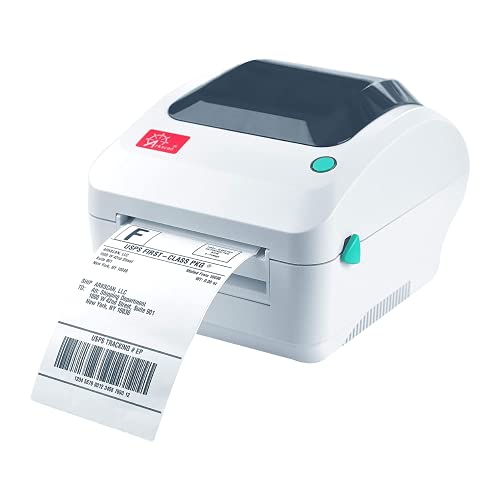
If your shipping workflow touches multiple platforms at once, the Arkscan 2054A might be your best match. The compatibility list is genuinely impressive: Amazon Seller Merchant Fulfillment, FBA, FNSKU, EasyPost, eBay, Etsy, FedEx Ship Manager, PayPal, Poshmark, ShippingEasy, Shippo, ShipStation, Shopify, Stamps.com, StockX, UPS WorldShip, USPS, XPSship, Pirateship, and more. If you can print a label from it, this printer can handle it.
Beyond shipping labels, this is a genuinely multi-functional unit. It prints product labels, barcode labels, and custom formats — label width ranges from 0.75" to 4.25", and length from 0.4" up to 90 inches. That flexibility is unusual at this price point. It supports both roll paper (loaded inside) and fanfold paper (loaded from the back), which gives you options for your label supply. Print speed runs at about 5 inches per second, which is solid for everyday use.
A free copy of BarTender UltraLite Label Design Software (Windows only) is included, which is a nice touch for sellers who need custom product labels alongside their shipping labels. Works across Windows, Mac, Chromebook, and Android. If your eBay store has grown into a multi-channel operation, the Arkscan 2054A handles the complexity without complaint.
Pros:
Cons:
The JADENS Bluetooth label printer hits a sweet spot for sellers who want wireless printing without spending a lot. It comes in a distinctive blue color and uses a Japanese thermal print head rated at 203 DPI — the same resolution as more expensive models. No ink, no toner, no mess. Label width ranges from 1.57" to 4.1", covering the standard 4×6 shipping label format used by eBay, USPS, UPS, and FedEx.
Wireless printing on Windows 8 and later (and Mac) works via Bluetooth pairing directly. Android and iOS users need to download the "Jadens printer" app and print through it — the printer doesn't support direct Bluetooth printing from a phone without the app. USB connection is available for Windows 7 and newer, plus Mac OS 10.9 and newer. One important note: recalibrate the label size every time you swap label rolls by holding the feed button. Skip this step and you'll get misaligned prints.
Build quality is decent for the price. It accepts both fanfold and roll labels, which gives you flexibility when buying supplies in bulk. If you're just getting started on eBay and want a no-fuss Bluetooth printer without a big upfront cost, the JADENS is a practical starting point. Just keep the app handy if you're printing from your phone.
Pros:
Cons:
DYMO is one of the most recognized names in label printing, and the LabelWriter 5XL represents their current flagship for shipping use. The standout feature is patented Automatic Label Recognition technology — the printer reads the DYMO label you've loaded, identifies its size and type, and aligns everything automatically. No manual settings, no guessing, no jams.
According to DYMO, this reduces label waste by up to 65% compared to printers without the feature, because the printer knows exactly where the label starts and stops. For extra-wide shipping labels from UPS, FedEx, USPS, Amazon, eBay, Etsy, and Poshmark, it handles them all without fuss. The printer also displays the remaining label quantity so you're never caught mid-batch without supplies.
The trade-off is one you need to know upfront: the LabelWriter 5XL exclusively works with DYMO-branded labels. You can't use third-party label rolls from Amazon or other generic suppliers. DYMO labels cost more per roll than off-brand alternatives. If you're printing at high volume, that adds up. But if you prioritize reliability and hate dealing with jams or misfed labels, the premium is arguably worth it. DYMO's software ecosystem is also mature and stable in 2026, with solid integrations across major platforms.
Pros:
Cons:
The MUNBYN 130B is built with mobile-first sellers in mind. If you print from your phone or tablet more than from a desktop, this is the model to look at. The setup is a simple three-step process: connect, design, print. iOS and Android users download the "MUNBYN Print" app and connect via Bluetooth. Desktop users can use the browser-based "Munbyn Editor" through Google Chrome — no installation required for wireless label design and printing on a PC.
Print speed is quoted at 72 pages per minute, which is fast enough to keep pace with a busy eBay selling day. MUNBYN's own branded labels are resistant to smudging and fading, which matters if your packages are sitting in a sorting facility or exposed to weather. The design tools inside the app and web editor are surprisingly capable: over 3,500 design elements, 2,000 templates, 80 fonts, PDF and TXT import, OCR (optical character recognition, which converts images of text into editable text), and multi-language support.
For Bluetooth-less desktops, USB connection is available as a fallback. Compatibility with Etsy, eBay, Shopify, and major shipping platforms is fully supported. If you run your eBay store from your couch with a phone in hand, the MUNBYN 130B is one of the smoothest wireless experiences available in 2026. It's also worth checking out our guide on best printers for stickers if you're creating custom product labels alongside your shipping workflow.
Pros:
Cons:
If you want the reliability of the DYMO name without the full price of a new unit, the LabelWriter 4XL (Renewed) is a smart way in. This is a certified refurbished model of DYMO's popular 4XL, which has been the workhorse of small business shipping operations for years. It prints extra-large labels up to 4" × 6" — the standard size for all major eBay shipping labels.
Over 60 professional label templates are included with the free DYMO Label Software, and it integrates with Microsoft Office and QuickBooks for sellers who track inventory and financials in those platforms. Like the 5XL above, it uses thermal printing — no ink, no toner, just heat. Setup is straightforward, and the DYMO software is intuitive enough that you won't need a manual.
The renewed condition means you're buying a unit that has been inspected and tested, though cosmetic wear is possible. This is a valid option if your budget is tight and you want a proven, reliable printer that handles the basics without fuss. Keep in mind this is an older model — it lacks the Automatic Label Recognition of the 5XL, so manual label calibration is sometimes needed. But for a seller who wants a dependable workhorse at a lower price, the renewed 4XL still delivers in 2026.
Pros:
Cons:
All seven printers above use direct thermal printing (a process that uses heat to mark specially coated label paper — no ink or toner required). That's the baseline you want for shipping labels. Beyond that, here are the factors that actually matter when you're choosing between models.
This is the first question to answer. Think about how you actually run your eBay operation.
This is a cost-of-ownership question that most buyers overlook at first.
For most eBay sellers, both of these specs are fine across the board — but here's what to know.
You want your label printer to work seamlessly with whatever you use to manage your eBay orders — and ideally other platforms too if you sell across multiple channels.
If you're also thinking about other printing needs beyond shipping, check our roundup of the best 4×6 photo printers — useful if you also handle product photography prints for your listings.
You don't need a special printer, but a dedicated thermal label printer makes the process much faster and cheaper. Regular inkjet printers work, but you'll spend money on ink and need to cut labels to size. A 4×6 thermal label printer eliminates ink costs entirely and prints labels that match the carrier's standard format perfectly. Most eBay sellers who ship regularly find the switch pays for itself within a few months.
eBay shipping labels for most carriers — USPS, UPS, FedEx, and DHL — are printed in the 4×6 inch format. All seven printers reviewed here support this standard size. Some printers also support smaller sizes for product labels and barcodes, which is useful if you also need to label your inventory or packages with custom tags.
Yes, with most printers. Rollo, MUNBYN, Arkscan, and JADENS all work with generic third-party label rolls, which you can buy cheaply in bulk on Amazon. DYMO printers are the exception — both the 4XL and 5XL are designed to work exclusively with DYMO-branded labels. Generic labels in a DYMO printer will either not work or give unreliable results.
Thermal printing is the industry standard for shipping labels in 2026. The labels resist moisture better than inkjet-printed paper, they don't smear in transit, and they're produced much faster than traditional printing. Direct thermal printing (used by all the printers here) doesn't require ink or toner at all — the heat from the print head creates the image on specially coated label paper. It's the same technology used by UPS, FedEx, and USPS at their own counters.
Several of these printers support mobile printing. The MUNBYN 130B and JADENS Bluetooth both connect to Android and iOS devices. However, the process varies: MUNBYN uses its own app for design and printing, while JADENS requires its "Jadens printer" app for phone-based printing. The Rollo Wireless supports AirPrint directly from iPhone and iPad without a separate app. Check the specific connection method before buying if mobile printing is important to your workflow.
The key difference is Automatic Label Recognition. The DYMO 5XL reads your label roll automatically, adjusts alignment, and reduces waste — the 4XL requires manual calibration when you swap labels. The 5XL is a newer model with a higher price; the 4XL reviewed here is a renewed (refurbished) unit at a lower cost. For a high-volume seller who values jam-free reliability, the 5XL is worth the upgrade. For casual or budget-conscious sellers, the renewed 4XL still does the job.


About Editorial Team
The DigiLabsPro editorial team covers cameras, lenses, photography gear, and creative technology with a focus on helping photographers make informed buying decisions. Our reviews and guides draw on hands-on testing and research across a wide range of equipment, from entry-level beginner kits to professional-grade systems.
You can get FREE Gifts. Or latest Free phones here.
Disable Ad block to reveal all the info. Once done, hit a button below
