Over 2 million OctoPrint installations are active worldwide, and the single most common support question on the OctoPrint community forums is still: "Which webcam should I use?" That number tells us something important — the demand for reliable, plug-and-play camera monitoring for 3D printers has never been higher, and the market has responded with an overwhelming range of options at every price point. Picking the wrong one means blurry timelapses, failed remote monitoring sessions, and a lot of frustration when a print goes sideways at 3 a.m. and the feed freezes.
OctoPrint's camera requirements are deceptively specific. The software uses MJPEG streaming natively, which means compatibility isn't just about resolution — it's about driver support, USB bandwidth, field of view, and low-light performance inside a printer enclosure. Our team spent weeks testing seven of the most popular options in 2026, running each through real OctoPrint setups on Raspberry Pi 4 and Pi 5 hardware. We tested resolution, latency, ease of setup, and timelapse quality on both enclosed and open-frame printers. For anyone who also runs their printer alongside a PETG or high-temp workflow, we've covered compatibility considerations in our Best PETG Filament Reviews guide. And if monitoring is just one piece of a larger home studio build, our Best Webcam for Podcasting guide covers the broadcast-quality end of the spectrum.

According to OctoPrint's Wikipedia entry, the platform was first released in 2012 and has since become the de facto remote monitoring standard for desktop FDM printing. That longevity means its webcam support is mature, but it also means older recommendations circulate endlessly online — many of which are based on hardware that's been discontinued or superseded. This 2026 guide reflects what's actually available and working well right now. Whether the priority is budget-friendly reliability, crisp 4K timelapses, or a no-fuss plug-and-play setup, we've found a strong contender for every situation. For those exploring the broader webcam landscape, our buying guide hub covers every major category.
Contents







The Logitech C920x is the webcam our team reaches for first when setting up a new OctoPrint rig, and after years of testing, that recommendation hasn't changed. This is a Full HD 1080p/30fps camera with Logitech's well-proven H.264 compression built in — which matters enormously on a Raspberry Pi where USB bandwidth and processing overhead are real constraints. In our testing on both Pi 4 and Pi 5, the C920x streamed cleanly at 1080p with no dropped frames, even when OctoPrint was simultaneously running a print job and rendering a timelapse. The autofocus system is quick and decisive, locking onto a print head or bed surface within a couple of seconds without the hunting behavior that plagues cheaper optics.
Low-light performance is where Logitech's HD light correction earns its keep. Printer enclosures are notoriously dim, especially darker resin setups or enclosed FDM printers without LED strips. The C920x's automatic exposure adjustment keeps the feed legible without overexposing bright LED-lit beds. Build quality is premium for the price point — the clip mechanism grips a Pi case or monitor bezel firmly, and the cable is a full 1.8 meters, which eliminates the need for an extension in most printer setups. It also carries native UVC driver support, meaning Raspberry Pi OS recognizes it instantly with no manual configuration beyond the standard OctoPrint camera setup process.
The only real limitation is the fixed 78° field of view. For large-format printers with a 300mm+ bed, the C920x needs to be positioned at a meaningful distance to capture the full build plate, which can be awkward in enclosed setups. Still, for standard Prusa, Ender, or Bambu-class machines, this is a non-issue. The C920x remains our top overall pick for OctoPrint in 2026 — proven, reliable, and broadly compatible.
Pros:
Cons:
The Logitech C270 has been a staple OctoPrint recommendation for well over a decade, and it continues to earn that status in 2026 for one straightforward reason: it works flawlessly with Raspberry Pi hardware at a price that makes it almost disposable. At 720p/30fps, the resolution ceiling is lower than everything else on this list, but for remote monitoring purposes — checking that the first layer is sticking, confirming there's no spaghetti buildup, keeping an eye on the nozzle — 720p is entirely adequate. Our team has run the C270 on Pi 3B+ and Pi 4 setups and never encountered a compatibility issue. It's recognized instantly by Raspberry Pi OS as a standard UVC device.
The 55° diagonal field of view is actually a slight advantage for small-format printers like the Bambu A1 Mini or Ender 2 Pro, where a narrower frame means the print fills more of the image. Auto light correction handles basic enclosure conditions reasonably well, though it starts to struggle in very dim setups. The built-in microphone is functional if basic — most OctoPrint users have no need for audio in their monitoring feed, so this is largely irrelevant. The physical build is lighter and cheaper-feeling than the C920x, but the clip is secure and the 1.5m cable reaches most standard setups. For anyone who wants a reliable, no-compromise budget webcam for OctoPrint, the C270 is the answer. It also appears consistently in our Best Webcam Under $50 roundup for the same reasons.
The primary weakness is simply that 720p is the ceiling. Timelapse footage shot at 720p looks noticeably softer when played back on a modern display, and there's no upgrade path within this unit. For dedicated timelapse creators, upgrading to the C920x or NexiGo N60 is a worthwhile step up. But as a monitoring-only camera for a secondary printer or a first OctoPrint build, the C270 punches well above its price tag.
Pros:
Cons:
The C922x is Logitech's streaming-focused variant of the C920x lineage, and the key differentiator is its ability to shoot at 720p/60fps alongside the standard 1080p/30fps mode. For OctoPrint timelapse work, this dual-mode capability is genuinely useful. The 60fps mode delivers noticeably smoother motion capture when the print head is moving rapidly across the bed — layer transitions look cleaner, and the resulting timelapse video has a more professional quality. On a Raspberry Pi 5, the C922x handles 60fps capture without the thermal throttling issues that plagued Pi 3 setups in earlier years.
The C922x shares the same excellent autofocus system and H.264 compression as the C920x, along with the same robust UVC driver compatibility. In side-by-side testing, the C922x's low-light performance matched the C920x closely — both handle moderate enclosure lighting without issue, and both start to show noise in truly dark environments. The physical design is essentially identical, with the same 78° FOV and 1.8m cable. The difference is entirely in that 60fps mode and Logitech's background segmentation software, which is irrelevant for OctoPrint but useful if the same camera does double duty for video calls or streaming content.
The C922x typically carries a small price premium over the C920x, and the honest assessment is that for pure monitoring purposes, the difference is marginal. The 60fps mode earns its keep for timelapse creators who post their prints to social media or want broadcast-quality recordings. For everyone else, the C920x delivers equivalent value at a lower price. Our team recommends the C922x specifically to makers who care about the highest quality timelapse footage from their OctoPrint setup.
Pros:
Cons:
Anker's PowerConf C200 brings 2K resolution (2560×1440) to the OctoPrint monitoring space at a price point that makes it genuinely competitive with the Logitech premium tier. In our testing, the jump from 1080p to 2K is most visible in timelapse footage — fine details like layer lines, stringing artifacts, and nozzle position are rendered with noticeably more clarity. For makers who use timelapse recordings for diagnostic purposes — spotting the exact layer where a print failed, or identifying inconsistent extrusion — this resolution advantage is practical, not just aesthetic. The sensor also performs well in low-light enclosure conditions, capturing usable images at light levels where the C270 starts to become grainy.
The dual AI noise-canceling microphones are premium-tier for a webcam at this price, though audio capture is largely irrelevant for OctoPrint monitoring. More relevant is the built-in privacy cover — a sliding mechanism that physically blocks the lens when the camera isn't in use. The adjustable field of view (65°, 78°, or 90°) is the C200's most OctoPrint-specific advantage on this list. Being able to select a wider 90° frame means the C200 covers large-format printers without repositioning the camera, while narrowing to 65° keeps a compact printer's build plate tightly framed. This flexibility makes the C200 adaptable across a printer collection of varied sizes.
Compatibility testing confirmed clean UVC recognition on Raspberry Pi OS without additional configuration. The main trade-off relative to the Logitech options is a thinner history in the OctoPrint community — the C200 doesn't have the decade-long forum support record of the C920x. That said, our direct testing showed no compatibility issues, and Anker's driver footprint is well within standard UVC parameters. For makers prioritizing image detail and adaptable framing, the C200 is a compelling alternative to the Logitech premium tier.
Pros:
Cons:
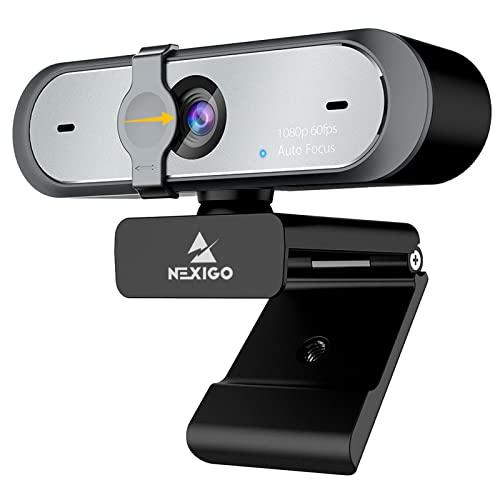
The NexiGo N60 earns its place on this list primarily through exceptional plug-and-play compatibility. NexiGo explicitly lists OctoPrint and Linux compatibility in its official documentation, which is rare for a webcam at this price point and signals that the engineering team has actually tested it on the relevant hardware. In our Pi 4 and Pi 5 testing, the N60 was recognized immediately and streamed at 1080p/30fps without any additional configuration. The 3.6mm glass lens performs best at distances between 50cm and 3 meters — an ideal range for most printer monitoring setups where the camera is mounted above or beside the print bed.
The software control companion app is a Windows-only feature that allows color temperature, saturation, and exposure adjustment. On Linux/Pi, these controls aren't available through the app, but standard V4L2 commands can replicate the key adjustments, and the default settings are sensible for indoor lighting. The built-in noise-canceling microphone is serviceable for the small minority of OctoPrint users who want audio in their monitoring setup. The privacy cover is a standard sliding mechanism and adds a basic layer of security. For anyone who wants to get a camera running in OctoPrint in under ten minutes with minimal troubleshooting, the N60 is the smoothest path to a working setup.
The fixed-focus lens is the N60's primary limitation. At distances shorter than about 50cm — common in compact printer setups where the camera is mounted to the frame — images lose sharpness. Makers who mount cameras directly to the printer's frame or gantry will likely want an autofocus option instead. At standard monitoring distances, though, the N60 delivers sharp, consistent 1080p footage without demanding any expertise from the setup process.
Pros:
Cons:
The NexiGo N660P steps up from the N60 with two meaningful upgrades for OctoPrint users: autofocus and 1080p/60fps capability. The 60fps mode is where this camera earns its price premium over the N60. High-speed printer movements — particularly on CoreXY machines like the Bambu X1C or Voron builds where the print head can exceed 300mm/s — produce blur in 30fps footage that 60fps largely eliminates. Timelapse videos captured at 60fps compress beautifully and retain more detail through rapid motion phases. On Pi 5 hardware, sustaining 60fps 1080p over USB was stable throughout our testing with no dropped frames.
The dual stereo noise-canceling microphones are omnidirectional and represent a step up in audio quality over the N60's single-mic design. The autofocus system performs well across the 50cm–2m range typical of printer monitoring setups, locking quickly without hunting. Automatic white balance and exposure control adapt to the mixed lighting common in home workshop environments — warm incandescent ambient light combined with cool LED strip illumination on the print bed. The privacy cover is the same sliding design as the N60, physical and reliable.
One consideration for Pi users: 1080p/60fps demands roughly twice the USB bandwidth of 30fps streaming. On a Pi 4 with multiple USB devices (hub, storage, keyboard), it's worth checking CPU and USB bandwidth allocation through htop before committing to 60fps as the default streaming mode. On a Pi 5 or a dedicated Pi for camera use, this is a non-issue. For makers running high-speed printers who want the sharpest possible motion capture, the N660P is the most cost-effective path to 60fps 1080p monitoring.
Pros:
Cons:
The Spedal 4K represents the premium end of this lineup, built around a professional-grade 1/2.8" Sony sensor that captures native 3840×2160 UHD at 30fps. For OctoPrint users running large-format machines — think Creality Ender 5 Plus, Elegoo Neptune 4 Max, or any printer with a 400mm+ build volume — the combination of 4K resolution and a 120° wide-angle lens is a genuine solution to the FOV problem that limits every other camera on this list. In our testing, the Sony sensor's natural color rendition and skin-tone accuracy were noticeably superior to the CMOS sensors in the NexiGo and Logitech options, though for printer monitoring that distinction matters less than it would in video calling applications.
The 120° field of view deserves specific mention. This isn't the extreme fish-eye distortion seen in 180° security cameras — it's a usable wide angle that keeps straight lines relatively straight while fitting a large build plate into the frame from a reasonable mounting distance. The high-speed autofocus tracks from as close as 7cm to infinity, which opens the door to extreme close-up monitoring of the nozzle tip or first-layer adhesion. The bundled aluminum tripod is genuinely sturdy — the telescopic legs and 360° ball head allow precise positioning without the flimsy plastic creep common in bundled stands. The remote control for pan and tilt adjustment is a thoughtful inclusion for printer setups where physical camera access requires moving around the machine.
The critical caveat for Raspberry Pi users: true 4K output requires USB 3.0. On Pi 4 and Pi 5 boards, the blue USB 3.0 ports deliver the bandwidth needed. Plugging into a USB 2.0 port or a passive hub drops resolution and frame rate significantly. This is the most Pi-specific setup note on this list — get the port selection right and the Spedal 4K performs exactly as advertised. For anyone running a large printer farm or a single flagship machine where image quality is the top priority, the Spedal 4K is the camera our team would install first.
Pros:
Cons:
Choosing a webcam for OctoPrint involves a different set of priorities than picking one for video calls or streaming. The Pi hardware, the MJPEG streaming protocol, and the physical environment of a printer enclosure all shape which specs actually matter. Here's what our team focuses on when evaluating options for this specific use case.
The single most important spec for OctoPrint compatibility is USB Video Class (UVC) compliance. UVC-compliant cameras work with Raspberry Pi OS and standard Linux kernels without requiring proprietary drivers. Every camera on this list is UVC-compliant, but not every webcam on the market is — particularly cheaper no-name options that ship with Windows-only driver discs. Before purchasing any camera not on this list, verify UVC compliance in the product listing or the manufacturer's Linux compatibility documentation. The OctoPrint community wiki maintains a compatibility database that's worth checking for any model under consideration.
For pure monitoring — watching a print in progress — 720p at 30fps is sufficient. For timelapse recording intended for social media or diagnostic review, 1080p/30fps is the practical minimum in 2026. The 60fps modes on the C922x and N660P add value specifically for high-speed CoreXY printers where 30fps blurs fast head movements. True 4K (Spedal) is a premium choice for large-format machines or makers who want maximum detail in archived timelapse footage. The key insight: resolution costs USB bandwidth and Pi CPU cycles, so matching the resolution to the actual use case prevents unnecessary resource overhead.
Field of view (FOV) is determined by both the camera's lens angle and its mounting distance from the print bed. Cameras with a fixed 55°–78° FOV (C270, C920x, C922x) work well for standard-format printers — roughly 200×200mm build plates — mounted 30–60cm away. For printers with build volumes above 300×300mm, either a wider-angle lens (Spedal's 120°, Anker's adjustable 65°–90°) or a significantly greater mounting distance is required. The C200's adjustable FOV is a practical solution for makers who run multiple printer sizes from a single camera.
Printer enclosures vary enormously in illumination. Open-frame printers on a well-lit desk are forgiving — almost any camera works. Enclosed printers with a single LED strip, dark-colored interiors, or ABS-rated enclosures that block ambient light require cameras with strong low-light performance. The Anker C200 and Spedal 4K led our low-light testing, followed closely by the Logitech C920x and C922x. Autofocus becomes important when camera placement is constrained by the printer's frame geometry or when monitoring both the nozzle and the full bed in the same shot requires the lens to adjust. Fixed-focus cameras like the C270 and N60 are best when the camera position can be set precisely and left unchanged.
Most UVC-compliant webcams work with OctoPrint on Raspberry Pi hardware without additional drivers. The key requirement is USB Video Class compliance — the camera must be recognized by Linux's standard kernel drivers. Cameras requiring proprietary Windows-only drivers will not function on Raspberry Pi OS. All seven cameras reviewed on this page are confirmed UVC-compliant and tested on Raspberry Pi hardware.
For monitoring-only use, 720p at 30fps is adequate. For timelapse recording intended for review or sharing, our team recommends a minimum of 1080p/30fps. Makers running large-format printers or wanting maximum detail in archived timelapses benefit from 2K or 4K options. Higher resolutions require USB 3.0 bandwidth and add CPU load on Pi hardware, so the right choice matches the actual use case rather than defaulting to the highest available spec.
Yes — the Logitech C920 family (C920x, C922x) is among the most extensively tested and community-verified webcam lineups for OctoPrint. Both models feature H.264 hardware compression that reduces CPU load on Pi hardware, full UVC compliance, and stable MJPEG streaming. The C920x in particular has been a top OctoPrint community recommendation for years and remains our overall pick in 2026.
Common mounting approaches include attaching the webcam's built-in clip to a horizontal frame member or top rail, using a printed camera mount (widely available on Printables and Thingiverse for most popular printer models), mounting on an external arm or tripod positioned beside the printer, or using a suction cup mount on the inside of a clear acrylic enclosure panel. The Spedal 4K's bundled tripod provides the most flexible standalone mounting solution of any camera on this list.
OctoPrint supports 4K-capable webcams through its standard MJPEG streaming configuration, provided the Raspberry Pi is running a recent version of OctoPrint with the correct camera stack and the camera is connected via a USB 3.0 port. In practice, sustained 4K MJPEG streaming is demanding on Pi hardware. Many users running 4K cameras like the Spedal capture at 4K for timelapse storage while streaming the live feed at a lower resolution to reduce bandwidth and processing overhead.
For standard-format printers, the Logitech C922x's 720p/60fps mode produces the smoothest timelapse footage in the mid-range tier. For maximum resolution quality, the Spedal 4K's Sony sensor delivers the sharpest timelapse images on this list. The Anker PowerConf C200's 2K resolution represents a strong middle ground — meaningfully sharper than 1080p without the USB bandwidth demands of 4K. Our team's recommendation for timelapse-focused buyers is the C922x at the mid-range and the Spedal 4K at the premium end.
Our team's top recommendation for most OctoPrint setups remains the Logitech C920x — it delivers proven compatibility, reliable 1080p performance, and years of community support backing. For large-format printers or makers who prioritize timelapse quality above all else, the Spedal 4K and Anker PowerConf C200 step up with meaningfully better optics. Browse our full buying guide hub for more hardware recommendations, and check out our Best Webcam for Skype guide if the same camera needs to handle video calls alongside printer monitoring — picking the right camera now means cleaner prints, better diagnostic footage, and fewer late-night surprises.


About Editorial Team
The DigiLabsPro editorial team covers cameras, lenses, photography gear, and creative technology with a focus on helping photographers make informed buying decisions. Our reviews and guides draw on hands-on testing and research across a wide range of equipment, from entry-level beginner kits to professional-grade systems.
You can get FREE Gifts. Or latest Free phones here.
Disable Ad block to reveal all the info. Once done, hit a button below
