Over 130 million books have been published throughout history, and libraries worldwide are racing to digitize their collections before physical copies deteriorate beyond recovery. Whether you're a researcher archiving rare texts, a student building a digital library, or a small business owner going paperless, a dedicated book scanner saves you hundreds of hours compared to a standard flatbed. But not all book scanners are created equal — some flatten curved pages automatically, others fit in your backpack, and a few cost more than your laptop.
We tested and compared seven of the top book scanners available in 2026, evaluating them on scan quality, speed, ease of use, and value for the price. From high-end overhead cameras with laser curve-flattening to budget-friendly portable wands, this guide covers every type of book scanner you'd actually want to buy. If you're also looking into related scanning gear, check out our best portable scanners for Mac roundup for more options.

The right scanner depends on what you're scanning and how often. Thick bound books need overhead or V-shaped designs that won't crack the spine. Loose documents and photos work fine with a wand or flatbed. And if you need OCR (optical character recognition) — the technology that turns scanned images into searchable, editable text — make sure your scanner supports it natively or bundles capable software. Let's break down each option.
Contents





The CZUR ET MAX is the scanner to beat in 2026 if you're serious about digitizing books. Its 38-megapixel CMOS sensor captures pages at 7168 × 5376 resolution with 410 DPI — sharp enough to read fine print footnotes and reproduce detailed illustrations without artifacts. Setting it up takes about five minutes: unfold the arm, connect the USB cable, install the CZUR software, and you're scanning.
What sets the ET MAX apart from cheaper overhead scanners is its patented laser curve-flattening technology. Two laser lines project across the open book, mapping the page curvature in real time. The software then digitally flattens the image so text runs straight across the page, even near the spine where pages naturally curve inward. You never need to press the book flat or unbind it. For anyone scanning library books, rare editions, or anything you can't risk damaging, this is a game-changer.
The built-in OCR engine handles over 180 languages and exports to Word, Excel, and searchable PDF formats. It's accurate for printed text in Latin, CJK, and Cyrillic scripts, though it doesn't support Thai, Arabic, or Hebrew. The HDMI output is a nice bonus — you can use the ET MAX as a live document camera for presentations. Scanning speed averages about 1.5 seconds per page, so a 300-page book takes roughly 15 minutes with page-turning time included.
Pros:
Cons:
If you prefer the reliability of a traditional flatbed scanner but hate the dark shadow that forms along the spine of a book, the Plustek OpticBook 3800L solves that problem with a clever design. Its narrow 2mm bezel edge lets you press a book right up against the scanning element, virtually eliminating the gutter shadow that plagues standard flatbeds. You get a clean, even scan from edge to edge without needing to flatten the book completely.
The OpticBook 3800L scans at 1200 DPI optical resolution — more than enough for text, line art, and photographs. It connects via USB and works with both Mac and Windows. Scanning speed is respectable at about 7 seconds per page at 300 DPI, which is slower than overhead scanners but produces consistently uniform results because the sensor is right up against the page. The bundled software handles basic OCR and image correction, though power users may want to pair it with dedicated OCR software like ABBYY FineReader for large batch jobs.
Where the OpticBook 3800L really shines is durability and simplicity. There's no complex arm mechanism, no calibration needed, and no software learning curve. Place the book face down, press scan, flip the page. It handles textbooks up to 3 inches thick without complaint. For teachers, students, and anyone who needs consistent scan quality without fussing with settings, this is the most straightforward option on the list.
Pros:
Cons:
The CZUR ET16 Pro is already a capable overhead book scanner on its own, but this bundle pairs it with a portable studio box that transforms your scanning setup. The studio box isolates the scanning area from ambient light, eliminating glare, uneven shadows, and the color inconsistencies that plague overhead scanners in rooms with mixed lighting. If you're scanning glossy pages, color photographs, or archival materials where color accuracy matters, this combination delivers noticeably better results than any open-air overhead scanner.
The ET16 Pro itself uses a 16MP sensor with CZUR's curve-flattening technology (similar to the ET MAX but at a lower resolution). It scans at about 1.5 seconds per page and includes the same OCR engine supporting 180+ languages. The studio box folds flat for storage but sets up in under a minute — it's essentially a light tent with a slot for the scanner arm. The interior is lined with a matte surface that diffuses the built-in LED lights evenly across the scanning area.
This bundle makes the most sense for archivists, collectors, and anyone working with materials where lighting consistency matters. If you're just scanning text-heavy paperbacks, the studio box is overkill — save money with the standalone ET MAX. But for art books, vintage photographs, or manuscripts with aging paper that catches light unevenly, the controlled environment makes a real difference in final scan quality.
Pros:
Cons:
The CZUR Aura sits in a sweet spot between CZUR's professional scanners and budget alternatives. This bundle includes the Aura standalone scanner plus an assistive cover — a physical accessory that presses book pages flat mechanically while you scan. It's a simpler approach to the curve-flattening problem compared to the ET MAX's laser system, but it works surprisingly well for everyday scanning tasks.
The assistive cover is the real selling point here. You place your open book under the scanner, lower the transparent cover onto the pages, and it gently presses them flat while remaining clear enough for the overhead camera to capture the text. This reduces curvature distortion and eliminates the finger shadows you'd get from holding pages down manually. It's not as automated as laser curve correction, but it produces clean scans consistently and costs significantly less.
The Aura's overhead design means you simply flip pages and scan — no need to press the book face-down into a flatbed. Connection is USB to your computer, and the CZUR software handles OCR, image cropping, and page splitting (for scanning two pages at once). Scanning speed is fast enough that you can digitize a full book during a coffee break. If you're scanning personal collections, study materials, or office documents and want good quality without the professional-grade price tag, the Aura bundle hits the mark. For complementary scanning needs like old film and negatives, take a look at our best negative scanner guide.
Pros:
Cons:
The IRIScan Desk v6 Business pulls double duty as both a book scanner and a document camera, making it uniquely versatile for remote workers and educators. During a Zoom or Google Meet call, you can switch from showing your face to showing a live document view in seconds. When the meeting ends, you switch to scanning mode and digitize your notes. That dual-purpose design alone justifies its place on this list for anyone who regularly presents physical documents during virtual meetings.
As a scanner, the v6 Business performs well for flat documents and moderately curved book pages. The 8MP base camera (12MP extrapolated) captures clear text at letter-size, and scanning takes under one second per page. IRIScan's AI features include automatic curve flattening for book pages, auto-scan detection (it captures when you flip a page), and finger hiding that digitally removes your fingers from the scan. These AI features work reasonably well, though the curve flattening isn't as precise as CZUR's laser system on deeply curved pages.
The built-in LED lights illuminate the scanning area evenly, and OCR supports 138+ languages with export to JPG, PDF, searchable PDF, Word, and Excel. A standout feature is text-to-speech — the scanner can read your documents aloud after scanning, which is useful for accessibility. The main limitation is that it's designed for A4 documents, not A3, so you can't scan oversized books or spread newspapers. For standard books and office documents, though, it's one of the most versatile devices here.
Pros:
Cons:
Not everyone needs a fancy overhead scanner with laser-guided curve flattening. If you're scanning individual pages, loose documents, photos, or the occasional chapter from a thin paperback, the Canon CanoScan LiDE 400 does the job well at a fraction of the price. This is a classic flatbed scanner done right — slim, USB-powered (no separate power adapter needed), and backed by Canon's reliable scanning software.
The LiDE 400 scans at up to 4800 DPI optical resolution, which is the highest on this list and excellent for photographs, artwork, and any document where you need to zoom in on fine details. A full-color A4 scan at 300 DPI takes about 8 seconds. The scanner is only about an inch thick and weighs under four pounds, so it fits easily on a desk or bookshelf. Canon's CanoScan software includes auto-scan mode that detects the document type and applies appropriate settings automatically.
The obvious trade-off is that this is a face-down flatbed. Scanning a thick bound book means pressing it against the glass, which can stress the binding and always produces some gutter shadow near the spine. You also have to manually flip and reposition every page. For single-sided documents, photos, and thin magazines, none of that matters. But if your primary use case is digitizing bound books, you're better off with an overhead design. The LiDE 400 is the scanner you buy when you need reliable everyday scanning with occasional book pages — not a dedicated book scanner. If you also need to scan checks or financial documents, our best check scanner roundup has specialized picks.
Pros:
Cons:
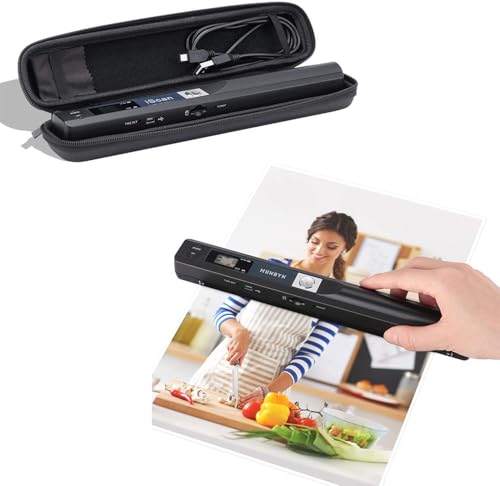
When you need to scan pages at a library, archive, or client's office and can't bring a full-size scanner with you, the MUNBYN Portable Scanner fits in a small bag and runs on two AA batteries — no computer or power outlet required. At 9.5 inches long and 0.66 pounds, it's about the size of a TV remote. You roll it across a page at a steady pace, and it captures the content at up to 900 DPI resolution, saving files directly to a microSD card.
The scanning technique takes a little practice. You need to glide the wand evenly across the page at a consistent speed — too fast and the scan comes out stretched, too slow and you get compression artifacts. Once you get the hang of it (usually after 5-10 pages), you can scan a page in 3-5 seconds. The results are surprisingly good for text documents and clean photographs. The wand design is also gentle on originals since there's no pressing or binding stress involved. Old photos, fragile documents, and pages in bound books can all be scanned without risk.
The bundle includes a hard travel case that fits the scanner and a few accessories. Keep in mind this is a handheld device — it doesn't auto-flatten curves, perform OCR on the device, or connect to your computer in real time. You scan to the SD card, then transfer files to your computer for processing. For quick grabs of a few pages while you're out, it's unbeatable. For digitizing an entire bookshelf, you'd want one of the overhead scanners above. The MUNBYN is the scanner you throw in your bag "just in case."
Pros:
Cons:
Your choice of scanner type should match what you're scanning most. Overhead scanners (like the CZUR models and IRIScan Desk) are the best choice for bound books because the book lies open and face-up — no spine stress, no gutter shadow, and fast page-turning. Flatbed scanners like the Canon LiDE 400 and Plustek OpticBook excel at loose pages, photos, and thin documents where pressing against glass produces the sharpest possible scan. Portable wand scanners like the MUNBYN are for grab-and-go situations where you can't bring anything else. Most people doing regular book scanning want an overhead scanner. If you scan a mix of books and loose documents, consider an overhead model with a flat scanning mat.
Resolution is measured in DPI (dots per inch). For readable text documents, 300 DPI is the standard — it's what most offices and libraries use. If you're scanning photographs, artwork, or documents you might need to zoom into later, 600 DPI gives you more room to crop and enlarge. Going above 600 DPI only matters for professional archival work or extremely fine detail like microfilm. More megapixels in the sensor generally means sharper scans, but the lens quality and lighting matter just as much. Don't chase the highest DPI number — a well-lit 300 DPI scan from a good sensor beats a noisy 1200 DPI scan from a cheap one.
This is the feature that separates a "book scanner" from a "document scanner." When you open a bound book, the pages curve near the spine. Without correction, your scan will have warped text that's hard to read and impossible for OCR to process accurately. There are three approaches to this: laser curve flattening (CZUR ET MAX) uses projected lasers to map the curve and digitally straighten the text — the most accurate method. AI/software flattening (IRIScan Desk) uses algorithms to estimate and correct the curve — decent but less precise. Physical flattening (CZUR Aura's assistive cover, Plustek's narrow bezel) mechanically presses or positions pages to minimize curvature — simple and reliable. For occasional scanning, any method works. For high-volume book digitization, laser flattening saves you the most time in post-processing.
The best scanner hardware is only as useful as the software that processes the output. Look for bundled OCR that supports your languages and exports to the formats you need — searchable PDF is the most universally useful format for digitized books. Check whether the OCR runs locally or requires a cloud connection, especially if you're scanning sensitive or proprietary materials. Some scanners include basic editing tools (cropping, rotation, brightness adjustment, page splitting for two-page scans) that save you from needing third-party software. If you plan to scan in a language other than English, verify support before purchasing — not all OCR engines handle non-Latin scripts equally well. Visit our buying guide hub for more tips on evaluating scanning and imaging equipment.
A book scanner is specifically designed to handle bound pages without damaging the spine. Overhead book scanners let the book lie open and face-up, while regular document scanners typically require pressing pages face-down against a glass surface. Book scanners also include curve-flattening technology (laser, AI, or physical) to straighten text that warps near the binding. If you primarily scan bound materials, a dedicated book scanner produces significantly better results with less effort and no risk to the book.
For standard text documents, 300 DPI provides sharp, readable results and is the accepted standard for digital archiving. If the book contains photographs, illustrations, or fine print you might need to enlarge later, scan at 600 DPI. Most overhead book scanners default to 300-400 DPI, which is the sweet spot for balancing file size with readability. Going above 600 DPI is rarely necessary unless you're doing professional archival work with very fine detail.
Yes — overhead book scanners are the safest option for fragile materials. The book stays open and face-up on a flat surface with no pressure on the spine. You never need to press pages flat against glass or unbind the book. Models with laser or software curve flattening are especially good because they correct page distortion digitally, so you don't even need to open the book to a full 180 degrees. For extremely rare materials, pair an overhead scanner with the CZUR Studio Box to also eliminate light damage from repeated flash exposure.
Modern OCR on printed text in good condition achieves over 99% accuracy in major languages like English, Spanish, French, German, and Chinese. This means roughly one error per page of clean printed text — far faster than retyping. Accuracy drops with handwritten text, faded ink, unusual fonts, or low-resolution scans. For best OCR results, scan at 300 DPI minimum, ensure even lighting, and use curve flattening so text lines are straight. Always proofread OCR output for critical documents like legal or financial papers.
Most book scanners come with proprietary software that handles scanning, image processing, OCR, and file export. CZUR scanners use CZUR software, IRIScan uses Readiris, Canon uses CanoScan, and so on. These bundled programs are usually sufficient for most users. However, if you need advanced OCR features, batch processing, or support for specialized formats, third-party software like ABBYY FineReader or Adobe Acrobat Pro can work with the scanner's image output. The MUNBYN portable scanner saves raw images to an SD card, so you'd process those files with whatever software you prefer on your computer.
Speed varies by scanner type and your page-turning pace. Overhead scanners like the CZUR ET MAX capture a page in about 1-2 seconds, so a 300-page book takes roughly 15-20 minutes including page flipping. The IRIScan Desk scans in under 1 second per page. Flatbed scanners like the Plustek OpticBook 3800L take about 7-8 seconds per page, putting a 300-page book at around 40-50 minutes. The MUNBYN wand scanner takes 3-5 seconds per pass but requires careful hand movement. For high-volume projects, overhead scanners with auto-scan detection (they capture when they detect a page turn) are the fastest workflow.
The best book scanner for you comes down to what you're digitizing and how often. Go with the CZUR ET MAX if you want the best scan quality and laser curve flattening for serious book digitization. Pick the Plustek OpticBook 3800L if you want flatbed reliability with minimal spine shadow. Choose the MUNBYN if portability is your top priority. Whatever you pick, start with the books that matter most to you — every page you digitize today is one that's preserved and searchable for years to come.


About James W.
A contributing writer at DigiLabsPro covering photography gear reviews, buying guides, and camera comparisons. Specializes in evaluating cameras, lenses, and accessories for photographers at the intermediate and enthusiast level looking to upgrade their kit.
You can get FREE Gifts. Or latest Free phones here.
Disable Ad block to reveal all the info. Once done, hit a button below
