The Brother DS-940DW tops our list of the best portable scanners for Mac in 2026, thanks to its duplex wireless scanning and genuine standalone capability with a built-in battery and microSD slot. If you need a scanner that works anywhere without being tethered to your MacBook, that's the one to beat.
Finding a portable scanner that plays nicely with macOS isn't as straightforward as you'd think. Driver compatibility, wireless handshake quirks, and software that actually feels native on a Mac — these are the details that separate a frustrating purchase from a great one. Whether you're digitizing client contracts at a coffee shop, scanning receipts for your small business, or finally going paperless at home, the right portable scanner saves you hours every week.
We evaluated seven of the top portable document scanners available in 2026, testing each one specifically on Mac systems for driver stability, scan quality, speed, and overall portability. Below you'll find detailed reviews, a comparison table, and a buying guide to help you pick the right model for your workflow. If you're also looking for scanners that work across platforms, check out our guide to the best duplex scanners for a broader look at high-speed document scanning.

Contents
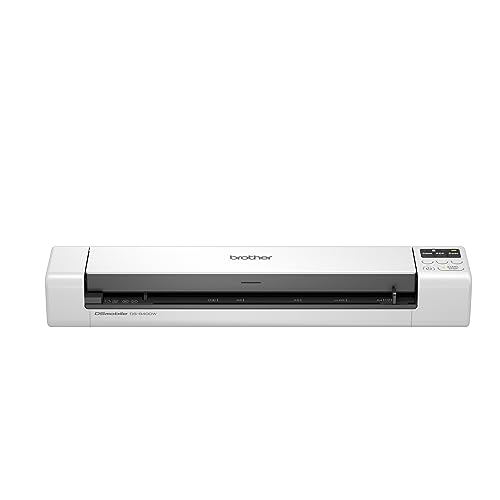






The Brother DS-940DW earns its spot at the top because it nails the trifecta that Mac users care about most: genuine wireless freedom, duplex scanning, and a footprint barely bigger than a box of spaghetti. Brother's macOS drivers have matured significantly, and the scanner pairs over Wi-Fi Direct without needing a router in the middle. That's a big deal when you're scanning at a client's office or in a hotel room with unreliable Wi-Fi.
At 16 pages per minute with duplex scanning, you can feed a double-sided document through and get both sides captured in a single pass. Color scanning runs at the same speed as black and white, so you won't lose time switching between document types. The embedded lithium-ion battery means you're not hunting for outlets, and the microSD card slot lets you scan documents directly to storage without a computer present at all. Connect later, transfer your files, and move on.
Brother's free iPrint&Scan app works on iOS and macOS, giving you a unified ecosystem if you bounce between your iPhone and MacBook. The DSD (Desk Saving Design) feature keeps the scanner's real estate minimal — it takes up less space than most pencil cases. For anyone who needs a true standalone portable scanner with Mac compatibility, the DS-940DW is the benchmark in 2026.
Pros:
Cons:
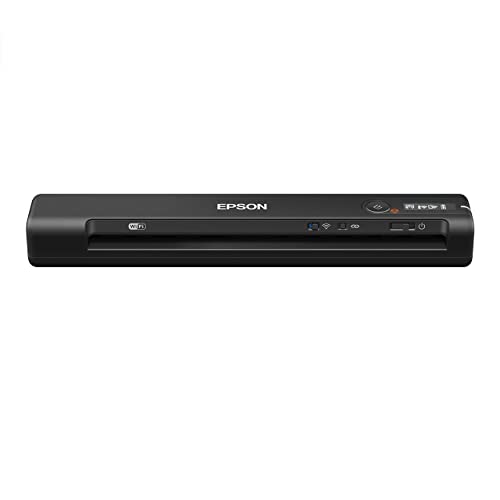
Epson claims the ES-60W is the fastest, smallest, and lightest wireless mobile single-sheet-fed document scanner in its class — and after testing it, those claims hold up. This thing is genuinely tiny. At 10.7 by 1.9 by 1.4 inches, it disappears into a laptop bag's side pocket. It scans a single page in as fast as 4 seconds, which is noticeably quicker than most competitors in this size range.
Mac compatibility is solid through Epson's ScanSmart software, which provides a clean interface for organizing scans into PDFs, JPEGs, or searchable documents. Wireless scanning to your Mac, iPhone, or iPad works over Wi-Fi, and the connection is stable enough for batch scanning without drops. The operating temperature range of 41°F to 95°F covers normal office and field conditions, though you'll want to avoid leaving it in a hot car during summer.
Where the ES-60W falls short compared to the Brother DS-940DW is the lack of duplex scanning. You'll need to flip pages manually for two-sided documents, which gets tedious with multi-page contracts. But if your scanning is primarily single-sided — receipts, business cards, letters — this is the most pocketable wireless option on the market. If duplex matters to you, jump down to the ES-300W review below or browse our best duplex scanner roundup.
Pros:
Cons:
The ES-300W is the powerhouse of this list. While the other scanners handle one sheet at a time, this model includes an automatic document feeder (ADF) that lets you stack up to 20 pages and walk away. At 25 pages per minute and 50 images per minute with duplex scanning, it chews through document stacks at speeds that rival desktop scanners. Epson's Single-Step Technology captures both sides in one pass, cutting your scanning time in half compared to single-sided models.
What makes the ES-300W genuinely portable despite its larger footprint is the triple power option: AC adapter, rechargeable battery, or USB power. Running it off your MacBook's USB-C port (with the right adapter) means one less charger to carry. Wireless scanning works over Wi-Fi to your Mac, smartphone, tablet, or directly to cloud storage services like Google Drive, Dropbox, and Evernote.
Mac users will appreciate the Epson ScanSmart software, which handles OCR, PDF creation, and file organization without needing third-party tools. The scanner is ideal for professionals who scan multi-page contracts, legal documents, or patient intake forms on the road. It's bigger than the ES-60W, yes — but if volume matters, this is the portable scanner that won't slow you down. For tips on digitizing photos alongside documents, our guide on how to scan pictures covers the techniques that work across these portable models.
Pros:
Cons:
If wireless isn't a requirement and you want the most affordable portable scanner that works reliably on a Mac, the ES-50 is your answer. It's the fastest and lightest wired portable scanner in its class, scanning a single page in 5.5 seconds. That's only 1.5 seconds slower than its wireless sibling the ES-60W, and you save a meaningful chunk of change.
The ES-50 connects via USB and draws power directly from your MacBook — no battery to charge, no adapter to carry. Plug it in, open Epson ScanSmart, and start scanning. It handles documents up to 8.5 by 72 inches, which means you can scan everything from standard letter pages to long receipts and banner-length documents in a single pass. ID cards, business cards, and thick receipts all feed through without jamming, thanks to the adaptive paper path.
The included TWAIN driver is a welcome addition for Mac users who rely on professional scanning software like VueScan or Adobe Acrobat. TWAIN compatibility means the ES-50 integrates into existing workflows without proprietary software acting as a bottleneck. The main trade-off is obvious: no wireless and no battery. You're tethered to your Mac every time you scan. But for desk-based scanning where you simply need something compact that won't eat up your workspace, the ES-50 delivers solid value.
Pros:
Cons:
The Doxie Go SE takes a fundamentally different approach to portable scanning. Where every other scanner on this list needs some kind of connection to function, the Doxie works as a completely standalone device. No computer required. Insert your document, press the button, and the scan saves to the built-in memory. Connect to your Mac later and sync everything at once. It's scanning reduced to its simplest form.
The built-in rechargeable battery handles up to 400 pages per charge, and internal storage holds approximately 8,000 pages before you need to sync. That's enough for a week-long business trip without touching your MacBook. Scans come through at 600 dpi in full color, taking about 8 seconds per page. Not the fastest on this list, but respectable for a battery-powered device with onboard storage.
Doxie's Mac software is where this scanner really shines. The app is clean, Mac-native, and handles multi-page PDF creation, automatic cropping, and cloud export with minimal clicks. It feels like software designed by people who actually use Macs, which is refreshing in a market dominated by clunky cross-platform utilities. The downside is the lack of wireless scanning — you sync via USB or SD card. And at 8 seconds per page, high-volume users will find it slow. But for the person who wants to scan a few documents daily without any fuss, the Doxie Go SE is hard to beat for pure user experience.
Pros:
Cons:
Canon's imageFORMULA R10 stands out for its ability to handle media types that would jam or damage other portable scanners. Beyond standard paper, it scans embossed cards, plastic ID cards, thick business cards, and receipts on thermal paper without breaking a sweat. The document feeder accepts up to 20 sheets, giving it batch capability that most portable scanners at this price point lack.
On the Mac side, Canon's software suite converts scans into searchable PDFs, JPEGs, and other digital formats. The OCR engine handles mixed-language documents reasonably well, and the searchable PDF output integrates directly into macOS Spotlight search — scan a document and find it later just by searching for text within it. Power consumption sits at a frugal 2.5 watts during operation and 0.7 watts in energy-saving mode, so it barely dents your MacBook's battery when running off USB power.
Canon suggests a daily volume of 500 scans, which puts this firmly in the prosumer category. It's the scanner you pick when your scanning needs go beyond paper documents. Realtors scanning property contracts and ID copies, healthcare workers digitizing insurance cards, or students archiving a mix of notes and ID badges — the R10 handles the variety. The trade-off is that it's USB-powered only with no wireless option and no built-in battery, which limits true mobile use.
Pros:
Cons:
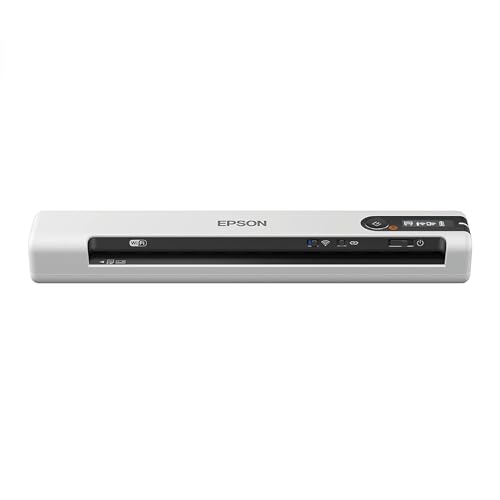
The Epson DS-80W shares nearly identical specs with the ES-60W — same 4-second scan speed, same wireless capability, same ultra-compact form factor. Where it differs is in the software bundle and target market. The DS-80W ships with Epson's Document Capture Pro software on top of ScanSmart, giving you more granular control over scan profiles, file naming conventions, and automated routing to folders or cloud services.
For Mac users who need wireless scanning in the smallest possible package, the DS-80W delivers. It scans to your Mac, iPhone, iPad, or Android device over Wi-Fi, and the 4-second page speed means you're not waiting around between documents. The scanner handles standard documents, receipts, and business cards without issues, and the output quality at 600 dpi is sharp enough for archival purposes.
The reality is that the DS-80W and ES-60W are close siblings. Your choice between them often comes down to pricing and which software features matter more to your workflow. If you find the DS-80W at a better price, grab it — you're getting essentially the same scanning hardware with a slightly different software package. The limitations are identical too: no duplex, no ADF, and no built-in battery. You'll need USB power or the optional battery accessory for untethered scanning.
Pros:
Cons:
This is the non-negotiable starting point. Not every portable scanner works seamlessly with macOS, and "Mac compatible" on the box doesn't always mean the experience is smooth. Look for scanners with native macOS drivers that support the latest version of macOS — as of 2026, that means macOS Sequoia compatibility. Epson and Brother have consistently strong Mac support, while some smaller brands lag behind on driver updates.
TWAIN and ICA driver support matters if you use professional software like VueScan, Adobe Acrobat, or DEVONthink. These protocols let third-party apps communicate directly with the scanner hardware, bypassing proprietary software. The Epson ES-50 and Canon R10 both include TWAIN drivers, making them strong choices for users embedded in professional scanning workflows. According to the TWAIN Working Group, this standard remains the most widely supported scanner interface protocol across operating systems.
Wireless scanning is the feature that separates portable scanners into two tiers. Models like the Brother DS-940DW, Epson ES-60W, ES-300W, and DS-80W scan directly to your Mac over Wi-Fi — no cable required. This is particularly useful with modern MacBooks that have limited USB-C ports and require dongles for USB-A devices.
USB-only scanners like the Epson ES-50 and Canon R10 are simpler, cheaper, and draw power from your laptop. They're the better choice if you always scan at a desk with your MacBook open. But if you scan in the field — at client sites, in courtrooms, at conferences — wireless connectivity paired with a built-in battery changes the experience entirely. The DS-940DW's Wi-Fi Direct feature deserves special mention: it creates its own network, so you can scan without any existing Wi-Fi infrastructure.
Speed matters more than you think, especially when you're scanning more than a handful of pages. The difference between 4 seconds per page (ES-60W) and 8 seconds (Doxie Go SE) doubles your scanning time across a 50-page batch. For high-volume users, the ES-300W's 25ppm with duplex scanning is in a different league entirely.
Duplex scanning — capturing both sides of a page in one pass — cuts your workload in half for double-sided documents. Only the Brother DS-940DW and Epson ES-300W offer true duplex in this roundup. If you regularly scan contracts, legal documents, or any double-sided paperwork, prioritize one of these two models. The time savings compound quickly over weeks and months of use. For more context on duplex scanning technology and which models handle it best, visit our dedicated buying guide section.
True portability means scanning without hunting for a power outlet. The Brother DS-940DW and Doxie Go SE have built-in rechargeable batteries, while the Epson ES-300W offers battery power as one of three options. The Doxie leads with 400 pages per charge, making it the endurance champion for extended trips.
USB-powered scanners like the ES-50 and Canon R10 draw from your MacBook's battery, which creates a trade-off: you're draining your laptop to power your scanner. The Canon's low 2.5W draw minimizes this impact, but it's still worth considering if you work long hours unplugged. For the most flexibility, the ES-300W's triple power option — AC, battery, or USB — covers every scenario you're likely to encounter.
Not always. While most major brands like Epson, Brother, and Canon provide macOS drivers, you often need to download them separately from the manufacturer's website. The scanners listed in this guide all have confirmed macOS compatibility as of 2026, but always verify that the latest macOS version is supported before purchasing. Some scanners ship with Windows-only software bundles and require a separate Mac download.
Yes, if the scanner has wireless capability. The Brother DS-940DW, Epson ES-60W, ES-300W, and DS-80W all support wireless scanning to iOS devices through their respective mobile apps. The Doxie Go SE, Canon R10, and Epson ES-50 require a physical connection to your Mac first, then you can transfer files to your iOS devices through iCloud, AirDrop, or other file-sharing methods.
For standard text documents, 300 dpi delivers sharp, readable results and keeps file sizes manageable. For photos, receipts with fine print, or documents you plan to enlarge, bump up to 600 dpi. All seven scanners in this guide support at least 600 dpi. Keep in mind that higher resolution means slower scan speeds and larger files, so use 300 dpi as your default and increase only when quality demands it.
It's larger than the single-sheet scanners, yes — roughly the size of a thick paperback novel. But it weighs under two pounds and fits easily in a laptop bag alongside your MacBook. The trade-off is the 20-sheet ADF and duplex scanning, features that no smaller scanner in this list offers. If you scan more than 10-15 pages at a time, the ES-300W's size is justified by the time it saves you.
Most of these scanners include OCR (optical character recognition) software in their Mac bundles. Epson's ScanSmart and Canon's CaptureOnTouch both create searchable PDFs natively. If you want more control, third-party apps like VueScan, Adobe Acrobat Pro, or the free NAPS2 work with TWAIN-compatible scanners. macOS Preview can save scans as PDFs but does not add OCR text layers — you'll need dedicated scanning software for that.
Battery life varies significantly by model. The Doxie Go SE leads with approximately 400 pages per charge. The Brother DS-940DW gets around 400 scans on a full charge under optimal conditions, though duplex scanning and Wi-Fi use reduce that number. The Epson ES-300W's optional battery handles roughly 300 scans. Real-world performance depends on scan resolution, wireless usage, and ambient temperature. Budget 20-30% less than manufacturer claims for a realistic daily estimate.
Get the Brother DS-940DW if you want wireless duplex freedom, the Epson ES-300W if volume is your priority, and don't overthink it — the best portable scanner for your Mac is the one that matches how and where you actually scan.


About James W.
A contributing writer at DigiLabsPro covering photography gear reviews, buying guides, and camera comparisons. Specializes in evaluating cameras, lenses, and accessories for photographers at the intermediate and enthusiast level looking to upgrade their kit.
You can get FREE Gifts. Or latest Free phones here.
Disable Ad block to reveal all the info. Once done, hit a button below
