The Digital Check TellerScan 240 stands as the overall top pick for check scanning in 2026, delivering reliable 75 DPM throughput with built-in inkjet endorsement that most competing units charge extra for. Check scanners remain essential hardware for banks, credit unions, and businesses processing remote deposit capture, and the market has matured enough that even budget-friendly models now offer respectable MICR accuracy and image quality.

Whether a financial institution needs a high-volume teller capture device or a small business simply wants to deposit checks without driving to the bank, the right scanner depends on throughput requirements, software compatibility, and the specific capture environment. The models reviewed here span the full range from single-feed desktop units to multi-pocket workhorses capable of processing hundreds of items per hour. For those also researching general-purpose document scanning, the best duplex scanners offer complementary functionality worth considering alongside dedicated check capture hardware.
One critical note that applies across every product in this roundup: always verify scanner compatibility with the intended financial institution or software provider before purchasing. Check scanning hardware relies on certified drivers and APIs that vary by bank and RDC platform, and even the finest hardware becomes an expensive paperweight without proper software support. The remote deposit capture ecosystem has standardized considerably since its inception, but certification requirements remain institution-specific in 2026.
Contents






The Digital Check TellerScan 240 has long been considered the gold standard in teller-window check scanning, and the 75 DPM inkjet variant remains the version to buy in 2026 for medium-to-high volume capture environments. Out of the box, the TS240 requires no assembly whatsoever — the unit arrives ready to plug in and scan, which is a genuine advantage when deploying across multiple branch locations where IT support may be limited. The integrated inkjet endorser prints transaction records directly on the back of each check as it passes through, eliminating the need for manual stamping and creating an auditable endorsement trail that regulators expect.
Build quality on the TS240 is immediately apparent when handling the unit. The redesigned exterior styling serves a functional purpose beyond aesthetics, with improved paper guides and a feed path engineered to minimize jams even with wrinkled or folded checks. Image quality at 75 documents per minute is remarkably consistent, producing clean captures of both the front face and MICR line that meet the stringent requirements of most RDC platforms. The contact image sensor technology Digital Check employs here delivers sharper results than the CIS modules found in several competing scanners at this price point, particularly when scanning checks with faded ink or light printing.
Where the TS240 truly separates itself from budget alternatives is in driver maturity and software ecosystem support. Digital Check has cultivated relationships with virtually every major banking software provider, meaning the TS240 carries certifications from more institutions than nearly any other scanner on the market. For branches processing between 200 and 500 checks daily, this model strikes the ideal balance between speed, reliability, and total cost of ownership.
Pros:
Cons:
The 50 DPM variant of the TS240 shares the same proven chassis and feed mechanism as its faster sibling but ships without the inkjet endorser, which makes it a compelling option for environments where endorsement printing is handled separately or simply not required. Small businesses running remote deposit capture through their bank's portal will find that the 50 DPM speed is more than adequate for daily batches of 50 to 150 checks, and the absence of the inkjet module means one fewer consumable to manage over the life of the device.
Image quality remains identical to the 75 DPM model since both units utilize the same contact image sensor array and optical path. The difference in throughput comes down to firmware-level speed regulation rather than any hardware compromise, which means buyers choosing the 50 DPM version are not sacrificing capture fidelity for cost savings. This makes it arguably the best value proposition in the Digital Check lineup for low-to-medium volume users. The same broad software certification portfolio applies here, so compatibility concerns are minimal regardless of which banking platform the buyer uses.
One practical consideration worth noting is that upgrading from 50 DPM to 75 DPM later requires purchasing an entirely new unit — there is no firmware unlock or field upgrade path. Buyers who anticipate growth in check volume within the next twelve to eighteen months may want to invest in the inkjet model upfront rather than face a full replacement cycle down the road.
Pros:
Cons:
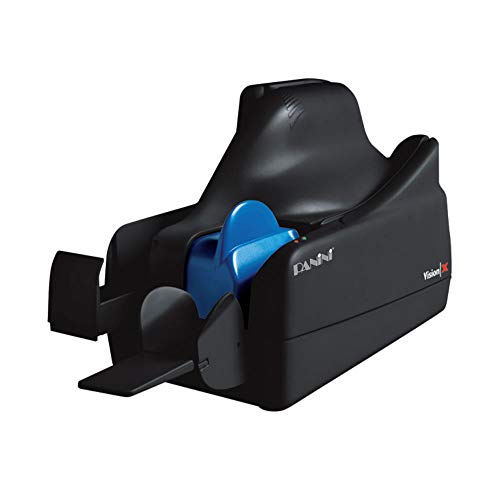
Panini has built its reputation on document handling precision, and the Vision X VX5050NJ represents the culmination of that engineering philosophy. The 50-sheet automatic document feeder accepts mixed-condition checks with remarkably few misfeeds, a capability that becomes critically important in teller environments where customers hand over wrinkled, folded, and occasionally torn documents. At 50 documents per minute, the Vision X matches the entry-level Digital Check on speed while offering what many technicians consider best-in-class image quality among scanners in this price tier.
MICR read accuracy is where the Panini truly distinguishes itself from the competition. The magnetic ink character recognition engine built into the Vision X achieves near-perfect read rates on standard E-13B and CMC-7 fonts, which translates directly to fewer manual corrections and rejected deposits in production environments. Financial institutions that have experienced frustration with MICR misreads on competing hardware frequently migrate to the Panini platform specifically for this capability, and the VX5050NJ delivers on that promise consistently across extended scanning sessions.
The 50-sheet feeder capacity is generous enough for batch processing workflows where an operator loads a stack and lets the scanner work through it unattended. Combined with the robust feed mechanism, this means fewer interruptions and higher effective throughput despite the 50 DPM rating. The VX5050NJ also handles mixed document sizes gracefully, accepting everything from personal checks to business voucher checks without requiring manual adjustment of the paper guides between items. Those who also need to scan photographs or pictures alongside documents will appreciate the scanner's versatility with various media types.
Pros:
Cons:
Canon's imageFORMULA CR-190i occupies a different tier entirely from the desktop scanners reviewed above, targeting high-volume branch banking operations that process thousands of checks daily. This is a full-sized production check transport designed to sit alongside a teller workstation or in a back-office processing center, and its throughput capabilities reflect that positioning. The CR-190i incorporates Canon's decades of imaging expertise into a purpose-built check capture platform that handles the demands of commercial banking environments with mechanical precision.
The imaging system on the CR-190i captures both sides of each document simultaneously in full color at resolutions high enough to satisfy even the most stringent image quality requirements set by the Federal Reserve and clearing houses. Canon's proprietary image processing algorithms automatically correct for skew, detect double-feeds, and enhance faded or poorly printed check faces — all in real-time without reducing throughput speed. This level of automated image cleanup reduces the number of rejected items that require manual re-scanning, which is a significant productivity factor when processing volumes measured in the thousands.
Integration with existing banking infrastructure is generally smooth, as Canon maintains active driver support and SDK documentation for the CR-190i platform. However, prospective buyers should note that the CR-190i represents a substantial capital investment compared to desktop units, and the physical space requirements are considerably greater. This scanner makes financial sense primarily for institutions processing upward of 1,000 items per day at a single location, where the speed and reliability advantages compound into meaningful labor savings over time.
Pros:
Cons:
The SmartSource Micro Elite from Burroughs occupies a unique niche in the check scanner market as the smallest scanner in its class, designed explicitly for single-feed remote deposit capture applications where desk space is at a premium. Rather than competing on throughput speed, the Micro Elite focuses on doing one thing exceptionally well: capturing individual checks as fast as they can be hand-fed into the scanner. This single-feed approach eliminates the complexity of automatic document feeders and the jams that occasionally plague batch-feed units in low-volume environments.
For small businesses, medical offices, and professional service firms that deposit between five and thirty checks per day, the Micro Elite's design philosophy makes considerable practical sense. There is no feeder tray to load, no batch to accumulate — each check is simply inserted into the feed slot, scanned in under two seconds, and ejected. The compact footprint allows the unit to sit beside a keyboard or monitor without consuming valuable workspace, and the understated design means it does not visually dominate a reception desk or customer-facing counter.
The Micro Elite's optimization for low-volume applications extends to its power requirements and maintenance profile as well. The unit draws minimal power through its USB connection and contains fewer moving parts than multi-feed alternatives, which translates to longer service intervals and lower lifetime maintenance costs. Buyers should understand, however, that the single-feed design becomes a genuine bottleneck if check volumes exceed approximately 50 items per session, as hand-feeding each document individually consumes considerably more operator time than loading a batch feeder. For those exploring other compact scanning solutions, the roundup of portable scanners for Mac covers complementary options for mobile and space-constrained workflows.
Pros:
Cons:
The TellerScan TS250 represents Digital Check's latest-generation check capture platform, and the 55IJ variant reviewed here ships with a single-line rear inkjet endorser as a standard feature. What distinguishes the TS250 series from its TS240 predecessor is the addition of native network readiness via Ethernet-over-USB, allowing institutions to switch between direct USB connection and network-attached operation without additional hardware or licensing. This flexibility is particularly valuable in branch consolidation scenarios where scanner sharing across multiple workstations reduces total equipment costs.
The TS250 platform is available in three speed tiers — 55, 75, and 120 documents per minute — all sharing the same physical chassis and feature set. The 55 DPM model reviewed here additionally supports Digital Check's SmartPVA (Smart Payment Verification and Authentication) technology, which adds an extra layer of fraud detection capability that the higher-speed models do not currently offer. The automated cleaning mode with Smart LED indicator is a thoughtful maintenance feature that alerts operators when the scanner's optical path needs attention, preventing the gradual image quality degradation that can occur with neglected cleaning schedules.
Front-feed ID capture at up to 600 DPI color resolution extends the TS250's utility beyond check scanning into identity verification workflows, allowing tellers to scan driver's licenses and identification cards through the same device. The optional ReceiptNOW Elite network-ready receipt printer integrates cleanly with the TS250 ecosystem for institutions that need printed transaction confirmations at the teller window. While the 55 DPM speed places this model in the mid-range category, the combination of network flexibility, fraud detection, and ID capture makes it a forward-looking investment for institutions planning infrastructure upgrades through 2026 and beyond.
Pros:
Cons:
The SmartSource Merchant Elite bridges the gap between the compact Micro Elite and full-sized production scanners, offering 55 DPM throughput paired with a generous 100-item automatic feeder in a single-pocket configuration. This combination makes it particularly well-suited for retail environments, property management offices, and merchant service providers who accumulate moderate check volumes throughout the day and batch-process them in one session. The 100-item feeder capacity means most businesses can load their entire daily accumulation in a single pass without needing to reload.
The Merchant Elite's feed mechanism handles mixed document sizes with impressive reliability, accepting standard personal checks, business checks, and remittance coupons without requiring manual adjustment between document types. This mixed-document capability is essential for retail environments where payment types vary unpredictably throughout the day. The scanner's single-pocket output design keeps the processing workflow simple — scanned items collect in one output tray for easy retrieval and filing, avoiding the sorting complexity of multi-pocket alternatives that some operators find confusing.
At 55 documents per minute, the Merchant Elite processes a full 100-item batch in under two minutes, making it fast enough to complete end-of-day deposits without keeping staff waiting. The scanner integrates with the broader Burroughs SmartSource software ecosystem, though as with all check scanners in this roundup, institutional certification should be confirmed before purchase. For merchants currently using the Micro Elite who find themselves outgrowing single-feed operation, the Merchant Elite represents the natural upgrade path within the Burroughs product family. Those seeking related buying guides for other technology categories can explore the full library of product reviews and recommendations.
Pros:
Cons:
The most fundamental decision in selecting a check scanner is matching the unit's documents-per-minute rating to the actual processing volume of the intended environment. Single-feed scanners like the SmartSource Micro Elite suit operations handling fewer than 50 checks per day, where the simplicity and compact size outweigh the lack of batch processing. Desktop units rated between 50 and 75 DPM serve the broad middle ground of branch banking and medium-sized business operations effectively. Production scanners like the Canon CR-190i justify their premium only when daily volumes consistently exceed several hundred items, where the speed differential compounds into measurable labor savings across a full workday.
No factor matters more than confirming that a check scanner is certified for use with the buyer's specific banking software or RDC platform. Check scanner manufacturers maintain certification lists with supported financial institutions and software providers, and purchasing an uncertified model typically means the bank's support team will not assist with setup or troubleshooting. Digital Check generally maintains the broadest certification portfolio, followed closely by Panini, while some Burroughs models may have more limited institutional support. Always obtain written confirmation of compatibility from the financial institution before committing to a purchase, as return policies on specialized banking equipment are often restrictive.
Integrated inkjet endorsement prints a customizable stamp on the reverse side of each check as it passes through the scanner, typically including the bank's routing information, transaction date, and deposit account number. Regulatory requirements for endorsement printing vary by institution and transaction type, so buyers should determine whether their bank mandates physical endorsement before deciding between inkjet and non-inkjet models. Scanners with built-in inkjet modules carry higher upfront costs and ongoing consumable expenses for replacement cartridges, but they eliminate the manual stamping step that would otherwise be required for compliance.
Traditional check scanners connect via USB to a single dedicated workstation, which is sufficient for most small business and single-teller applications. The newer Digital Check TS250 series introduces Ethernet-over-USB networking that allows a single scanner to serve multiple workstations, potentially reducing equipment costs in branch environments where scanner utilization at any individual station is low. Buyers planning for 2026 and beyond should weigh the long-term value of network-ready hardware against the lower upfront cost of USB-only models, particularly in environments where workstation configurations may evolve over the scanner's expected service life of five to seven years.
Single-feed scanners accept one check at a time, requiring the operator to manually insert each document individually. Batch-feed scanners include an automatic document feeder that holds multiple checks and processes them sequentially without operator intervention. Single-feed units like the SmartSource Micro Elite are best for low-volume environments under 50 checks per day, while batch-feed models with 50 to 100 item capacity serve medium and high-volume operations more efficiently.
No, check scanners require specific driver certification from each financial institution or RDC software provider. A scanner that works perfectly with one bank's system may be entirely incompatible with another's. Buyers should always contact their financial institution to obtain a list of approved scanner models before making a purchase, as returning specialized banking equipment can be difficult and costly.
MICR (Magnetic Ink Character Recognition) accuracy directly affects the efficiency of check processing workflows. Scanners with high MICR accuracy, such as the Panini Vision X, correctly read account and routing numbers from the magnetic ink line on the first pass, minimizing the need for manual data correction. Poor MICR accuracy leads to rejected deposits, reprocessing delays, and increased labor costs that compound over time in high-volume environments.
DPM stands for Documents Per Minute and represents the scanner's maximum throughput speed when processing standard-sized checks. A 75 DPM scanner can theoretically process 75 checks per minute under ideal conditions, though real-world throughput may be slightly lower depending on document condition, image processing settings, and operator loading speed. DPM ratings provide a useful basis for comparing scanner speed across different manufacturers and models.
The necessity of inkjet endorsement depends on the specific requirements of the financial institution processing the deposits. Some banks mandate physical endorsement printing on the back of each deposited check for regulatory compliance, while others accept electronic endorsement records without requiring a physical stamp. Scanners with integrated inkjet endorsers add ongoing consumable costs for replacement cartridges but provide automatic endorsement that satisfies the strictest compliance requirements.
Quality check scanners from established manufacturers like Digital Check, Panini, and Burroughs typically deliver five to seven years of reliable service with proper maintenance, including regular cleaning of the optical path and timely replacement of wear parts like feed rollers. The automated cleaning reminders found on newer models like the Digital Check TS250 help maintain optimal performance throughout the scanner's service life by alerting operators when maintenance is due.
Match the scanner to the volume, confirm the bank certification, and let everything else follow from there — the best check scanner is simply the one the institution actually supports.


About James W.
A contributing writer at DigiLabsPro covering photography gear reviews, buying guides, and camera comparisons. Specializes in evaluating cameras, lenses, and accessories for photographers at the intermediate and enthusiast level looking to upgrade their kit.
You can get FREE Gifts. Or latest Free phones here.
Disable Ad block to reveal all the info. Once done, hit a button below
