Which ID card printer actually delivers professional-quality badges without wasting your time or budget? If you've been searching through spec sheets and confusing jargon, the answer is simpler than you think — the Zebra ZC300 Dual Sided ID Card Printer is the top pick for 2026, and the rest of this guide breaks down exactly why, along with six other serious contenders worth your consideration.
ID card printers are specialized machines, and the gap between a great one and a mediocre one shows up fast — in card durability, print resolution, encoding flexibility, and the hidden cost of consumables. Whether you're outfitting a corporate office, a school district, a healthcare facility, or a government agency, choosing the right printer saves you money, headaches, and embarrassment at the front desk. According to the National Institute of Standards and Technology (NIST), identity credentialing standards continue to evolve, making card quality and encoding capability more important than ever in 2026.
This guide covers seven of the best ID card printers available right now, tested and evaluated for real-world performance. You'll find detailed reviews, a buying guide covering the key features to look for, and answers to the most common questions buyers ask. Before committing to any printer, visit our buying guide section to understand the full landscape of professional printing equipment. And if you're also thinking about consumables for your broader print setup, our guide to the best remanufactured ink cartridges for 2026 is worth a read.
Contents





The Zebra ZC300 earns its place at the top of every serious shortlist for 2026. Zebra has been building industrial-grade printers for decades, and that expertise is on full display here. The ZC300 handles both color and monochrome printing seamlessly, which means one machine covers your full range of card types — from full-color employee badges to simple black-and-white access cards. That flexibility alone justifies the investment for most organizations running mixed card programs.
What sets the ZC300 apart in day-to-day operation is its highly intuitive LED/LCD interface. The display uses icons, animations, and multilingual text prompts that genuinely guide even a first-time operator through setup, consumable changes, and troubleshooting. You don't need an IT department standing by. The encoding options are equally impressive — magnetic stripe, contactless smart card, and custom third-party encoder support via the ZIP Pocket and updated SDKs make this a genuinely future-proof platform. If your access control system changes in three years, the ZC300 adapts.
Print quality is sharp and consistent across a full ribbon cycle. Cards printed on the ZC300 have the clean, professional look you'd expect from a machine used in corporate lobbies and secure facilities. Connectivity is standard USB with optional Ethernet, and the printer integrates cleanly with most major card design software platforms. For organizations that need a reliable, flexible, and operator-friendly printer day after day, the ZC300 is the definitive choice in its price segment for 2026.
Pros:
Cons:
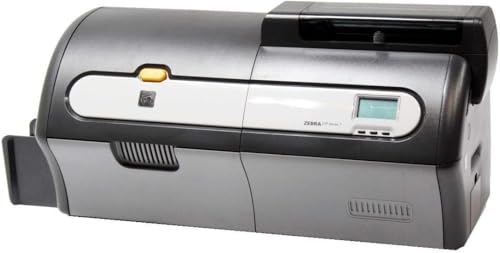
The Zebra ZXP Series 7 is a workhorse. This is the printer that government agencies, large universities, and major healthcare networks reach for when they need to produce hundreds or thousands of cards with no tolerance for downtime or quality inconsistency. Available here as an Amazon Renewed unit — professionally inspected, tested, and cleaned by qualified vendors — it delivers enterprise-level performance at a significantly reduced price point compared to buying new.
The ZXP Series 7 features USB and Ethernet connectivity as standard, making it straightforward to integrate into your existing network infrastructure. The dual-sided capability means full personalization on both card faces in a single pass, which is critical for organizations printing photo IDs with data on the back. Print throughput on the ZXP Series 7 is among the highest in its class, making it the right machine when you're facing a large-scale card issuance project or a regular high-volume print schedule. The build quality is unmistakably industrial — this machine is designed to operate in environments where reliability is non-negotiable.
Choosing a Renewed unit does require some due diligence on your part. Verify the remaining warranty terms and confirm the vendor's inspection standard before purchasing. That said, Amazon's Renewed program has a solid track record, and for buyers who need professional-grade dual-sided printing without the new-unit price tag, the ZXP Series 7 Renewed represents outstanding value in 2026.
Pros:
Cons:
If print quality is your non-negotiable priority, the Fargo HDP5000 is in a class by itself. This machine uses High Definition Printing (HDP) technology, which means the dye-sublimation ribbon prints onto a clear retransfer film before that film is fused to the card surface — rather than printing directly onto the card. The result is true edge-to-edge printing with zero white borders, richer color saturation, and significantly better resistance to abrasion and fading over the card's lifespan. Cards off the HDP5000 look and feel premium in a way that direct-to-card machines simply cannot match.
This bundle from Card Imaging includes the full supply package you need to start immediately: YMCK color ribbon, retransfer film, Card Imaging design software, and 100 PVC cards. That's a meaningful advantage for buyers who don't want to source consumables separately from day one. The HDP film also provides a measurably more durable card — relevant for cards that see daily physical use, such as employee access badges or student IDs that go in and out of wallets repeatedly. The dual-sided capability covers both faces in a single pass.
The HDP5000 is a professional machine that rewards users who care about credential quality. Setup requires some familiarity with retransfer printing mechanics — this isn't the plug-and-play experience of a direct-to-card printer. But for organizations where card quality directly reflects organizational credibility, the learning curve is worth it. If you're also working with design tools for your card templates, check out our guide to the best tablets for Adobe Illustrator in 2026 for complementary workstation upgrades.
Pros:
Cons:
Not every organization needs dual-sided printing, and not every office has the budget or space for an enterprise-grade machine. The Fargo DTC1250e is built specifically for small to mid-sized operations that need fast, high-quality single-sided ID cards with minimal setup friction. Fargo markets this as the fastest printer in its class for single-sided color output, and in real-world use, the speed difference is noticeable — you're not standing at the printer waiting while a new hire stands awkwardly at reception.
The DTC1250e uses dye sublimation and thermal transfer technology, producing visually rich, high-quality credentials on demand. The interface is deliberately user-focused — plug-and-play operation means your HR coordinator can load consumables and print cards without reading a manual. USB connectivity keeps the setup simple. For tabletop deployment in a typical office environment, the DTC1250e fits cleanly on a desk without dominating the workspace.
Where the DTC1250e makes trade-offs is obvious: single-sided only, no encoding options in the base configuration, and limited throughput compared to the ZXP Series 7 or even the ZC300. But for a small business, a nonprofit, a clinic, or a school office that issues cards a few dozen at a time, those limitations are irrelevant. This machine delivers on its core promise — fast, quality, hassle-free card printing — at a price point that makes sense for operations that don't need industrial capacity.
Pros:
Cons:
The Evolis Primacy 2 is the 2022 successor to the widely respected Primacy 1, and it improves on its predecessor in meaningful ways while retaining the qualities that made the original a favorite in European and North American markets. Evolis printers have a distinct design aesthetic — clean, modern, and professional-looking on a desktop — and the Primacy 2 continues that tradition. This isn't just about looks: the machine is engineered to be operator-friendly while delivering consistent output across a long service life.
The bundle configuration included here is what makes this listing exceptional value in 2026. You receive a color ribbon, 100 blank PVC cards, and Card Imaging card design software right in the box. Direct-to-card dye sublimation printing technology delivers vibrant, durable results without the complexity of retransfer film systems. Dual-sided capability means you can print photo, name, and title on the front and barcode, department data, or policy text on the back — all in a single automated pass.
The Primacy 2 sits in the professional mid-tier, positioned above entry-level machines but without the complexity overhead of HDP or enterprise-level systems. It's a strong choice for HR departments, hospitality groups, security contractors, and educational institutions that need dual-sided professional output with a reasonable budget and a clean out-of-box experience. The transition from Primacy 1 to Primacy 2 also brings updated driver and software compatibility, which matters for organizations running modern operating systems.
Pros:
Cons:
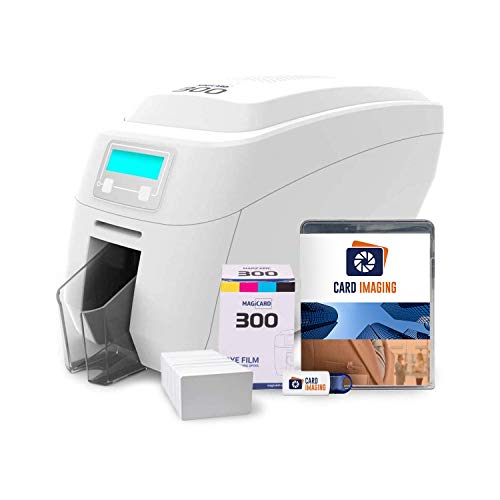
Magicard is a UK-based manufacturer with a long track record in the ID card printer market, and the Magicard 300 is their most accessible dual-sided offering. What immediately distinguishes this machine from competitors in a similar price range is the included free technical support from Magicard's own expert team. For organizations where no one on staff has ever set up an ID card printer before, having a direct line to a support specialist during initial setup is genuinely valuable — and it's a rarity in this product category.
The bundle configuration is competitive: color ribbon, 100 PVC cards, and Card Imaging design software are all included. The LCD display provides clear, easy-to-read messages that walk operators through every stage of the printing process, from loading cards to changing ribbons to diagnosing errors. Dual-sided printing means professional, information-rich cards without manual flipping, and the machine handles standard CR80 PVC cards reliably. For organizations printing their first batch of employee badges or event credentials, the Magicard 300 removes most of the friction from the learning curve.
In terms of print quality, the Magicard 300 performs solidly for its price tier — you get clean, vibrant color output that looks professional in real-world use. It's not competing with the HDP5000's retransfer quality, but for standard access cards and employee IDs, the output is entirely appropriate. If you're building out a complete office credential program and want to pair your printer investment with updated design workstations, our guide to the best graphics cards for photo editing in 2026 covers the hardware side of card template design workflows.
Pros:
Cons:
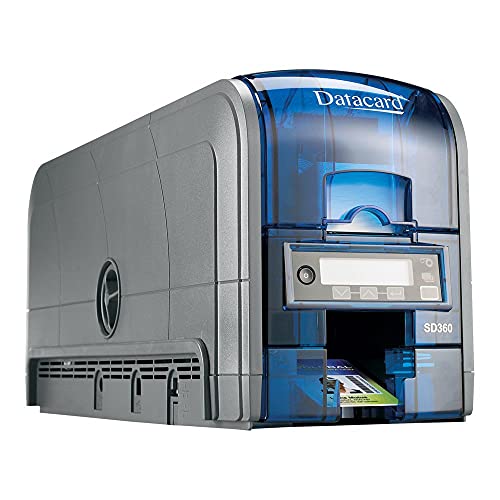
Datacard — now part of the Entrust family — has been supplying ID card printers to government agencies, financial institutions, and large enterprises for decades. The SD360 is a professional-grade duplex printer built to operate in demanding environments where card issuance is mission-critical. The 100-card input hopper is a practical feature that reduces how often an operator needs to reload cards during large batch runs, and the USB and Ethernet connectivity options give your IT team the integration flexibility they need.
The SD360 runs on PC platform with standard desktop form factor deployment. One important note for buyers: this unit includes only a driver CD, not printing software. You'll need a compatible card design software license separately — factor that into your total cost of ownership. For organizations already running a card management system, this is a non-issue. For buyers starting from scratch, confirm your software stack before purchasing.
Where the SD360 earns its reputation is in reliability over long operational cycles. This is a printer that institutional buyers specify for multi-year deployments, not a machine you replace every two years. The duplex module handles dual-sided printing with the mechanical precision you'd expect from an Entrust-lineage product. If your organization operates at scale and needs a printer with an institutional pedigree and a robust supply chain for replacement parts and consumables, the SD360 belongs on your evaluation list for 2026.
Pros:
Cons:
The single most important technical decision you'll make when buying an ID card printer is the print technology. Direct-to-card (DTC) printing applies dye-sublimation color directly onto the card surface. It's faster, simpler, and less expensive per card, making it the right choice for most standard applications — employee badges, membership cards, event credentials. The trade-off is that direct-to-card printing leaves a small unprinted border around the card edge, and the print layer sits on the card surface where it's exposed to wear.
Retransfer (HDP) technology, used in the Fargo HDP5000, adds an intermediate step: the image is printed onto a clear film, which is then thermally fused to the card surface. This produces true edge-to-edge printing with no white border, significantly better scratch resistance, and the ability to print on cards with uneven surfaces — including smart cards and contactless card bodies. The cost is higher per card due to dual consumables (ribbon plus retransfer film), and setup is more involved. For organizations where credential quality is a security or prestige requirement, retransfer is worth the premium.
If your ID program puts photo, name, title, and department on the front and barcode, emergency contact, or policy text on the back, you need a duplex printer. Single-sided printers like the Fargo DTC1250e are faster per card and cost less upfront, but they require manual card flipping for any back-side content — which is impractical at any meaningful volume. Most professional ID programs in 2026 require dual-sided capability, and the price premium over single-sided models is narrower than it used to be. Unless you have a specific use case that's genuinely single-sided, buy duplex.
A blank visual ID is only part of the picture for most secure environments. If your building access control, time-and-attendance, cashless payment, or transit systems use magnetic stripe or smart card technology, your printer needs the corresponding encoding module. The Zebra ZC300 leads this category with support for magnetic stripe, contact smart card, and contactless (NFC/HF RFID) encoding — all in a single machine. Before you buy, map out every system your card needs to interface with and confirm the printer's encoding options cover them all. Retrofitting encoding capability after purchase is possible on some models but typically expensive and complicated.
USB connectivity is universal across this category, but Ethernet is the practical standard for any networked office environment where multiple workstations need to send print jobs to a shared printer. Verify that the printer you're considering is compatible with your existing card design software — or plan the cost of a compatible software license into your budget. The Datacard SD360 is a clear example: excellent hardware, but no software included. Beyond connectivity, calculate your total cost of ownership over three years, factoring in ribbon costs, card stock, and any maintenance contracts. Cheaper upfront machines sometimes carry significantly higher per-card costs that erode their initial price advantage within the first year. Also consider print volume: high-volume printers designed for thousands of cards per month will have lower per-card costs but higher upfront investment — similar to how our guide on best screen printing inks in 2026 breaks down professional versus consumer-grade consumable economics.
For most small businesses, the Fargo DTC1250e is the ideal starting point if you only need single-sided printing, while the Magicard 300 bundle is the best dual-sided option. Both are designed for low to moderate volume, easy setup, and straightforward daily operation without requiring dedicated IT support. The Magicard 300's included free technical support is a particular advantage for first-time buyers.
Direct-to-card printing applies dye-sublimation color directly onto the card surface, leaving a small unprinted border at the card edge and placing the print layer where it's exposed to surface wear. Retransfer (HDP) printing first prints onto a clear film and then thermally fuses that film to the card, producing edge-to-edge prints with superior scratch resistance and more vivid color. Retransfer costs more per card but delivers a noticeably higher quality credential, making it the standard for government, financial, and high-security identification programs.
Most professional ID card printers are compatible with major card design platforms such as Zebra CardStudio, Fargo's ID Works or Asure ID, Evolis CardPresso, and third-party options like Card Imaging software. However, compatibility is not universal — always verify driver and software support before purchasing. The Datacard SD360 notably does not include any software with the unit, requiring a separate purchase. When in doubt, contact the manufacturer or reseller to confirm your software environment is supported.
Yes, most professional ID card printers support optional encoding modules that can be factory-installed or retrofitted. The Zebra ZC300 offers the broadest encoding flexibility in this roundup, supporting magnetic stripe, contact smart card, and contactless NFC/RFID encoding. When evaluating encoding options, identify every system your issued cards need to interact with — access control, time-and-attendance, payment, transit — and confirm the printer model supports all required encoding standards before purchasing. Adding modules post-purchase is possible but typically more expensive than buying with the required modules from the start.
Print speed varies significantly by printer model and print mode. Entry-level single-sided printers like the Fargo DTC1250e typically produce 20–30 color cards per hour. Professional dual-sided machines like the Zebra ZXP Series 7 can exceed 250 mono cards per hour or around 120 dual-sided color cards per hour under optimal conditions. Retransfer printers like the HDP5000 are slower due to the additional film fusion step. Always check the manufacturer's rated throughput for your specific print mode — color dual-sided speeds are typically the most relevant benchmark for real-world ID programs.
No. ID card printer ribbons are proprietary and brand-specific — a Zebra ribbon will not work in a Fargo machine, and vice versa. Even within a brand, different printer models use different ribbon formats. This is an important factor in your total cost of ownership calculation: some brands have broader distribution networks and more competitive consumable pricing than others. Before committing to a printer platform, research the ongoing ribbon and card stock costs for that specific model in your region, as consumable availability and pricing can vary considerably.
The right ID card printer for your organization in 2026 comes down to three things: print technology, volume requirements, and encoding needs. Start with the Zebra ZC300 if you want the best all-around performer, move up to the HDP5000 if quality is paramount, or keep it straightforward with the Fargo DTC1250e for smaller operations — then check current pricing on Amazon to lock in the best deal before stock changes.


About Editorial Team
The DigiLabsPro editorial team covers cameras, lenses, photography gear, and creative technology with a focus on helping photographers make informed buying decisions. Our reviews and guides draw on hands-on testing and research across a wide range of equipment, from entry-level beginner kits to professional-grade systems.
You can get FREE Gifts. Or latest Free phones here.
Disable Ad block to reveal all the info. Once done, hit a button below
