Laptop batteries are rated for an average of just 300 to 500 charge cycles — meaning most heavy users face battery degradation within two to three years of purchase, long before the rest of the laptop wears out. This raises a genuinely useful question: can laptop work without battery, and if so, is it a viable long-term setup? Our team has tested this across multiple machines and the answer, in most cases, is a clear yes. Understanding how this works is particularly valuable for photographers and creatives who use laptops at fixed editing stations. For a broader look at laptop hardware and buying decisions, our laptop guides section is a solid starting point.

A laptop battery's job is to store power for use away from a wall outlet. When portability isn't a priority — like at a dedicated photo editing desk — the battery shifts from essential to optional hardware. The power adapter (also called an AC adapter) pulls electricity directly from the wall and routes it to the laptop's internal components. Most modern laptops handle this cleanly, with the battery slot left empty or holding a dead unit without any negative performance impact.
Photographers who spend hours at a fixed workstation — following workflows like those covered in our guide on taking professional headshots — often find that a reliable, tethered laptop setup works just as well as any desktop. The sections below cover the full process, real costs, common myths, and practical tips for making the most of an AC-only setup.
Contents
The process of using a laptop without its battery is simpler than most people expect. No special software or technical expertise is required — just a working AC adapter and a few quick checks before getting started. Our team has walked through this on both Windows and macOS machines with consistent results across different brands and price points.
Before removing a battery, a few things are worth verifying:
Pro tip from our team: Before committing to battery removal, simulate AC-only behavior using the laptop's power management settings to cap charging at a low percentage. This tests the setup without voiding any warranty or touching the hardware.
For laptops with a physically removable battery, the process is straightforward:
If the laptop boots and runs normally, AC-only operation is confirmed viable for that machine. Most Windows laptops display a "no battery detected" notification in the system tray — this is expected behavior, not a hardware error. Performance and processing speed remain identical to battery-powered operation in this state.
Not every use case suits AC-only operation. Our team's experience is that the decision comes down almost entirely to how and where the laptop is actually used on a regular basis.
Battery-free operation makes real sense in several scenarios:
For photographers, this setup is particularly practical. Anyone spending sessions at a fixed workstation running quick edits in Lightroom doesn't need portability — and a stable, wall-powered laptop removes one potential source of workflow interruption entirely.
There are equally valid situations where a working battery isn't negotiable:
Our team's position is that AC-only operation is a practical tool, not a universal upgrade. It solves specific problems well and creates new ones when applied outside the right context.

One of the most common reasons people look into whether a laptop can work without battery comes down to money. Replacement batteries vary widely in price, and the math doesn't always favor a repair. Our team pulled together a general cost comparison based on typical market pricing to make that decision easier.
| Laptop Type | OEM Battery Cost | Third-Party Cost | Estimated Battery Lifespan |
|---|---|---|---|
| Budget laptop (under $300) | $50–$90 | $20–$45 | 2–3 years (third-party) |
| Mid-range laptop ($300–$800) | $70–$120 | $35–$70 | 2–4 years (third-party) |
| Premium or business laptop | $100–$180 | $50–$100 | 3–5 years (OEM) |
| Gaming laptop | $120–$200 | $60–$110 | 2–4 years (third-party) |
| MacBook (Apple service) | $129–$199 | Not applicable (sealed) | 3–5 years (Apple service) |
For a laptop purchased used under $200, spending $80–$120 on a replacement battery is a hard sell — especially when the machine sits permanently on a desk. In those cases, continuing on AC power alone often makes cleaner financial sense than any repair option.
On higher-end machines used for professional photography or video work, investing in a quality replacement battery usually pays off over time. The same cost-benefit thinking that applies to photography gear decisions — explored in our guide on where to sell used camera equipment — applies here too: knowing the real value of older hardware drives smarter choices.
Worth noting: Before purchasing a third-party replacement battery, checking whether the manufacturer still offers OEM (original equipment manufacturer) options is a worthwhile step — OEM batteries typically last longer and carry better safety certifications than no-name alternatives.
A surprising amount of conflicting information surrounds laptop batteries and AC-only operation. Our team has encountered the same myths repeatedly across tech forums and support conversations, so here's a clear breakdown of what's actually true.
This is false for the majority of modern laptops. As long as the AC adapter delivers the correct voltage and wattage, the machine can boot and run without any battery present. The battery is a backup power source — not a startup requirement. According to Wikipedia's overview of laptop hardware, modern laptops treat the AC adapter as the primary power source, with the battery functioning as secondary and supplemental.
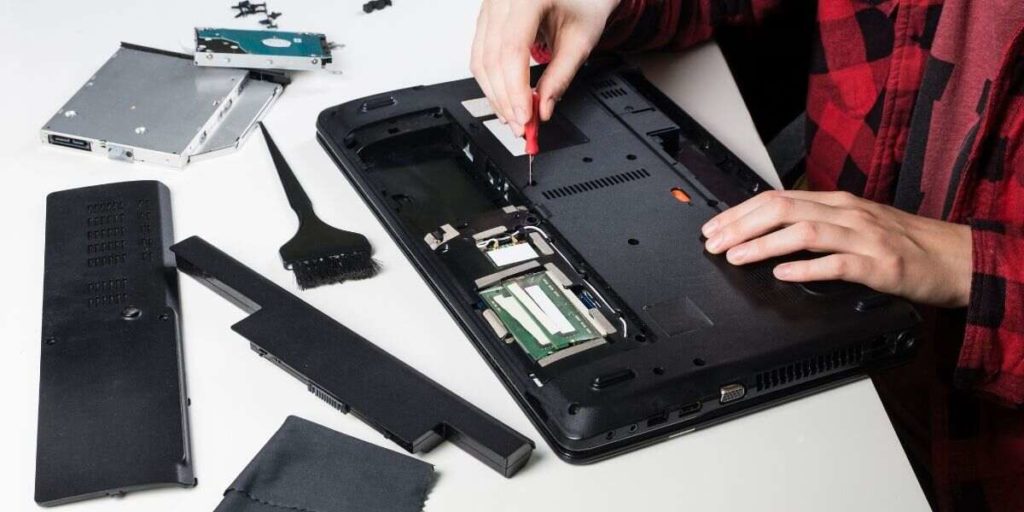
The battery-free question looks very different depending on who is asking and how they use their machine. Our team works with both occasional home users and professional creatives, and the gap in priorities is significant enough to warrant separate guidance.
For most home users — people who browse the web, manage a small photo library, or handle light document work — battery-free operation at a fixed desk is almost always fine. The main requirements are a reliable AC adapter and a stable wall outlet.
Beginners getting started with photography who are working through resources like our digital photography tips for beginners guide are typically stationed at a desk anyway. A laptop without a battery handles these kinds of workflows without any meaningful issues.
Two things beginners should be aware of in this setup:
Professional photographers and videographers have more demanding considerations. High-resolution RAW file editing, running software like Lightroom or Capture One, and managing large photo archives place serious load on a processor — including for precision tasks like those covered in our guide on converting JPG to PNG without losing quality.
For these workflows, the question isn't just whether the laptop will run — it's whether it will run consistently and safely under sustained load for hours at a stretch. Our team recommends that professionals either invest in a quality replacement battery or add an uninterruptible power supply (UPS — a device that provides short-term backup power during outages) to any AC-only setup handling critical files.
Our team has found: Certain professional-grade laptops — including select Lenovo ThinkPad models — explicitly support AC-only operation through BIOS settings, treating battery-free use as a designed and supported configuration rather than a workaround.
Theory aside, real-world usage patterns tell a clearer story. Our team has seen and used several configurations where removing the battery made the laptop significantly more practical and cost-effective.
One of the most common battery-free scenarios is the desktop replacement — an older, higher-spec laptop permanently stationed at a desk. These machines often carry batteries that have degraded past usefulness, and replacement costs frequently exceed the machine's resale value.
By removing a dead or swollen battery, the laptop gains a marginal improvement in internal airflow, runs slightly cooler, and continues to operate at full speed on AC power. Many setups in this category also include an external keyboard, mouse, and monitor — effectively turning an aging laptop into a capable desktop workstation at a fraction of the cost of buying a new machine entirely.
Our team has observed photographers running dedicated editing stations built around older laptops — machines with capable processors and sharp displays that still handle post-shoot culling, card management, and export workflows comfortably. For context on how storage media fits into this kind of setup, our comparison of SanDisk Ultra vs. Extreme SD cards covers the broader question of matching gear to actual workflow demands.
Videographers reviewing footage or handling rough cuts at a fixed desk share the same dynamic. Portability isn't needed, and the battery becomes dead weight — sometimes literally, when a swollen unit adds unwanted mass to a chassis that never moves. Removing it keeps the machine cooler and the workspace cleaner during extended creative sessions.
Whether the goal is to test battery-free operation or to extend the life of a laptop that still has a functioning battery, several concrete steps produce immediate results with minimal effort or cost.
For those keeping a working battery in the machine, a few consistent habits extend its usable lifespan considerably. Keeping charge levels between 20–80% is widely cited practice that reduces electrochemical stress on lithium cells over repeated cycles.
Our team finds that applying the same care to laptop health as to other photography gear tends to pay off over time. Just as photographers track equipment-specific metrics — like those covered in our guide on how to check a camera's shutter count — monitoring laptop battery cycle count and health is a low-effort habit that helps avoid expensive surprises down the road.
For AC-only setups running sustained workloads, keeping ventilation slots clear and using a cooling pad are both practical additions. Consistent airflow matters more than usual when the battery isn't present to help absorb voltage regulation work from the adapter.
Most can, but not all. Laptops with physically removable batteries generally handle AC-only operation without issue. However, many ultrabooks and thin-and-light models have batteries soldered to the motherboard, making removal impractical without professional service. A smaller number of older models also have firmware that requires battery detection before the machine will boot. Checking the specific model's documentation before attempting any removal is strongly recommended.
In most cases, no. Running on AC power without a battery does not damage the motherboard or other components, provided the AC adapter is correctly rated for that laptop model. The main risks are power surges — mitigated by a surge protector — and instant shutdowns if power is interrupted unexpectedly. Adding an uninterruptible power supply (UPS) to the setup addresses the shutdown risk for anyone handling critical work or large files.
No. A visibly swollen battery — one that appears puffed up, distorted, or is causing the laptop chassis to warp — should be removed as soon as safely possible. Swollen lithium batteries can press against internal components, crack the chassis, and in rare cases pose a fire risk. Disposal at an electronics recycling facility is the recommended approach; most major electronics retailers accept dead lithium batteries at no charge.
Running a laptop without a battery is a practical, well-supported option for anyone who doesn't need portability — and knowing this can save a meaningful amount of money on unnecessary repairs. Our team encourages anyone dealing with a dead or aging battery to run a quick AC-only test before committing to a replacement; it's a five-minute process that often settles the question entirely. For more guidance on getting the most from laptop hardware and photography gear alike, browsing our full laptop guides section is a great concrete next step.


About Editorial Team
The DigiLabsPro editorial team covers cameras, lenses, photography gear, and creative technology with a focus on helping photographers make informed buying decisions. Our reviews and guides draw on hands-on testing and research across a wide range of equipment, from entry-level beginner kits to professional-grade systems.
You can get FREE Gifts. Or latest Free phones here.
Disable Ad block to reveal all the info. Once done, hit a button below
