Have you ever looked at your monthly cable bill and wondered if there's a better way? There is — and knowing how to hook up a TV antenna is your first step toward free, over-the-air (OTA) broadcasts in crystal-clear HD. The process is more straightforward than most people expect, and the payoff is real: local news, major network programming, and live sports delivered to your TV without a subscription fee. This guide walks you through every stage, from picking the right antenna to keeping it performing at its best long after installation. For more practical tech and visual media guides, browse our photography articles section.
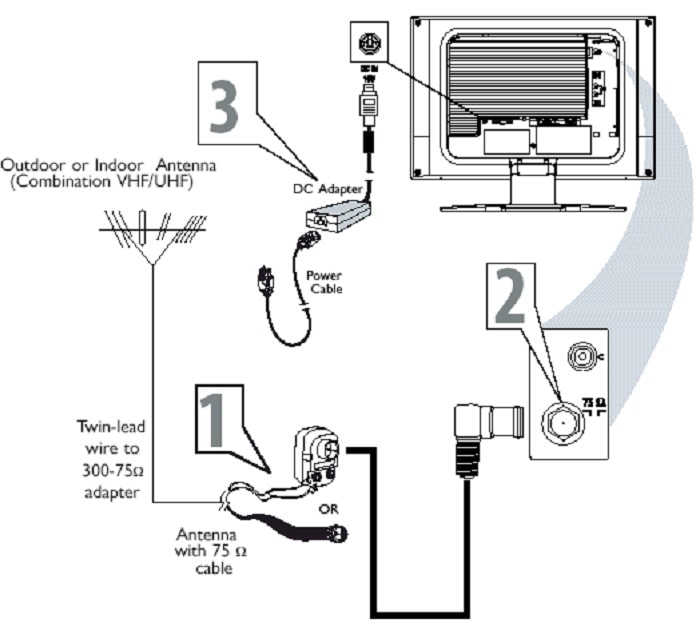
Over-the-air television uses digital broadcast signals transmitted from local towers. Your antenna captures those signals and passes them through a coaxial cable to your TV's built-in tuner, which decodes them into picture and sound. No internet connection, no monthly fees — just a direct line between you and the broadcast tower. Your results depend on where you live, how you position your antenna, and how cleanly you make every connection.
Whether you're working with a compact flat indoor model or a directional unit on your roof, the core principles are the same. Read through this guide once before you pick up a single tool. A few minutes of planning saves a lot of troubleshooting later.
Contents
If you live within 30 to 35 miles of your nearest broadcast towers, an indoor antenna is almost certainly enough. These compact, flat units mount on a window or wall and require zero complex installation. They work well in apartments, rentals, and any situation where you want a low-commitment setup. Most modern flat indoor antennas cover both the VHF (Very High Frequency, channels 7–13) and UHF (Ultra High Frequency, channels 14 and above) bands, giving you broad channel coverage from a single device.
The trade-off is sensitivity. Walls, building materials, and distance from windows all absorb signal. If your TV room faces away from the broadcast towers, or if your building uses concrete or metal construction, you'll pick up fewer channels. Position your antenna near a window pointed toward the towers, run a full channel scan, and see what comes in. If results disappoint after repositioning, it's a clear sign you need more antenna power.

Homes more than 35 miles from towers, or in hilly or heavily wooded terrain, benefit from an outdoor antenna. These larger directional units mount on rooftops, attics, or exterior walls and pull in signals that an indoor unit simply cannot grab. A properly aimed outdoor antenna can receive signals from 50 to 100 miles away, depending on the model and terrain. Rural households and anyone who loses signal on stormy days will find an outdoor setup far more reliable. For details on maximizing directional antenna performance, see our guide on how to improve VHF antenna reception.
| Feature | Indoor Antenna | Outdoor Antenna |
|---|---|---|
| Typical range | Up to 35 miles | 35–100+ miles |
| Installation difficulty | Easy (plug and play) | Moderate (roof or attic mount) |
| Weather impact | Low | Higher — requires weatherproofing |
| Signal strength | Good in urban areas | Strong in rural and suburban areas |
| Typical cost | $15–$60 | $30–$150+ |
Gather everything before you begin. You need your antenna, a coaxial cable (RG6 is the standard for home use — it handles signal loss better than the older RG59 type), and a compass or a free antenna-pointing app on your phone to orient your antenna toward local towers. If you plan to feed more than one TV, pick up a coaxial splitter and a signal amplifier to compensate for the split. Look up your local broadcast towers through the FCC's online search tool to confirm which direction to aim and which channels to expect. Going in with that information cuts setup time dramatically.
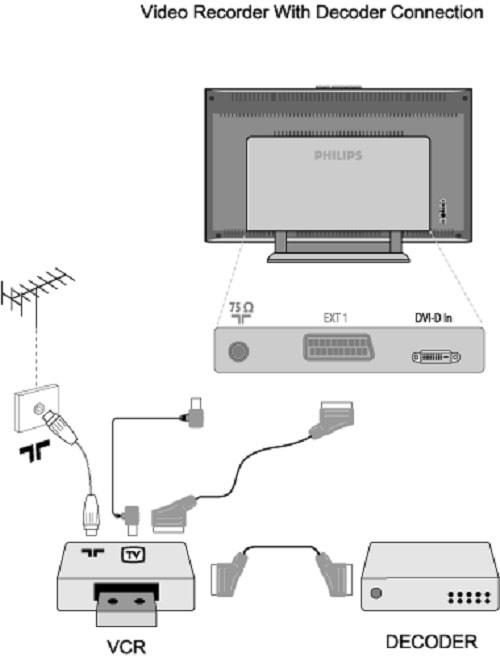
Run your coaxial cable from the antenna to the port labeled "ANT IN" or "RF IN" on the back of your TV. Hand-tighten the connector — finger-tight is exactly right, and over-tightening can damage the port threads. Once connected, open your TV's settings menu and find "Channel Scan," "Auto-Tune," or "Antenna Setup" (the label varies by brand). Always run a full channel scan, not a quick or partial one, to ensure your TV finds every available broadcast. The scan takes two to five minutes. When it finishes, all available channels appear in your TV's guide, ready to watch.
Pro tip: After your first successful scan, write down every channel you received. If a storm or repositioning causes channels to vanish, you'll know exactly what you had before and can diagnose what changed.
Poor placement is the single most common reason people struggle with antenna reception. Tucking your antenna behind a TV, inside a cabinet, or in a corner pointing the wrong direction will cost you channels. Broadcast signals travel in a straight line from the tower — anything in that path degrades what your antenna receives. If you're using a directional outdoor antenna, aim it toward the highest concentration of broadcast towers in your area. Most major markets have multiple towers clustered within a narrow arc; pointing toward that cluster is more effective than chasing any one channel's signal.
Height also matters more than people realize. Moving an indoor antenna from desk level to the top of a window frame can add several channels to your scan. For outdoor units, every foot above the roofline is a foot fewer obstructions between you and the towers.
Using the wrong cable type quietly degrades your signal. Long runs of older RG59 cable lose signal over distance. For any cable run longer than 25 feet, use RG6. Loose connectors bleed signal too — if your coaxial fitting feels wobbly, disconnect it, inspect the center pin, and reconnect firmly. Avoid adding a splitter unless you genuinely need to feed multiple TVs, because each split reduces signal strength by roughly half. When a splitter is necessary, pair it with a signal amplifier. Our article on how to choose and install a TV signal booster covers the right amplifier for different setups.
Indoor antennas need very little attention. Wipe them down occasionally to remove dust, which can affect flat-panel reception slightly over time. More importantly, re-scan for channels every few months. Broadcasters periodically shift frequencies or launch new subchannels, and a fresh scan ensures your TV's guide stays current. If you rearrange furniture or move the antenna for any reason, put it back in its tested position — even small displacement affects reception more than you'd expect.
Outdoor antennas take real punishment from the weather. Inspect your outdoor unit at least once a year. Look for corrosion at coaxial connection points, loose mounting hardware, bent elements (the horizontal metal rods), and cracked weatherproofing around any cable entry points. Apply coaxial connector sealant — available at any hardware store — to every outdoor connection. Moisture infiltrating the cable is the leading cause of outdoor antenna performance decline. If you notice pixelation or dropped signals only during rain or high humidity, suspect a compromised connection before blaming the antenna hardware itself.
If your current antenna isn't pulling in all the channels you want, you don't need to replace everything. Adding a preamplifier — a signal booster mounted directly at the antenna before the cable run — is often the most cost-effective fix. Preamplifiers boost the signal at the source, minimizing the loss that accumulates over long cable runs. Swapping your existing coaxial cable for an RG6 quad-shield variant is another low-cost upgrade that helps in high-interference environments.
Combining over-the-air channels with streaming services gives you a flexible, low-cost entertainment setup. For guidance on pairing your antenna with online options, our guide on how to watch TV and movies online is a natural companion to this one.
Broadcast technology is advancing. ATSC 3.0, also called NextGen TV, is the emerging broadcast standard rolling out across major markets. It delivers 4K HDR picture quality and improved reception in challenging environments. The important detail for you: new TVs with ATSC 3.0 tuners will receive NextGen TV signals using the same physical antenna you install today. You won't need to change the antenna hardware when you eventually upgrade your TV. If you're shopping for a new set, checking for ATSC 3.0 tuner compatibility means your current antenna investment carries forward without question.
No. Over-the-air TV operates entirely independently of your internet connection. Your antenna receives digital broadcast signals from local towers, and your TV's built-in tuner decodes them into picture and sound. No router, modem, or streaming account is required.
Different channels broadcast from different towers at varying power levels. Channels farther away or transmitting at lower power are harder to receive. Reposition your antenna higher and closer to a window facing the tower direction, then re-scan. A signal booster can also help pull in weaker stations.
Yes, using a coaxial splitter. Each split cuts signal strength, so pair your splitter with an amplifier if you notice degraded reception on any connected TV. A two-way split combined with a quality distribution amplifier typically delivers clean signal to both sets.
Light rain and clouds cause minor fluctuations at most. Significant signal drops during wet weather usually point to moisture entering the coaxial cable through a poorly sealed outdoor connection rather than the weather itself. Sealing all outdoor connectors with weatherproof coaxial tape prevents this entirely.
VHF covers channels 2–13 and UHF covers channels 14 and above — they operate on different frequency bands. Most modern antennas receive both. If you're consistently missing lower-numbered channels, verify that your antenna is explicitly rated for full VHF coverage, not just UHF.
As high as safely possible. Above roofline level is the target — at minimum, above nearby trees and neighboring structures. Each extra foot of height reduces the obstructions between your antenna and the broadcast tower, which translates directly into stronger, more stable reception.
Not always. In strong-signal areas close to broadcast towers, an amplifier can overload your TV's tuner and introduce more problems than it solves. Amplifiers provide the most benefit in weak-signal environments, over long cable runs, or when using a splitter to feed multiple TVs.
Re-scan every three to six months, and any time you move your antenna, change your cable setup, or notice channels disappearing unexpectedly. Broadcasters periodically reassign frequencies and add new subchannels, so a fresh scan ensures your TV's channel list reflects everything currently available in your area.
You now have everything you need to hook up a TV antenna correctly, avoid the most common pitfalls, and keep your signal strong over time. The next step is simple: pick an antenna rated for your distance from the nearest broadcast towers, connect it to your TV using the steps in this guide, run a full channel scan, and start watching free HD television tonight. If reception falls short of what you expect, revisit the placement and cable tips here before spending money on new hardware — most signal problems are solvable without buying anything new.


About Editorial Team
The DigiLabsPro editorial team covers cameras, lenses, photography gear, and creative technology with a focus on helping photographers make informed buying decisions. Our reviews and guides draw on hands-on testing and research across a wide range of equipment, from entry-level beginner kits to professional-grade systems.
You can get FREE Gifts. Or latest Free phones here.
Disable Ad block to reveal all the info. Once done, hit a button below
