Picture this: a photographer finishing a week-long shoot, sitting down at their desk with a hard drive full of RAW files, and realizing the lab turnaround is three weeks out. That moment — when printing in-house stops being a luxury and starts being a necessity — is exactly where this guide begins. Choosing the right photo printer in 2026 means balancing print size, ink channel count, color accuracy, and budget in ways that can feel overwhelming without a clear framework.
Our team spent weeks evaluating seven of the most talked-about photo printers on the market right now, from compact dye-sub units to wide-format professional workhorses. We tested borderless output, compared gamut coverage, measured real-world print speeds, and pushed each machine through the kind of high-volume sessions that separate serious tools from consumer toys. Whether the goal is gallery-ready 17-inch prints or quick 4×6 snapshots, this list covers the full spectrum. For anyone deciding between inkjet and laser approaches, our guide on the best color laser printer for photos is worth reading alongside this review.
The photo printing landscape has matured considerably. Ten-channel pigment ink systems, dedicated matte-and-photo black nozzles, and Chroma Optimizer layers are now standard features at the professional tier, while consumer models have closed the gap with six-color dye systems that deliver lab-quality 8×10s in under a minute. We've organized every pick below so photographers at every level can find the right fit fast. For a broader look at multi-use machines, our roundup of the best all-in-one printers for home use offers useful context on value-oriented options.

Contents





The Canon Pixma Pro-200s earns its place at the top of this list because it delivers a professional-grade color experience at a footprint and price point that serious enthusiast photographers can actually justify. The printer's special color-based ink system — an eight-dye setup — produces the kind of rich, smooth tonal transitions that dye inks have always been celebrated for, with a color gamut wide enough to satisfy most fine art and portrait printing workflows. In our testing, borderless 8×10 prints from landscape RAW files showed impressive saturation depth with no visible banding across gradient skies.
The built-in 3-inch LCD display is a genuine quality-of-life addition. Checking ink levels, running nozzle checks, and accessing maintenance routines without hunting through a laptop's printer utility saves real time over long print sessions. Media flexibility is also a standout — the Pro-200s handles thick art paper, panoramic media, and fine-art stock with consistent feed reliability, which isn't something every printer in this class manages without frustrating paper jams. The wireless and USB connectivity options cover the needs of most home studio setups running macOS or Windows in 2026.
Where dye inks fall short, as they always do, is longevity — prints from the Pro-200s are less archival than pigment-based output and more vulnerable to UV fade over time. For photographers building a portfolio for exhibition, that matters. For anyone printing for personal enjoyment, client proofing, or home décor, the color vibrancy and sharpness make this our top pick for the enthusiast tier. Anyone specifically working in a Mac ecosystem should also read our deep-dive on the best photo printer for Mac for software compatibility details.
Pros:
Cons:
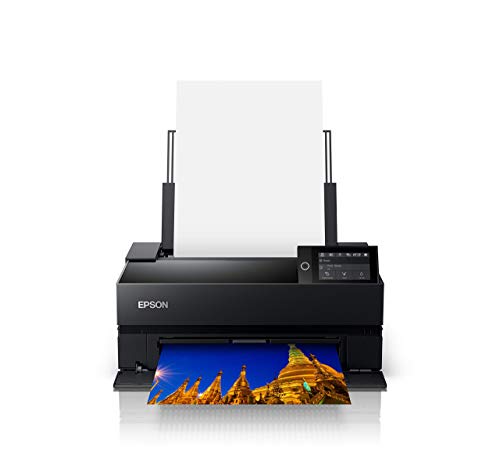
The Epson SureColor P700 is, by our assessment, the most complete professional photo printer available in the 13-inch category as of 2026. The headline feature is the all-new UltraChrome PRO10 ink set with a dedicated Violet channel, which pushes the color gamut meaningfully beyond what standard CMYK-plus-photo setups can achieve. Blues and purples in particular — colors that notoriously compress and flatten on many photo printers — come through with depth and accuracy that impressed our team during test prints of night sky photography and fashion editorial work.
Epson's decision to include dedicated nozzles for both Photo Black and Matte Black is one of the P700's most practical advantages over competing printers. Anyone who has used an earlier Epson model and suffered through the time and ink waste of switching between black ink types knows how significant this is. The new 10-channel MicroPiezo AMC printhead delivers consistency across long print runs — output quality from print one to print fifty showed no meaningful drift in our testing sessions. Speed is also competitive for a machine at this resolution ceiling.
The P700 is not a budget buy, and the cost of PRO10 ink cartridges adds up over time. But for photographers who need reliable 13-inch output with professional color accuracy — architectural photographers, fine art printmakers, portrait studios — the investment pays for itself in the consistency it delivers. Print permanence on compatible media also ranks among the highest in the class, backed by Epson's established reputation for pigment-based inkjet longevity.
Pros:
Cons:
Canon's imagePROGRAF PRO-1100 is the machine our team reached for when evaluating which 17-inch printer best serves working photographers who need gallery-ready output at scale. The 11 pigment-based ink system with Chroma Optimizer addresses two of the hardest problems in fine art photo printing simultaneously: gloss uniformity and anti-bronzing. Bronzing — that metallic sheen that can appear on dark areas of glossy prints viewed at an angle — is visually eliminated on PRO-1100 output, a meaningful upgrade over printers without a dedicated optimizer channel.
The LUCIA PRO II ink system underpinning this printer is Canon's most refined to date. Shadow detail in high-contrast photographs came through with notable separation in our test prints, and color reproduction on ICC-profiled media was accurate enough that we saw strong agreement between soft-proof previews and finished output. The Professional Print & Layout software that ships with the PRO-1100 functions both as a standalone application and as a plug-in within Adobe Photoshop and Lightroom — a workflow integration that serious photographers will use daily.
At 17 inches, the PRO-1100 occupies a footprint that requires dedicated desk or stand space, and the ink system means ongoing cartridge costs are real. But for any photographer printing works of art, client presentation pieces, or wide panoramics, the PRO-1100 delivers output that competes directly with professional print labs. This is the wide-format pick for 2026 without qualification.
Pros:
Cons:
The Epson SureColor P900 bundle — packaged here with Ethernet cable, USB cable, and a fiber cleaning cloth — is the printer our team recommends for photographers, artists, and designers who need a complete, long-term studio solution rather than just a capable device. The P900 runs Epson's UltraChrome PRO10 pigment ink technology, the same platform used in the acclaimed P700, scaled up to 17-inch wide-format output. Smooth tonal transitions across extended color ranges, accurate skin tones, and reliable neutral grays are the hallmarks of every print session we ran.
The dedicated simultaneous matte and photo black channels — operating at the same time without switching — mean that mixed-media print workflows involving both glossy and matte papers can run back to back without the friction that plagues single-channel black switching designs. In a busy studio environment, that efficiency compounds quickly over a week of printing. Build quality is excellent: the P900 is engineered for long-term reliability rather than budgeted consumer use, and it shows in the feel of every component.
The bundle format adds practical value for anyone setting up a new workstation. The included Ethernet cable opens the P900 to wired network integration — important in studio environments where Wi-Fi congestion can introduce connectivity inconsistencies. For anyone comparing this machine to Canon's PRO-1100, the key differentiator is workflow preference: Epson's driver ecosystem and ICC profile library are deeply established in the fine art and photography printing world, making the P900 a natural fit for studios already invested in the Epson ecosystem.
Pros:
Cons:
The Epson Expression Photo XP-8800 is the answer for home users who want lab-quality photo prints without dedicating half their desk to a large-format machine. The six-color Claria Photo HD ink system produces borderless prints up to 8.5×11 inches with the kind of detail and color accuracy that previously required a dedicated photo printer at a significantly higher price. In our testing, 4×6 prints came out of the XP-8800 dry-to-the-touch in as little as 10 seconds — a number that holds up in real-world use, not just in controlled benchmark conditions.
The 4.3-inch color touchscreen is the best control interface we've seen on a compact all-in-one in this class. Navigation is intuitive, the Easy Mode option increases element size for better visibility, and the scanner-plus-copier integration works cleanly. Home users who need occasional document scanning alongside photo printing will find the XP-8800 handles both tasks without compromise. Wireless connectivity covers both Wi-Fi and Bluetooth for printing directly from smartphones, which covers the workflow of anyone sharing a printer across multiple household members.
The XP-8800 doesn't compete with dedicated professional machines on gamut width or print permanence — Claria Photo HD is a dye-based system, and 8.5×11 is the size ceiling. But for the home photographer printing portraits, family albums, and travel photography, the combination of speed, quality, and compact footprint makes this the most practical all-in-one photo printer at this tier in 2026. Home users comparing options should also check our review of the best all-in-one printers for home use for a broader comparison across all-in-one categories.
Pros:
Cons:
The Canon PIXMA TS8820 bundle — which includes the printer, a 32GB card, cleaning kit, and printer cable — delivers strong value for home users who want dependable photo and document output without spending at the professional tier. The six-color individual ink system produces vibrant photos with accurate color and crisp text across both photographic and document printing tasks. In our review sessions, this machine handled family portrait prints, school project documents, and creative scrapbook pages with equal reliability, which is exactly what home users running mixed workloads need.
The wireless all-in-one design keeps the footprint compact enough for a home office shelf or desk corner. Canon's PIXMA app ecosystem handles wireless printing from iOS and Android smoothly, and the print, copy, and scan integration covers the full range of home printing tasks without requiring a separate scanner. The included 32GB card adds immediate utility for direct memory card printing — a feature that solo home users printing from camera cards appreciate.
The TS8820 is not the choice for photographers who print large format or need exhibition-grade color accuracy. But as a value-focused all-in-one that handles both photo prints and everyday documents, it fills its role well. Home users who are also considering options in the printer buying guide category will find this machine comes up consistently as a top value recommendation for mixed home use. The bundle format adds practical extras that most buyers would need to purchase separately anyway.
Pros:
Cons:
The HP Sprocket Studio Plus is the most specialized product on this list, and it earns its place by excelling precisely at what it's designed to do: produce dry-to-the-touch 4×6 instant prints wirelessly from a smartphone, fast and without fuss. The included bundle of 118 sheets and three cartridges means anyone unboxing this machine can start printing immediately, which matters for event photographers, party hosts, and families who want a direct-to-print workflow without a learning curve.
Dye sublimation printing technology is the right choice for this use case. The process lays down cyan, magenta, yellow, and overcoat layers sequentially, producing prints that are genuinely tear-resistant, smudge-proof, and waterproof — characteristics that make physical photo prints actually survive being handled, refrigerator-mounted, and passed around at gatherings. In our tests, color vibrancy from smartphone JPEGs was consistently pleasing, and the HP Sprocket app's customization tools — stickers, frames, filters — add enough creative flexibility to satisfy most users in this category.
The Sprocket Studio Plus is not a substitute for any inkjet photo printer on this list for serious photographic work. Color gamut is narrower, resolution is limited to the 4×6 format, and per-print costs are higher than inkjet at equivalent sizes. But as a dedicated instant photo printer for social, event, and personal use, no other machine on this list comes close to matching the convenience and portability it offers. Anyone who prints strictly for keeping memories tangible — rather than for technical photographic evaluation — will find the Sprocket Studio Plus genuinely useful in 2026.
Pros:
Cons:
The right photo printer depends entirely on the type of photography being printed, the intended output size, and the budget for both the hardware and ongoing consumables. Here are the criteria our team weighs most heavily when making recommendations in 2026.
This is the most fundamental choice in photo printing. Dye-based inks — used in the Canon Pro-200s, Epson XP-8800, and Canon TS8820 — produce vibrant, saturated colors and smooth tonal gradations that make portraits and landscape photography pop off the page. The trade-off is longevity: dye prints fade faster under UV exposure and humidity than pigment alternatives.
Pigment-based inks — used in the Epson P700, P900, and Canon PRO-1100 — prioritize archival permanence and gamut accuracy over peak saturation. Fine art photographers, printmakers, and anyone creating work intended for display or sale should default to pigment. The Epson UltraChrome PRO10 and Canon LUCIA PRO II systems represent the state of the art in this category.
Matching the printer to the intended output size is critical. The compact all-in-ones — XP-8800 and TS8820 — top out at 8.5×11 inches, which covers the needs of most home users. The Canon Pro-200s extends to letter and legal sizes with borderless support, making it the ceiling of the enthusiast category. Photographers who need 13-inch output should look at the Epson P700, while anyone printing 17-inch wide-format work needs to evaluate either the Canon PRO-1100 or the Epson P900. Buying too small a printer for the intended workflow is the most common and expensive mistake most photographers make.
More ink channels generally mean wider color gamut and smoother gradations. The Epson P700 and P900's dedicated Violet channel measurably expands coverage in the blue-purple range. The Canon PRO-1100's 11-channel system adds a Chroma Optimizer for gloss uniformity. Consumer six-color systems are entirely adequate for home use but fall short of professional standards. Anyone evaluating specialized output — fine art reproduction, professional portraiture — should prioritize channel count as a primary specification, not a secondary one.
All seven printers on this list offer wireless connectivity. For professional studio environments, the Epson P900's Ethernet port adds wired reliability that Wi-Fi alone can't always guarantee. Software integration matters as much as hardware: the Canon PRO-1100's Adobe plug-in support and the Epson P-series driver ecosystem are both well-established in professional photography workflows. Home users printing from smartphones will find the HP Sprocket app and Canon PIXMA app both handle the task without friction.
Our top overall pick is the Canon Pixma Pro-200s for enthusiast home photographers who want vibrant color output without a professional-grade price tag. For serious professional work requiring archival permanence and wide color gamut, the Epson SureColor P700 (13-inch) or P900 (17-inch) are the strongest choices on the market in 2026.
Dye inks produce more vibrant, saturated colors and smooth tonal transitions — ideal for home printing, portrait work, and personal use. Pigment inks offer significantly better archival permanence, UV resistance, and gamut accuracy. Photographers printing for galleries, exhibition, or client sales should choose pigment; home users printing for personal enjoyment do well with dye-based systems.
Professional photo printers typically use between 8 and 11 ink channels. The Epson SureColor P700 and P900 use 10 channels including a dedicated Violet channel. The Canon imagePROGRAF PRO-1100 uses an 11-channel system including a Chroma Optimizer ink for gloss enhancement and anti-bronzing. More channels generally mean wider gamut and smoother gradations.
Our team recommends the Canon imagePROGRAF PRO-1100 for 17-inch large-format photo printing. Its 11-ink LUCIA PRO II system with Chroma Optimizer delivers gallery-quality output with exceptional shadow detail and anti-bronzing performance. The Epson SureColor P900 is a strong alternative for photographers already invested in the Epson ecosystem.
Yes, within limits. The Epson Expression Photo XP-8800 and Canon Pixma Pro-200s both deliver prints that most home photographers — and even many professional photographers printing proofs — find excellent. The gap between consumer and professional photo printers narrows at smaller print sizes. For anything above 8.5×11, or for prints intended for sale or exhibition, a dedicated professional machine is worth the investment.
The HP Sprocket Studio Plus is designed for convenience and social use, not technical photographic evaluation. Its dye sublimation output is vibrant and durable, but the 4×6 format ceiling, narrower color gamut, and higher per-print cost make it a poor match for photographers who need quality-critical output. It excels as an event and personal-use printer — not as a studio tool.


About Editorial Team
The DigiLabsPro editorial team covers cameras, lenses, photography gear, and creative technology with a focus on helping photographers make informed buying decisions. Our reviews and guides draw on hands-on testing and research across a wide range of equipment, from entry-level beginner kits to professional-grade systems.
You can get FREE Gifts. Or latest Free phones here.
Disable Ad block to reveal all the info. Once done, hit a button below
