You're moving into your dorm room, and suddenly you realize that printing assignments, scanning notes, and copying forms is going to be a regular thing. Campus print labs are crowded, often cost per page, and never seem open when you need them at midnight before a deadline. A compact, affordable printer in your dorm room can save you serious time and frustration throughout the semester.
But dorm rooms are tiny, budgets are tight, and you need something that just works without a complicated setup. We've tested and researched the top printers that fit the dorm room lifestyle in 2026 — compact enough for a cramped desk, wireless for easy phone printing, and affordable to buy and run. Whether you need basic black-and-white printing or full color with scanning and copying, this buying guide has you covered.

From budget-friendly inkjets under $50 to laser printers that handle heavy workloads, we've rounded up seven solid options. Each one brings something different to the table, so you can pick the one that matches how you actually use a printer. Let's break them down.
Contents








The Canon PIXMA MG3620 has been a dorm room staple for years, and for good reason. It's one of the most affordable all-in-one printers you can buy, and it delivers reliable color and black-and-white printing without taking up much desk space. Setup is straightforward — download the Canon PRINT app on your phone, connect to your dorm Wi-Fi, and you're printing within minutes. The wireless connectivity works with AirPrint for iPhones and iPads, Google Cloud Print, and even NFC (near-field communication — just tap your phone to the printer).
Print quality is solid for essays, reports, and handouts. Color output looks decent for charts and presentation materials, though it's not going to rival a photo-grade printer. The hybrid ink system uses both dye and pigment inks, which gives you sharper text on plain paper and better color saturation on photo paper. You can print on everything from plain paper to envelopes to glossy photo paper, which is a nice perk if you want to print photos for your dorm wall.
The main trade-off is speed. At around 9.9 pages per minute for black and 5.7 for color, it's not the fastest printer on this list. There's also no automatic duplex printing (two-sided), so you'll burn through paper faster if you print a lot. But for a student who prints maybe 50-100 pages a month, this printer handles the job reliably and cheaply.
Pros:
Cons:
If you want the most features packed into a compact, affordable printer, the Brother MFC-J1010DW is hard to beat. It prints, copies, scans, and even faxes — though you probably won't need that last one in college. What makes this stand out for dorm use is the combination of automatic duplex printing and surprisingly fast output. At up to 17 pages per minute for black and 9.5 for color, it's noticeably quicker than many printers in this price bracket.
The 1.8-inch color display on the front panel makes it easy to navigate settings without needing your computer. You can connect through Wi-Fi, and the Brother Mobile Connect app lets you print and scan directly from your phone. It also integrates with cloud services like Google Drive and Dropbox, which is handy for printing documents you've saved online. The printer even works with Alexa if you're into voice commands.
Brother printers are generally known for lower ink costs than Canon and HP, and the MFC-J1010DW continues that trend. The automatic two-sided printing alone can cut your paper usage nearly in half, which adds up over a semester. The compact footprint means it won't dominate your desk. The only real downside is that the paper tray holds just 150 sheets, so heavy printers will be refilling it often. If you need to scan documents regularly — like receipts, notes, or signed forms — this is a great all-in-one choice. For scanning larger projects, you might also want to check out our roundup of best duplex scanners.
Pros:
Cons:
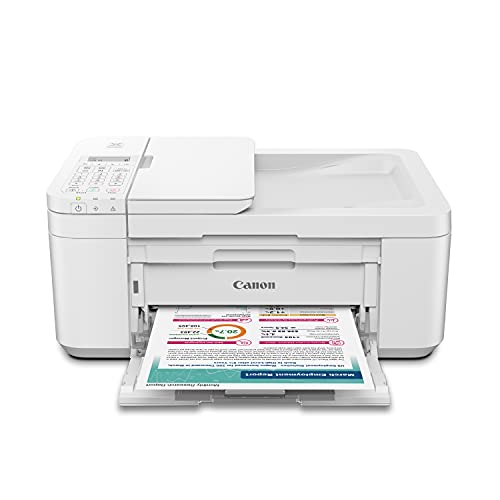
The Canon PIXMA TR4720 steps up from the MG3620 with a couple of features that make a real difference in daily use. The biggest upgrade is the automatic document feeder (ADF), which lets you load multiple pages for scanning or copying without feeding them one at a time. If you're scanning class notes, making copies of study guides, or copying multi-page documents, the ADF saves you a surprising amount of hassle.
Setup is simple through the Canon PRINT Inkjet/SELPHY app, and the printer connects over Wi-Fi to all your devices. It supports printing from smartphones and tablets, which is great when you want to print an assignment right from your phone. The printer also includes a built-in fax, though that's more of a "nice to have" than a necessity for most students. Canon designed the ink cartridge system for easy installation and replacement — you can swap cartridges in seconds without getting your hands dirty.
Like the MG3620, this printer uses Canon's hybrid ink system for good text and color quality. It also features automatic duplex printing, which the MG3620 lacks. The TR4720 is a solid middle-ground option if you want more functionality than a basic printer but don't want to spend laser printer money. It's compact enough for a dorm desk and versatile enough to handle almost any printing task you'll encounter in college. The white finish looks clean and modern too, which is a small thing but matters when everything in your room is on display.
Pros:
Cons:
If you print a lot — we're talking research papers, textbook chapters, study guides, and group project handouts — an inkjet might not cut it. The Brother MFC-L2820DW is a monochrome laser printer (black and white only, using a toner cartridge instead of ink) that absolutely flies through pages. At up to 36 pages per minute, it's the fastest printer in this roundup by a wide margin. Laser toner also doesn't dry out like inkjet ink does when you go weeks without printing, which is a common issue during breaks.
This is a full-featured all-in-one with print, copy, scan, and fax. The 50-page auto document feeder handles multi-page scanning jobs with ease, and scan speeds of up to 23.6 images per minute mean you're not standing around waiting. Connectivity is excellent — dual-band Wi-Fi (both 2.4GHz and 5GHz networks), Ethernet, and USB. Dual-band Wi-Fi is a real plus in dorms where the 2.4GHz band is often congested with everyone's devices. If you're using a laser printer, you'll probably want to pair it with the right paper for best results — see our guide on the best laser printer paper.
The cost per page with laser toner is significantly lower than inkjet — often less than 3 cents per page for black and white. Over four years of college, that adds up to serious savings. The trade-off is obvious: no color printing. If you need to print color charts or presentations, you'll still need the campus printer for those. But if 90% of what you print is text-based documents, this printer pays for itself. It's slightly bigger than the inkjets on this list, but Brother kept the footprint reasonable for a laser all-in-one.
Pros:
Cons:
HP's Envy 6155e brings a couple of smart features that set it apart from the other inkjets on this list. The standout is HP's AI-powered print formatting, which automatically cleans up web pages and emails before printing. No more wasting pages on ads, navigation bars, or awkward page breaks. For students who print a lot of online research, lecture slides, or email confirmations, this feature genuinely reduces paper waste.
The printer handles color documents and borderless photos well. Print speeds top out at 10 pages per minute for black and 7 for color, which is respectable for this class of printer. Automatic duplex printing is included, along with a 100-sheet input tray. The design is sleek and modern — the Portobello color scheme gives it a warmer look than the typical white or black printer box. It'll blend in nicely on your dorm desk.
One thing to know about HP's "e" series printers: they come with a 3-month Instant Ink trial, which is HP's subscription service that sends you new cartridges automatically when you're running low. After the trial, you'll need to either subscribe or buy cartridges outright. Some students find the subscription worthwhile (you pay based on pages per month, not ink used), while others prefer to just buy cartridges as needed. Either way, the print quality and smart features make this a strong contender for dorm use, especially if you print photos or color-heavy documents regularly.
Pros:
Cons:
When your budget is as tight as your dorm room, the Canon PIXMA TS3720 delivers the essentials without any frills. This is Canon's most basic all-in-one for 2026, and it does exactly what it promises: print, copy, and scan over Wi-Fi. The setup process is one of the simplest we've seen — Canon has streamlined it so you can go from unboxing to printing in just a few minutes through their app.
Print speeds are 7.7 images per minute for black and 4 for color. That's on the slower side, but perfectly fine if you're printing a handful of assignments each week rather than massive batch jobs. The printer connects wirelessly to your phone, tablet, or laptop, and it's compatible with both AirPrint and Mopria for easy mobile printing. The compact white design takes up minimal desk space — important when every square inch counts in a shared dorm room.
The big caveat here is that this is a single-sided printer only. No automatic duplex. If you print double-sided often, you'll need to manually flip pages, which gets old quickly. The paper tray is also relatively small. But if your printing needs are light — a few essays a week, the occasional form or receipt — the TS3720 gets the job done at a price point that won't stress your bank account. Sometimes simple is exactly what you need.
Pros:
Cons:
Here's something completely different. The HP OfficeJet 250 is a portable all-in-one printer with a built-in battery, meaning you can print without being plugged into a wall outlet. That's a game-changer if you need to print in the library, a study room, or anywhere your dorm desk isn't. It scans and copies too, and the 2.65-inch color touchscreen makes it easy to use without a connected device.
The OfficeJet 250 connects via Wi-Fi Direct, so you don't even need a Wi-Fi network — your phone or laptop connects directly to the printer. The HP ePrint app handles mobile printing smoothly on both iOS and Android. Print quality is respectable for a portable unit, handling documents and basic graphics well. It includes an auto document feeder for multi-page scanning, which is unusual in a printer this compact and portable.
Now, the trade-offs. This particular listing is a certified refurbished unit, which means it's been tested and comes with at least a 90-day warranty, but it's not brand new. Refurbished electronics are generally reliable, but it's worth knowing what you're getting. Battery life gives you around 200-300 pages on a full charge depending on usage. Print speed is slower than the desktop options — around 10 ppm black and 7 ppm color. And because it's portable, the paper tray is small (50 sheets). According to Wikipedia's overview of inkjet printing technology, portable inkjets use the same thermal or piezoelectric mechanisms as desktop models, just in a more compact package. If you move around campus a lot or split time between your dorm and another location, this is uniquely suited to that lifestyle.
Pros:
Cons:
Dorm desks are small. Some are barely two feet wide. Before you buy, measure the space where you plan to put your printer and compare it against the product dimensions. Most of the inkjets on this list are compact enough to fit on a shelf, a corner of your desk, or even the top of a small bookcase. Laser printers tend to be bigger and heavier, so plan accordingly. If space is truly at a premium, the Canon TS3720 and PIXMA MG3620 are among the most compact options available.
The purchase price is just the beginning. Ink and toner are the ongoing expense that really determines how much your printer costs over time. Inkjet cartridges vary widely in price and page yield. Brother printers generally have lower ink costs than Canon and HP. Laser toner (like in the Brother MFC-L2820DW) costs more upfront but prints far more pages per cartridge — often 1,000-3,000 pages versus 200-400 for inkjet. If you print more than a couple hundred pages per month, a laser printer will save you money in the long run. Also consider whether the manufacturer offers high-yield cartridge options for even better per-page costs.
Every printer on this list supports wireless printing, but the details matter. Look for compatibility with your devices — AirPrint for Apple, Mopria for Android, and Wi-Fi Direct if you want to print without connecting to the dorm's Wi-Fi network. Some printers also support cloud printing from services like Google Drive, Dropbox, or OneDrive, which is convenient when your files are stored online. If your dorm's Wi-Fi network is unreliable, Wi-Fi Direct is especially valuable since it creates a direct connection between your device and the printer.
Most college students need to scan or copy something at some point — a signed document, handwritten notes, a textbook page, or an ID card. All seven printers here include a flatbed scanner for basic scanning. If you scan multi-page documents often, look for a printer with an automatic document feeder (ADF) like the Canon TR4720, Brother MFC-J1010DW, or Brother MFC-L2820DW. An ADF lets you load a stack of pages and walk away while it scans. Without one, you're lifting the lid and placing each page individually, which gets tedious fast. For specialized scanning needs like digitizing photos or slides, you might want a dedicated scanner — check out our list of best portable scanners for Mac.
For most students, yes. Campus print labs charge per page (usually 5-10 cents for black and white, 25-50 cents for color), and they're not always accessible late at night or during busy periods. If you print more than about 50 pages per month, a personal printer usually pays for itself within the first semester. The convenience factor alone — printing a paper at 2 AM before a morning deadline — makes it worthwhile for many students.
It depends on what and how much you print. Inkjet printers are cheaper upfront, print in color, and are more compact. They're the right choice if you print moderately and need occasional color output. Laser printers cost more initially but have much lower per-page costs and faster speeds. If you print mostly black-and-white text documents in high volume — research papers, study guides, textbook excerpts — a laser printer like the Brother MFC-L2820DW will save you money over four years of college.
Standard inkjet cartridges typically cost $15-30 each and print 200-400 pages. A full set of color and black cartridges might run $40-80. Some manufacturers offer high-yield cartridges that cost a bit more upfront but bring the per-page cost down. Brother tends to have the most affordable ink. HP offers an Instant Ink subscription starting at a few dollars per month for light printing. Laser toner cartridges cost $30-60 but print 1,000-3,000 pages, making the per-page cost significantly lower.
Yes. Every printer on this list supports wireless mobile printing. iPhones and iPads use AirPrint, which requires no extra apps — just select the printer from the share menu. Android devices work through Mopria or the manufacturer's app (Canon PRINT, Brother Mobile Connect, HP Smart). Most of these printers also support printing from cloud storage services, so you can print a document saved in Google Drive or Dropbox without downloading it to your phone first.
For ongoing costs, the Brother MFC-L2820DW laser printer has the lowest cost per page at around 2-3 cents for black and white. Among the inkjets, Brother's MFC-J1010DW also offers relatively affordable ink. The Canon PIXMA MG3620 and TS3720 are the cheapest to buy, but their ink costs are higher per page. When calculating total cost, factor in how many pages you print per month, whether you need color, and whether the printer supports high-yield cartridges.
No. Inkjet printers typically use 10-30 watts while printing and less than 2 watts in sleep mode. Laser printers use more power during printing (300-500 watts in short bursts for the heating element) but are also very low in standby mode. In practical terms, even heavy use of a dorm printer adds less than a dollar to your monthly electricity bill. Most printers automatically enter sleep mode after a few minutes of inactivity, so energy consumption is minimal.


About James W.
A contributing writer at DigiLabsPro covering photography gear reviews, buying guides, and camera comparisons. Specializes in evaluating cameras, lenses, and accessories for photographers at the intermediate and enthusiast level looking to upgrade their kit.
You can get FREE Gifts. Or latest Free phones here.
Disable Ad block to reveal all the info. Once done, hit a button below
