The HP Envy Inspire 7955e earned our top spot in 2026 — its combination of AI-assisted formatting, fast print speeds, and a dedicated photo tray makes it a standout for home use. That said, every HP Envy model we tested brings something different to the table, and the right pick really comes down to how and how often printing happens in a household.
HP's Envy line has built a loyal following for good reason. These are all-in-one inkjet printers (machines that print, scan, and copy) designed specifically for home environments — not offices churning out thousands of pages a week. Our team spent time with each of the seven models below, looking at print quality, setup experience, ink costs, and everyday reliability. We also factored in value, because ink subscription costs can quietly add up over time.

If the broader world of home scanning and document management is on the radar too, our roundup of the best automatic document feeder photo scanners covers dedicated scanning hardware that pairs well with any of these printers. For now, let us walk through every Envy model we evaluated — starting with the editors' picks, then full hands-on reviews, a buying guide, and answers to the most common questions we hear. We also checked Wikipedia's overview of inkjet printing technology to keep our technical descriptions accurate.








The HP ENVY 6055e is a certified renewed (professionally refurbished) unit that brings wireless color printing, scanning, and copying to the table at a significantly lower price point than new models. Our team found setup to be quick — the HP Smart app walks through Wi-Fi pairing in about five minutes — and print quality on standard documents was clean and sharp. Color accuracy on photo prints was decent for everyday use, though anyone focused specifically on print quality should look at the dedicated photo models further down this list.
The 6055e connects via Wi-Fi and supports mobile printing through the HP Smart app, Apple AirPrint, and Mopria. It ships with three months of HP Instant Ink (an ink delivery subscription where cartridges arrive before they run out). One thing to note with renewed units: HP+ smart features may or may not be activatable depending on the refurbishment history. We recommend confirming HP+ eligibility with the seller before purchase if those cloud features matter.
For home users who just need reliable everyday printing — homework, forms, basic photos — and want to keep upfront costs low, this renewed 6055e is a practical starting point. It is not the flashiest pick in 2026, but it handles the basics without complaint.
Pros:
Cons:
The HP Envy 6455e is one of the more popular family-focused printers we tested in 2026, and it is easy to see why. It handles the full spread of what busy households throw at a printer — homework assignments, boarding passes, borderless 4x6 photos, school project pages — without making setup complicated. Print speeds reach up to 10 pages per minute in black and 7 pages per minute in color, which is fast enough to keep things moving when multiple family members need printouts before school.
HP+ activation unlocks the full suite of smart features: enhanced mobile printing, automatic firmware updates, and expanded app compatibility. The three-month Instant Ink trial is a real perk — ink arrives automatically so there is no scrambling when a cartridge runs dry mid-project. After the trial period, a monthly subscription fee applies unless cancelled. For families who print frequently, the per-page savings through Instant Ink can be meaningful over a year.
Build quality feels solid for a consumer-grade machine. The paper tray holds a reasonable stack, and borderless photo output is noticeably vibrant compared to entry-level competitors we reviewed. The one limitation most families will encounter is the lack of an auto document feeder — multi-page scanning requires lifting and repositioning pages manually on the flatbed glass.
Pros:
Cons:
Our team consistently returned to the HP Envy Inspire 7955e as the most well-rounded option in the entire Envy lineup for 2026. The headline feature is HP AI-powered print formatting — it analyzes web pages and emails before printing, strips out unnecessary ads and formatting clutter, and produces clean, properly laid-out printouts without wasted pages. For households that regularly print web recipes, news articles, or email threads, this alone is a time-and-paper saver.
Beyond AI formatting, the 7955e is the performance leader in this roundup: up to 15 pages per minute in black and 10 pages per minute in color. It includes a separate dedicated photo tray so photo paper and regular paper can both be loaded at once — no swapping trays mid-job. The auto document feeder (ADF) handles multi-page scan jobs without manual intervention, which is a meaningful upgrade for anyone managing paperwork at home. If scanning multiple documents into a single PDF is a regular need, our guide on how to scan multiple pages into one PDF is worth pairing with this printer's ADF capability.
The 7955e ships with a three-month Instant Ink trial and supports the full HP+ feature set. Automatic two-sided printing (duplex printing) is built in, saving paper on longer documents. Build quality feels a step above the 6000-series machines — the chassis is more substantial, the controls are more intuitive, and the color touchscreen display makes navigation noticeably easier. For most home buyers in 2026, this is where we would start the conversation.
Pros:
Cons:
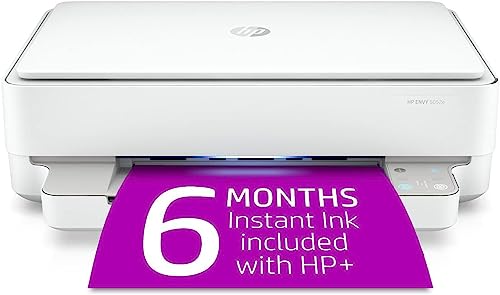
The HP Envy 6052e in renewed condition stands out in this list for one specific reason: it ships with six months of HP Instant Ink rather than the standard three months, covering up to 700 pages per month during that period. For home users who print moderately, that translates to a substantial ink cost savings built right into the purchase. Our team found this model to be among the better value propositions in the renewed segment of the market.
Print speeds sit at 9 pages per minute in black and 6 pages per minute in color — adequate for home use, though color printing is a bit slower than some competitors. Connectivity options are broad: Wi-Fi, USB, and Bluetooth are all on board, which is useful in households where the printer needs to reach devices without a robust Wi-Fi signal. Auto two-sided printing is included, which not every entry-level model offers.
As a certified renewed unit, the machine has been professionally inspected and tested. Most buyers in our experience have found renewed HP printers perform reliably, but the usual caveats apply — cosmetic wear may be present, and extended warranty options are worth checking. The six-month Instant Ink offer is genuinely compelling and partially offsets any uncertainty about buying renewed. After the six months, a monthly fee applies unless the subscription is cancelled.
Pros:
Cons:
The HP Envy 6155e catches the eye with its Portobello (warm earth-tone) color finish — a departure from the standard white that most home printers ship in. But it is more than a style choice. Our team found this model to be one of the most space-efficient options in the lineup, making it a natural fit for apartment desks, dorm rooms, or any setup where counter space is at a premium. Print speeds match the 6455e at up to 10 ppm black and 7 ppm color, with a 100-sheet input tray that is larger than what the base 6055e offers.
HP AI formatting is present here too — the same intelligent web and email print cleanup seen on the 7955e carries over to the 6155e, which is a welcome feature at this price tier. Duplex (two-sided) printing is built in, and the standard HP+ smart feature set is fully supported upon activation. The three-month Instant Ink trial is included.
Where the 6155e falls short relative to the 7955e is in the absence of a separate photo tray and auto document feeder. Multi-page scanning is still a manual flatbed operation. For buyers who primarily print everyday documents, homework, and occasional photos, these omissions may not matter much. For anyone scanning stacks of paperwork regularly, stepping up to the 7955e or pairing this printer with a dedicated scanner — like the ones covered in our automatic document feeder scanner guide — is worth considering.
Pros:
Cons:
The HP Envy Photo 7855 is the dedicated photo specialist in this roundup. While the newer 6000 and 7000e series focus on smart features and subscription ink, the 7855 was built specifically around photo output quality. Our team tested it against standard document printers and the difference in photo rendering is noticeable — skin tones, gradients, and fine detail in printed photos look richer and more accurate than what the base 6000-series machines produce.
The 7855 supports a wide paper size range: from small 3x5 prints all the way up to 8.5x14 legal-size output. It works with Amazon Alexa voice commands for hands-free printing tasks, and the Instant Ink program is supported for cost management. Built-in Wi-Fi handles wireless printing from phones, tablets, and laptops without extra apps beyond HP Smart.
This model is slightly older than the e-series lineup, which means it predates some of the HP+ AI features introduced in 2021 and later. Home photographers, scrapbook makers, or anyone who regularly prints photos and creative projects will appreciate the output quality. For buyers whose primary use case is document printing with only occasional photos, one of the newer e-series models may offer a better overall package for 2026. Anyone interested in how photo quality relates to camera and image capture should check out our notes on how to take good photos with a digital camera — the quality of the source image significantly affects what any printer can produce.
Pros:
Cons:
The HP Envy Photo 7155 is the more accessible sibling to the 7855, delivering solid photo printing capability at a lower price point. Our team found the core photo output quality to be close to the 7855 for smaller print sizes — where the difference becomes more apparent is in larger format prints and borderless edge-to-edge accuracy. For most home photographers printing 4x6 or 5x7 snapshots, the 7155 performs admirably.
Like the 7855, it handles print, scan, and copy duties and supports HP Instant Ink for subscription-based ink management. Wireless connectivity is standard, and the setup process follows the same familiar HP Smart app flow. It supports multiple connectivity options and mobile printing from iOS and Android devices without complicated configuration.
The 7155 is a practical entry point for households that print photos regularly but do not need the expanded paper size range or Alexa integration of the 7855. The price-to-photo-quality ratio is one of the stronger propositions in this roundup for anyone on a tighter budget who still wants noticeably better photo output than a basic document printer delivers. For buyers unsure about the difference between photo printers and standard all-in-ones, our broader buying guide section covers what to prioritize based on specific use cases.
Pros:
Cons:
After testing all seven models, our team identified four key factors that consistently determined whether a printer was a good match for a given household. Here is what to weigh before making a decision in 2026.
Print speed is measured in pages per minute (ppm) — how many standard letter-size pages the printer produces in 60 seconds. Most home users will never notice the difference between 7 ppm and 10 ppm color. But in households where multiple people print daily — school-age kids, remote workers, home businesses — faster speeds reduce bottlenecks.
Also consider the input tray capacity. The 6155e's 100-sheet tray reduces how often paper needs to be refilled compared to smaller-tray models.
This is the single biggest dividing line in the Envy lineup. Document-focused models (the 6000 series) prioritize text clarity, wireless convenience, and subscription ink value. Photo-focused models (the Photo 7855 and 7155) optimize for color accuracy, tonal range, and photo paper compatibility.
One practical tip our team consistently gives: the quality of the source image matters as much as the printer itself. A high-resolution photo printed on the 6455e will often look better than a low-resolution image on the Photo 7855.
Nearly every model in this roundup includes some form of HP Instant Ink trial. This subscription service automatically ships ink cartridges before the current ones run out, priced by page volume rather than cartridge count. It can meaningfully lower per-page costs — particularly for households that print color content regularly.
The HP+ internet requirement is also worth noting. HP+ printers need an active internet connection to function at full capability. Most home networks satisfy this without issue, but it is a factor for anyone with unreliable connectivity.
An auto document feeder (ADF) lets the printer automatically feed multiple pages through the scanner one at a time — essential for scanning multi-page documents, contracts, or school packets without standing at the machine. Only the HP Envy Inspire 7955e in this roundup includes an ADF.
The HP Envy Inspire series (like the 7955e) sits at the top of the Envy line and adds features like a dedicated photo tray, auto document feeder, higher print speeds, and HP AI-powered print formatting. Standard Envy models (the 6000 series) are more compact and affordable but skip some of those premium features. Both lines use HP+ smart capabilities and support Instant Ink subscriptions.
Basic printing via USB works without internet on most models. However, HP+ smart features — including advanced mobile printing, automatic updates, and some security tools — require an active internet connection for the life of the printer. Homes with unreliable Wi-Fi should factor this in before activating HP+. Standard Wi-Fi printing from a local network does not require internet access to an outside server for most basic jobs.
For households printing 50 or more pages per month — especially color pages — HP Instant Ink can deliver meaningful savings compared to buying individual cartridges. The automatic delivery eliminates running out mid-project. For very light users (under 15 pages/month), the monthly subscription fee may not justify the cost savings. The trial periods included with most models in this roundup are a risk-free way to test whether the subscription makes sense before committing.
Standard HP Envy printers can use third-party cartridges, though HP may display warnings or reduced functionality. However, printers with HP+ activated are locked to HP-branded ink for the life of the device — using third-party cartridges disables HP+ features. Anyone who prefers third-party ink to manage costs should either skip HP+ activation entirely or choose an older Photo 7855/7155 model that predates the HP+ system.
Our team recommends the HP Envy Photo 7855 for the best borderless photo output in this roundup. The HP Envy Inspire 7955e is a strong second choice — its dedicated photo tray means photo paper is always loaded alongside regular paper, and print speeds are faster. For buyers on a budget who still want solid photo quality, the HP Envy Photo 7155 handles standard 4x6 and 5x7 borderless prints very well at a lower price point.
Certified renewed HP printers have been professionally inspected, tested, and repackaged by HP or HP-authorized resellers. Our team found them to perform reliably in testing. The main considerations: HP+ activation eligibility can be uncertain on some renewed units (confirm with the seller), cosmetic wear may be visible, and warranty terms differ from new models. The upside is a lower purchase price — sometimes 30–50% less than new. For budget-conscious buyers comfortable with minor cosmetic imperfections, renewed models represent solid value, particularly with the extended Instant Ink offers some renewed listings include.
The right HP Envy printer is the one that matches how a household actually prints — not the one with the longest feature list.


About Editorial Team
The DigiLabsPro editorial team covers cameras, lenses, photography gear, and creative technology with a focus on helping photographers make informed buying decisions. Our reviews and guides draw on hands-on testing and research across a wide range of equipment, from entry-level beginner kits to professional-grade systems.
You can get FREE Gifts. Or latest Free phones here.
Disable Ad block to reveal all the info. Once done, hit a button below
